



alex.furer
Known Participant
February 7, 2022

P: Metadata Makersnote from Ricoh Theta Z1 not saved by Photoshop

  • February 7, 2022
  • 5 replies
  • 982 views

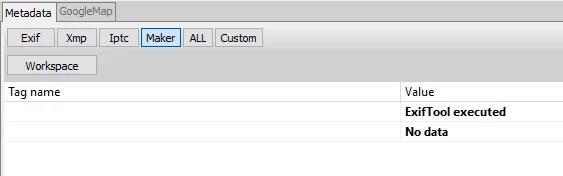
When I save an image coming from the RICOH Theta Z1 as TIF in Photoshop the makersnote metadata is not saved. There's also no difference to saving with no compression or LZW.


I can't imagine that I am the only one with this issue... And I really think Photoshop should pass on ALL metadata, period!


This is the original image maker (aka makernotes) metadata:
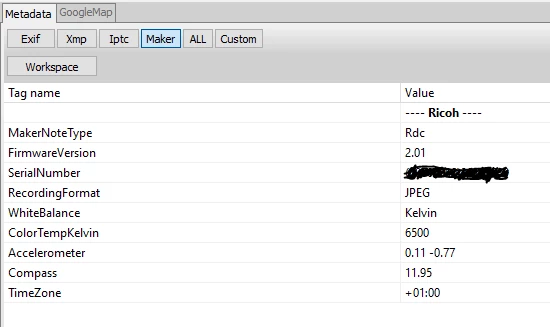
And here's what's left (nothing) when the TIF is saved in Photshop:
I hope there's going to be a fix for this some day because for now I need to copy the metadata over using commandline and ExifTools...

This topic has been closed for replies.

5 replies

alex.furer
Known Participant
February 20, 2022

Thanks! I am looking forward to hear the actual correct answer 🙂

Legend
February 20, 2022

Thanks for the example file. I've asked engineering to take a look.

alex.furer
Known Participant
February 17, 2022

Hi Jeffrey,

Thanks for chiming in!


I "Save As...", and as said above as TIF with following settings. But I also tried all kinds of settings saving TIF.


Here's my original post that describes the steps: https://community.adobe.com/t5/photoshop-ecosystem-discussions/makersnote-from-theta-ricoh-z1-not-saved-by-photoshop/td-p/12735238


And here's a DNG for you to test: https://drive.google.com/file/d/10NPhkrqXbI71E_R9ru5Ug7Pfe2sLYcPR/view?usp=sharing


Thanks,

Alex

Legend
February 17, 2022

How are you saving the file in Photoshop and which file format?


File > Save As...

File > Save a Copy...

File > Export > Export As...

File > Export > Save for Web...


Or some other method? 


JPEG, PNG, TIFF, PSD? something else?

alex.furer
Known Participant
February 7, 2022

I am working on 360 panoramas, trying to find a workflow that is semi automated.


My workflow:

- Shoot brackets with the Theta Z1 in DNG
- Merge the HDRs using SNS-HDR
- Upscale and denoise the shot using Topaz plugins in Photoshop (that's where the accelerometer data is lost)
- Stitch the shot in PTGui
- Remove Chromatic Aberration and fix the nadir in Photoshop.

- Export the final interactive panorama in PanoramaStudio


When I save the upscaled TIF in Photoshop, the makersnotes is not written to the TIF by Photoshop. Which results in PTGui not recognizing the yaw, pitch and roll for horizon alignment.


Am I missing some setting in Photoshop, or is that normal procedure for Photoshop not to save that part of the meta data? Is there a fix for this? Is it a bug or intentional?


It's very tedious to have to create a PTGui template per shot or manually transfer yaw pitch and roll from an original DNG.


Thanks & Cheers,
Alex

alex.furer
Known Participant
February 8, 2022

Following  up with some more testing done.


When I save the image in Photoshop the data clearly does not get saved. There's also no difference to saving with no compression or LZW.


I can't imagine that I am the only one with this issue... And I really think Photoshop should pass on ALL metadata, period! I am tempted to file this as a bug.


This is the original image maker (aka makernotes) metadata:

This is the same metadata after saving the image in Photoshop:

Gigapixel AI standalone keeps some data (will pick this up with Topaz):

Any pointers would be greatly appriciated.

Thanks,

Alex


alex.furer
Known Participant
February 16, 2022

Will file this as a bug. Mybe it get's more attention.


If you found this post because you ran into the same issue, I can provide you a solution using DOS scripting and ExifTools here