

New Participant
March 20, 2021
Question

Merge Down missing from keyboard shortcut
  • March 20, 2021
  • 2 replies
  • 1801 views

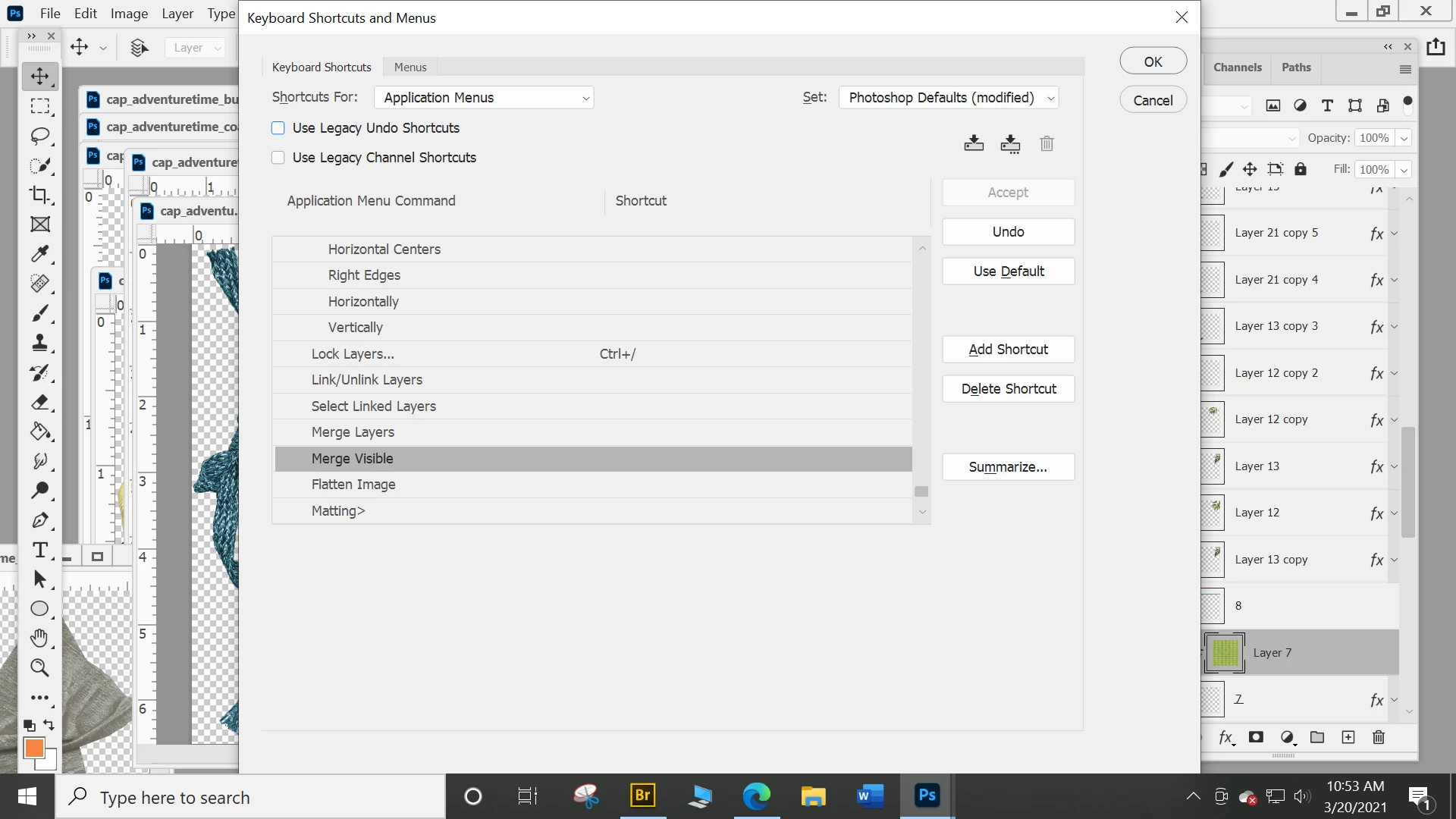
I am trying to set up a short cut for Merge Down and I can't find it under layers any more?!

2 replies

Riverforged
Participating Frequently
January 7, 2024

Add this to the list of 10,000 things that are annoying and nonsensical in photoshop. Very on-brand for them. Post up if you ever found a solution to this one.

Conrad_C
Community Expert
Community Expert
January 7, 2024
quote

Add this to the list of 10,000 things that are annoying and nonsensical in photoshop. Very on-brand for them. Post up if you ever found a solution to this one.

By @Riverforged


The correct answer is the one already posted in the reply on March 20, 2021, but there is a twist to it.


The original poster is looking for Merge Down, which has the default shortcut Command-E (macOS) or Ctrl-E (Windows). But the thing is, that command only appears as Merge Down when just one layer is selected, because it will merge that one layer into the next layer down. But, if any other number of layers is selected (two or more), it’s called Merge Layers because what you want is to merge the selected layers together, not to anything below. So, logically, when you select multiple layers, the name changes to Merge Layers, not Merge Down. It’s also called Merge Layers when no layers are selected, so that’s the default name for the command.


The logic actually makes sense (meaning, it isn’t “nonsensical”), the problem is that the default command name (Merge Layers) is what’s listed in the Keyboard Shortcuts dialog box and that’s not how the original poster was looking for it. So the key is to understand that the Merge Down and Merge Layers are the same command with the same shortcut (the name varies only to be consistent with the selection context), so if you don’t see it listed one way, look for it the other way too. Do that, and you find the shortcut.

Participating Frequently
March 20, 2021

Ctrl+E is the shortcut.

New Participant
March 20, 2021

I want to set my own short cut....and I can't find Merge Down on the Layers Menu (see above) I have been using PS since 1995 and I have always been able to set my own short cuts. I use just a few of them...merge down is one I use alot. I can not find it now. 


My shortcuts all 'went away"...or Reset themselves...not sure why!


Participating Frequently
March 20, 2021

It's under the Layers category. If you don't see it, add Ctr+E to something and it will give you a warning and tell you where it is presently assigned.