


Participating Frequently
April 6, 2020
Question

missing faux bold and italic in latest photoshop

  • April 6, 2020
  • 3 replies
  • 21270 views

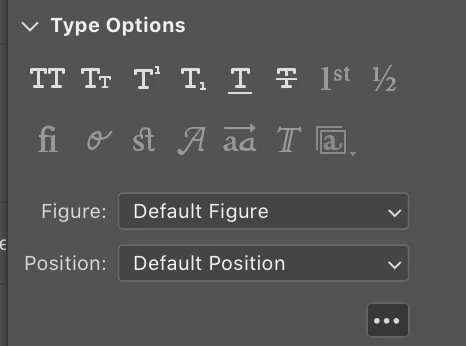
Hi there doesn't seem to be the faux bold and italic option in the latest photoshop. Or am I missing something? (no pun intended!) -here's a screenshot of my character options regardless of chosen font.
3 replies

Participant
May 20, 2021

I'm having the same trouble. I understand if Adode wanted to remove the feature because it was causing an issue for some customers, but it seems odd that they still have button that is permanently disabled.


c.pfaffenbichler
Community Expert
Community Expert
May 21, 2021

What is disabled? Faux Bold and Fauc Italic seem to be available in your screenshot. 

Derek Cross
Community Expert
Community Expert
October 10, 2020

If you select a font that doesn't have a bold version, you can apply faux bold via the Character Panel fly-out menu.

c.pfaffenbichler
Community Expert
Community Expert
April 6, 2020

Could you please post a screenshot in which the Character Panel is fully visible? 

Participating Frequently
April 7, 2020

Ahhh! Okay, I feel like an idiot. I just went to menu and Character Panel and everything is there. BUT in my (perhaps limited) defense, when I just open it up from the side they are not there by default which is weird since the other options are - and it's not like I can make it wider- so it does seem confusing. Just going to put up both images in case anyone else ever has this issue.

🙂

c.pfaffenbichler
Community Expert
Community Expert
April 7, 2020

I think the Faux Styles may have been left out of the Properties Panel because they do not produce proper vector output.