


New Participant
June 13, 2020
Answered

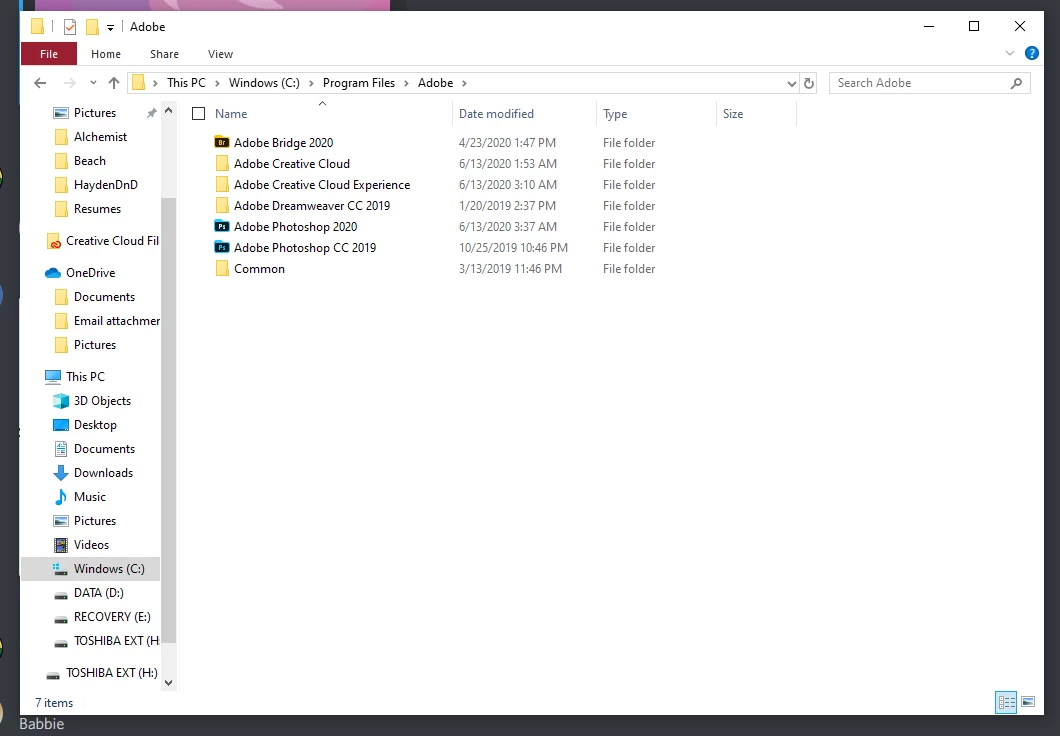
Missing Program Files/Adobe/Adobe Photoshop CC 2020 folder

  • June 13, 2020
  • 1 reply
  • 3412 views

I would like to use scripts with Photoshop but I am missing this folder and the folders within it such as Presets and Scripts. I've had some messy installations and uninstallations to this is likely part of the problem.


I just need to get these folders back and possibly other missing folders as well. I reinstalled using Creative Cloud Desktop.
This topic has been closed for replies.
Correct answer c.pfaffenbichler

I hope this is what you're looking for. I have PC and not Mac.


And what’s in the Folder »Adobe Photoshop 2020«? 

1 reply

c.pfaffenbichler
Adobe Expert
June 13, 2020

Did you use the Cleaner Tool before re-installing? 

https://helpx.adobe.com/creative-cloud/kb/cc-cleaner-tool-installation-problems.html


Are any Scripts represented under File > Scripts > …? 

New Participant
June 13, 2020

I can see some of them represented under File > Scripts. I'm still not sure where the folder is however.

c.pfaffenbichler
Adobe Expert
June 13, 2020

Could you post a screenshot of the application folder as visible when invoking »Show in Finder« from the Dock?