

folderolgirl
Known Participant
December 1, 2019
Answered

My pattern assets are missing

  • December 1, 2019
  • 10 replies
  • 19193 views

Hi. I opened Photoshop 2020 (Windows 10) today to find that all of my assets in the new Pattern panel have disappeared! Does anyone know if I can get them back and how? Thank you.

This topic has been closed for replies.
Correct answer silk-m

Import the pattern you saved from the pattern panel menu.
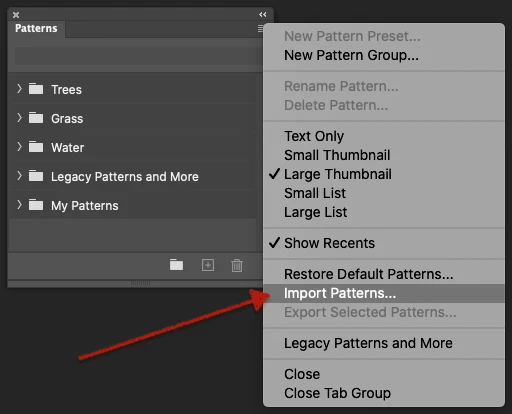
I don't know the exact location for Windows, but it is here for my Mac.

/Users/User Name/Library/Application Support/Adobe/Adobe Photoshop 2020/Presets/Patterns/Your Patterns.pat


10 replies

New Participant
December 6, 2020

Hi, I've had the same problem with my patterns TWICE! I lost hundreds of hours of work - totally devasted and seriously annoyed. Adobe told me to switch off auto updates after the first time it happened, which I did. I then got to the point where PS said it wasn't going to load without updating and restoring the defaults. Again all my patterns were lost. Why is this happening?? It's not good enough. What are the alternatives to PS? I'm TOTALLY ready to jump ship.

Participating Frequently
September 30, 2020

Sadly, Silk-m's solution only works when at some point you saved your patterns to disk. 

But I'll do you one stranger. I'm having the same issue now (almost a year later), but I DID NOT UPDATE. Especially because of things like this, I now dread updating ANY Adobe application while I'm still in the middle of deadline season. Which is basically 365 days a year, but ok. Anyway, Photoshop is still in the 'needs updating' list in the CC app, yet somehow as of just now all my patterns disappeared and have been replaced by some random nature patterns. Eh?

New Participant
August 18, 2020

I have just found the original PS legacy patterns I wanted from the help menu. Window - patterns then it's a case of a few more navigation steps to the patterns you want. Then I R clicked on the relevant folder and selected "Append patterns" 


Participating Frequently
August 19, 2020

That doesn't bring back patterns I made myself. Photoshop needs to warn people when an update is going to delete new brushes and patterns, because sometimes people are making a set in order to sell them and maybe they weren't ready to save the whole set of patterns. Too many saved sets can use a lot of HD space. They need to have a feature that warns or better yet, automatically saves self-made patterns to a folder. But there is no such folder on my computer. They just wiped everything.

Semaphoric
Braniac
August 19, 2020

If you have Auto Update enabld, I would suggest turning it off.

I'm bugged to see this is still happening. When the Creative Cloud first started, updates were ruthless, but they've been tamed a bit.


mmarieden, could you look on your computer for c:/users/your username/app data/roaming/Adobe/Adobe Photoshop 2020/Adobe Photoshop 2020 Settings/Patterns.psp, and tell me its file size?

Participating Frequently
August 11, 2020

I'm using Windows. The same thing happened to me. No, I did not save all of my work, because I've never had this problem befor with Photoshop. The price for CC keeps going up and up but the bugs keep getting worse. I hope Adobe isn't so desperate to sell patterns and stock that they'd purposely delete hundreds of hours of my work to do so. Why hasn't this issue been fixed yet? Nothing is in the presets except the four folders of Photoshop's brushes. 

New Participant
November 24, 2020

same problem, any solution? pissed.

New Participant
July 27, 2020

Hi, Same BIG problem!

No Patterns in new upgrade on MacOs !

And in the pattern pholder under application support-adobe-ph2020..nothing! i's Empty!!!

it is impossible years of pattern lost!!

New Participant
July 24, 2020

Today, I had a Photoshop update and I am having the same issue. All the patterns I have created (about 200) are gone. I have checked the presets and the only ones there are the ones that come with the software. Where can I find them?

PECourtejoie
Braniac
July 24, 2020

Hi, did it happen with the 21.2.1 update?

Were the patterns saved on disk, or did they just exist in the patterns panel?

verdemilo
New Participant
March 4, 2021
Hi. I found this article
and it
helped me immensely. I hope it helps you as well.

https://www.lifewire.com/add-save-custom-patterns-as-set-1700239

Gail

Gail McKeating

Thank you Gail. Unfortunately we are having trouble in retrieving patterns we already made.

Sent from my iPhone
verdemilo
New Participant
June 9, 2020

I have the same problem, am on Mac OS 10.15.4 and using Ps 21.1.3. I searched for "your patterns.pat" but did not find it, in the preset section of the Application support for Photoshop 2020 I only have an AMT folder and a PDF folder.

I am at loss. What can I do?


ps this is my Pattern menu

New Participant
June 10, 2020

Hi I just opened my photoshop and i have the exact same problem! All the patterns i created are gone! Have you been able to find a solution to this??

New Participant
May 3, 2020

Hi!

I was just using my patterns this morning and now when I went back to use them again from the pattern panel they are gone! Not all of them just the most recent ones (the ones I made in the past 3 months). Where did they go? I am worried they are gone forever. I tried to do load patterns but I didnʻt save a .pat file so I donʻt have something to load.

Bojan Živković11378569
Braniac
December 1, 2019

What happens when you click on panel menu > Restore Default Patterns? Have you tried that?


folderolgirl
Known Participant
December 1, 2019

My default patterns are showing in the Patterns panel. But I had added some .PAT files of my own since I upgraded to PS2020. Those are the ones that are missing. I've been using them and now they are gone.

Thank you.

silk-m
silk-mCorrect answer
Braniac
December 1, 2019

Import the pattern you saved from the pattern panel menu.

I don't know the exact location for Windows, but it is here for my Mac.

/Users/User Name/Library/Application Support/Adobe/Adobe Photoshop 2020/Presets/Patterns/Your Patterns.pat


--Susumu Iwasaki
silk-m
Braniac
December 1, 2019

Hi,

Manage pattern libraries and presets (Show legacy patterns)

https://helpx.adobe.com/photoshop/using/patterns-libraries-presets.html#Showlegacypatterns


--Susumu Iwasaki