Exit
  • Global community
    • Language:
      • Deutsch
      • English
      • Español
      • Français
      • Português
  • 日本語コミュニティ
  • 한국 커뮤니티
0

Need a script to save file with random or sequential filename to be placed in action

Community Beginner ,
May 09, 2017 May 09, 2017

I am working in CC. I need a script to be placed at the end of an action to save some open psd layers with random or sequential file names.. Not really a script guy although I can sometimes get the gist of a simple script. Any help would be greatly appreciated! Thank you in advance!

TOPICS
Actions and scripting
2.4K
Translate
Report
Community guidelines
Be kind and respectful, give credit to the original source of content, and search for duplicates before posting. Learn more
community guidelines

correct answers 1 Correct answer

Community Expert , May 09, 2017 May 09, 2017

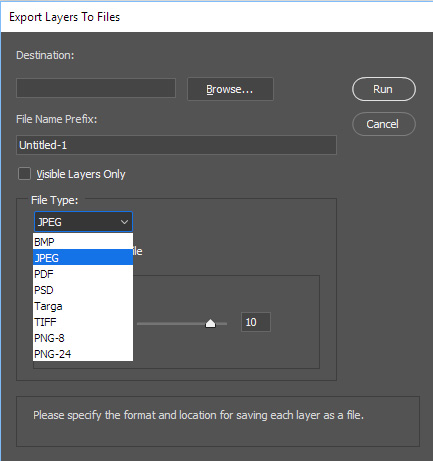
If they want to save out layers into files Photoshop that does that.   Menu File>Export>Export Layer to files.   However, if you run the script twice  and store the output  file to the same folder it will most likely overwrite the previous output files.  The way I read their question I thought they want to create version of their PSD. Document.  Each save would create a new version  hence sequence numbers. 

Re-reading it now I see they wrote some layers.  Export Layer to files cal also do that. 

...
Translate
Adobe
Community Expert ,
May 09, 2017 May 09, 2017

If you look in the Image Processor script you will find code that does that generate as sequence if output file exist it only saves new files.

JJMack
Translate
Report
Community guidelines
Be kind and respectful, give credit to the original source of content, and search for duplicates before posting. Learn more
community guidelines
Community Beginner ,
May 09, 2017 May 09, 2017

Thank you, I will look and see if I can figure it out. I was hoping someone might have one similar and could adapt that for me.  But this is a definite start. Thank you!

Translate
Report
Community guidelines
Be kind and respectful, give credit to the original source of content, and search for duplicates before posting. Learn more
community guidelines
Community Expert ,
May 09, 2017 May 09, 2017

It not to hard to read the Image Processor code functions.  Here are tow you may want to look at.

///////////////////////////////////////////////////////////////////////////////

// Function: CreateUniqueFileName

// Usage: Given a folder, filename, and extension, come up with a unique file name

// using a numbering system

// Input: string for folder, fileName, and extension, extension contains the "."

// Return: string for the full path to the unique file

///////////////////////////////////////////////////////////////////////////////

function CreateUniqueFileName( inFolder, inFileName, inExtension ) {

  inFileName = inFileName.replace(/[:\/\\*\?\"\<\>\|]/g, "_");  // '/\:*?"<>|' -> '_'

  var uniqueFileName = inFolder + inFileName + inExtension;

  var fileNumber = 1;

  while ( File( uniqueFileName ).exists ) {

     uniqueFileName = inFolder + inFileName + "_" + fileNumber + inExtension;

     fileNumber++;

     }

  return uniqueFileName;

}

function SaveAsPSD( inFileName, inEmbedICC ) {

  var psdSaveOptions = new PhotoshopSaveOptions();

  psdSaveOptions.embedColorProfile = inEmbedICC;

  app.activeDocument.saveAs( File( inFileName ), psdSaveOptions );

}

JJMack
Translate
Report
Community guidelines
Be kind and respectful, give credit to the original source of content, and search for duplicates before posting. Learn more
community guidelines
Community Beginner ,
May 09, 2017 May 09, 2017

Thanks, Ill look at this tomorrow. I have an early day tomorrow. Like I said if I study it I can sometimes get the gist of it if its simple but I am far from understanding it. Will try tomorrow.

Translate
Report
Community guidelines
Be kind and respectful, give credit to the original source of content, and search for duplicates before posting. Learn more
community guidelines
Community Expert ,
May 09, 2017 May 09, 2017

Originally here:

Looking for way to create random or sequential filename within save as action

I think that you should get the layer names correct in your source file, the various layer renaming scripts/panels can add incremented numbers.

Then simply use a script to save out all (correctly and uniquely named) layers as files.

Translate
Report
Community guidelines
Be kind and respectful, give credit to the original source of content, and search for duplicates before posting. Learn more
community guidelines
Community Expert ,
May 09, 2017 May 09, 2017

If they want to save out layers into files Photoshop that does that.   Menu File>Export>Export Layer to files.   However, if you run the script twice  and store the output  file to the same folder it will most likely overwrite the previous output files.  The way I read their question I thought they want to create version of their PSD. Document.  Each save would create a new version  hence sequence numbers. 

Re-reading it now I see they wrote some layers.  Export Layer to files cal also do that.  By controlling layers visibility. You can use export layers to files and use the visible layer only option.

Capture.jpg

JJMack
Translate
Report
Community guidelines
Be kind and respectful, give credit to the original source of content, and search for duplicates before posting. Learn more
community guidelines
Community Beginner ,
May 10, 2017 May 10, 2017

Export layers to files might work for me. I will consider how to approach this with that tool.

Translate
Report
Community guidelines
Be kind and respectful, give credit to the original source of content, and search for duplicates before posting. Learn more
community guidelines
Community Beginner ,
May 10, 2017 May 10, 2017
LATEST

Export layers to files seems to have resolved it at this time. Thank you all for your help!

Translate
Report
Community guidelines
Be kind and respectful, give credit to the original source of content, and search for duplicates before posting. Learn more
community guidelines