

Inspiring
January 25, 2018
Answered

New version CC fit screen doesnt work

  • January 25, 2018
  • 5 replies
  • 1944 views

Hi!

MS Pro 16. i7 etc.

Latest photoshop.

Change from previous version:

FIles open tiny, and fit screen (ctrl-0) is same.

Tried CC 2017 for comparison. Works fine.

This topic has been closed for replies.
Correct answer Trevor.Dennis

installed the new version today, sunday jan 28 and both issues persist


This might be a long shot, but do you have UI scaling set to Automatic?  I'm thinking about the intermittent nature dennis scalero art is experiencing, although UI sis shouldn't affect how the document appears on the screen.
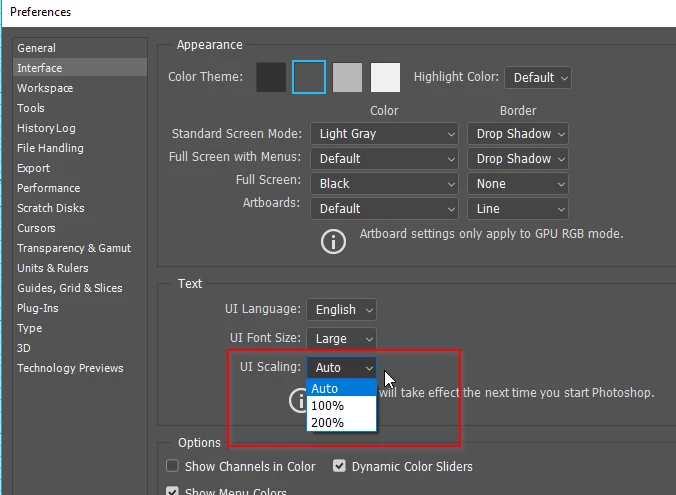
Would people who have the problem please give us enough information to maybe tie the issue down?

Operating System for sure?

Monitor Screen resolution?

Document size in pixels?

I can't think of anything else that might be relevant.  Any other thoughts?

5 replies

Kukurykus
Brainiac
March 5, 2018

For anyone who wants to get to know why it happens check: There isn't enough room to display this document => bug !

Inspiring
March 5, 2018

still going on.

Inspiring
February 9, 2018

lasso is back to crashing to program. this is really irritating. even when precision is on.

using 2017

Akash Sharma
Brainiac
January 25, 2018

Hi denniscaleroart,

Sorry that your files are opening tiny in Photoshop after the recent 19.1 version update.

As c.pfaffenbichler has mentioned, Could you please post a screenshot of Photoshop UI illustrating the issue? What is your operating system?

Also, Check if you are seeing similar behavior of Photoshop UI as mentioned in this discussion.

Thanks,

Akash

Inspiring
January 25, 2018

okay its now happening again, screenshot atatched

tried turning off use graphics processor and restarting the app didnt work

Inspiring
January 26, 2018

and then , everytime i hit the caps lock button on the lasso tool, the app would crash

what is happening

c.pfaffenbichler
Adobe Expert
January 25, 2018

Could you please post a screenshot taken with the pertinent Panels (Layers, Channels, Options Bar, …) visible?

Does turning off »Use Graphics Processor« in the Performance Preferences (Photoshop > Preferences > Performance > Graphic Processor Settings) and restarting Photoshop have any bearing on the issue?

Inspiring
January 25, 2018

thanks for your reply. after doing it all day yesterday and part of today it just....stopped.

If it happens again in the next few days, I'll try your fix and report