


Mister Zeta
Inspiring
May 1, 2020
Answered

No thumbnail when i save a psd file.

  • May 1, 2020
  • 2 replies
  • 9966 views

Hi all, there is an issue i'm not able to understand, so i hope you can help me.

When i save a psd file, sometimes there's not the thumbnail and i cannot see the preview in Bridge but just the icon.

What's the problem?

Thanks


Photoshop 21.1.2
This topic has been closed for replies.
Correct answer Mister Zeta

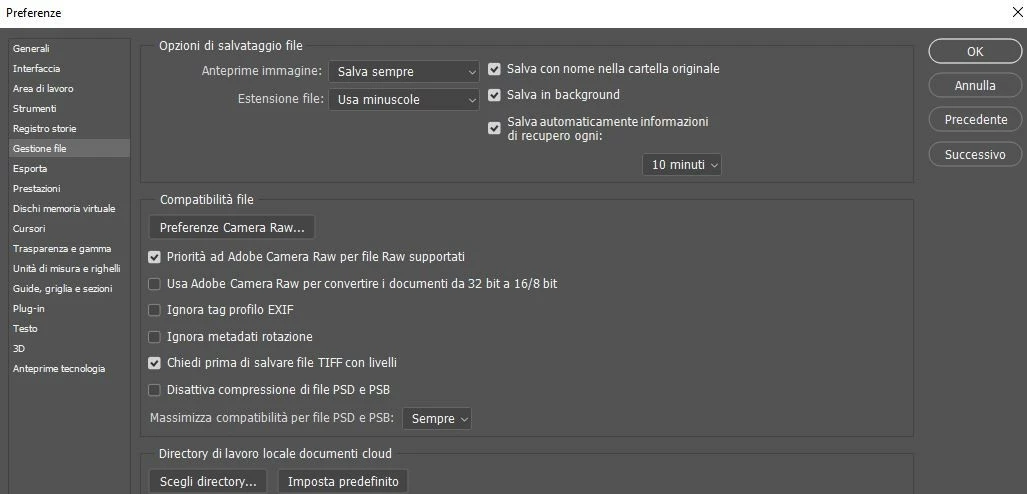
...But i've noticed a difference between the Preferences settings, because i don't have the option "Thumbnail" under Image Preview.

I don't think that this is important

2 replies

Participant
July 27, 2021

I have the same problem, but I have identified that PSDs that are over 50MB will not save a preview thumbnail nor show it in Explorer.
PSDs below 50MB are OK and will display a preview thumbnail in Windows Explorer.
I can't find where to change that setting.

Known Participant
May 11, 2022

I have the same problem I saved the psd multiple times same image same settings same everything psd_1 no thumbnail psd -2 has a thumbnail no changes were made just opened and saved. working through 50 individul wedding photos Photoshaop is randomly choosing to add or not add the thumbnails. ive tried resaving and renaming it remains a random photoshop anomaly.  screen shot Same file saved several versions and renamed to get the thumbnails (sometimes)  I cant find a solution. frustrating an not a good way to deliver a set of images. Photoshop is becoming un weildy and unreliable.


I spend more time fixing it re setting it and chasing down random issues than working these days. so frustrating this is the 

D Fosse
Community Expert
Community Expert
May 12, 2022

If this is Bridge, there's a setting in preferences to "not process files larger than", by default set to a rather small size.


If Windows Eplorer, there are no PSD thumbnails except through third party codecs.


If something else, don't know.

gener7
Community Expert
Community Expert
May 1, 2020

First be sure your file has the .psd extension

Next, check your file handing settings in Preferences. Make sure PSD and PSB compatibility is set to "always".

"Always Save" for Image Previews, Thumbnnail option checked on.

Next, you would need to apply the settings using "Save As..." to overwrite the old file. If save as a copy is checked, uncheck that.

Mister Zeta
Inspiring
May 1, 2020

yes, my files have the .psd extension and i have already set the compatibility on "Always". The strange thing is that in the Ps wellcome screen, i can see the preview but not in Bridge. My workflow in Ps is always the same, more or less but i don't understand where is the issue.

Thank for your quick reply

Mister Zeta
Mister ZetaAuthorCorrect answer
Inspiring
May 1, 2020

...But i've noticed a difference between the Preferences settings, because i don't have the option "Thumbnail" under Image Preview.

I don't think that this is important