


Not all layers of smart object are displayed in parent object.
Okay, so I am having a very strange bug/problem in Photoshop. Specifically, I have a PSD file 'A' that has linked another PSD file 'B' as a smart object, but only some of B's layers are being properly shown in A, despite the fact that they are all turned on and visible in B. If I modify the layers in B that do show in A, then I can see those modifications in A, but if I modify the layers in B that aren't shown in A, then they still don't show up correctly. Also, any newly-added layers to B do not show in A.
I originally had this problem with a PSD file that has about a hundred layers and a few dozen layer comps, but I've managed to reproduce it in a much simpler PSD by taking that problematic PSD and removing almost all of the layers and all of the layer comps.
So here I have two Photoshop files, test1.psd and test2.psd (click links to download files)...
The test1.psd is what was copied from my original buggy PSD file. It is now a very simple file that has only two layers. It looks like this:
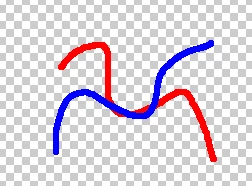
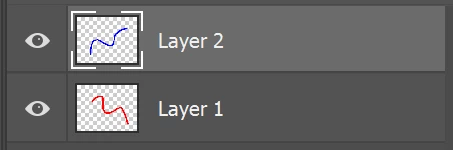
The test2.psd file is newly-created. It is also a very simple file that simply links in the test1.psd file as a smart object:
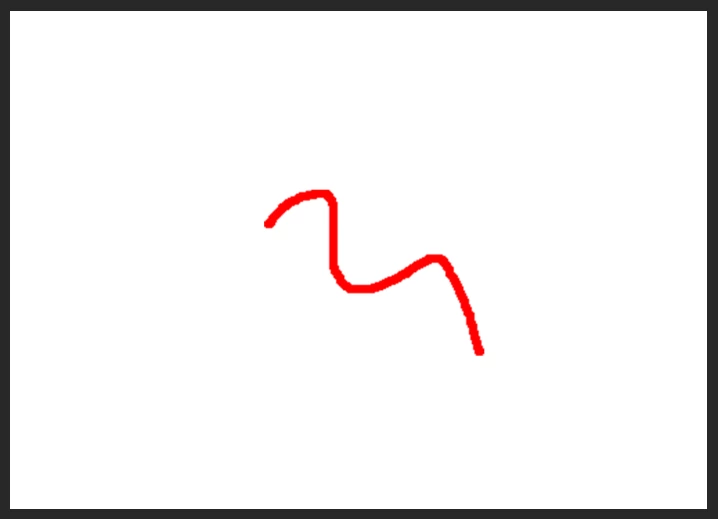
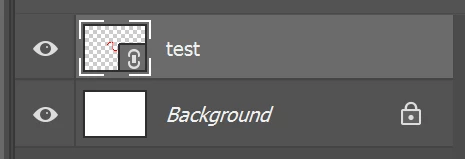
As you can see, for some reason, only Layer 1 is being displayed in test2.psd, but since both layers are turned on in test1.psd, both should be displayed in test2.psd, right? If I modify Layer 1 in test1.psd, the test2.psd is updated with those modifications as expected, though Layer 2 still isn't shown. If I modify Layer 2, or even add a new layer, then I can't see those layers in test2.psd. Note that neither of these files have any layer comps, so it's not an issue of test2.psd linking to a particular layer comp in test1.psd. (The issue still happens even if linked to a specific layer comp.)
Things I've already tried:
- Embedding the smart object instead of linking. Same problem occurs.
- Restarting my computer.
- Purging Photoshop's cache.
- Resetting my preferences.
- "Update All Modified Content"
- Re-linking the smart object.
- Making a copy of test1.psd and re-linking to that.
So now I'm all out of ideas! If you download the test1.psd and try to add it as a smart object to another file, does the same problem occur for you? Any ideas on how to fix this?
I'm using Photoshop 20.0.2 on Windows 10. Thanks for your help!
 AdChoices