


Participating Frequently
May 27, 2018
Answered

Not enough RAM error on opening any document

  • May 27, 2018
  • 3 replies
  • 3476 views

Hi,

I have been using Photoshop perfectly well for some time and all was going well until the latest Windows 10 update (about a week ago).  Suddenly, every time I launch Photoshop, I get the following message:
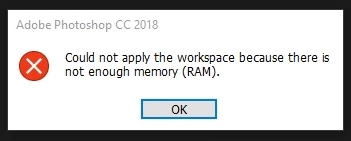
I was using Photoshop CC 2017, so I thought that updating to 2018 might solve the problem.  No such luck.

All my other software, including much hungrier packages like After Effects are unaffected, so I'm not sure why this is happening.

The Windows update was a major one and presumably necessary, so I'm not that eager to roll back to before it if I can avoid it, or at least if I can identify which bit of the update is causing the problem and remove it. (I recently had to remove an Windows update that was interfering with my Wacom tablet).

I saw in one post that you can increase the RAM via the preferences>performance panel, but if I try opening that I get an error saying "an integer between 96 and 8 is required".

I've seen lots of people posting about problems when saving documents, but haven't seen the issue at launch time.

Any help gratefully received.

This topic has been closed for replies.
Correct answer c.pfaffenbichler

Could it be related to this?

Invalid Numeric Entry - An integer between 96 and 8 is required

3 replies

Brian Capt
Participating Frequently
July 10, 2018

Well as i though utter crap i installed the update, god why didnt i listen to myself

Updates are OFF and staying of and going back to iX the if i could pay to punch the a r  se that came up with this rubbih I would happily pay

Developers, THINK, ABOUT, LISTEN TO, PRODUCE FOR THE USERS, not your little circle of fanzees oh look how much code weve written oh look it does this,, great but its screwed everythign else up, came back the reply!!!

THINK ON!!!!

DaftoonsAuthor
Participating Frequently
May 27, 2018

It seems to have done the job.  Thanks.  I'll know for sure when I work on some big files next week, but if I don't post back here you can assume it worked out OK.  I am very grateful.

Brian Capt
Participating Frequently
June 5, 2018

Hi Having had a new laptop with SSD etc running on Win 10 offie 365, office 2016, ive been using PS happily since september on this current laptop.

Now I get the insufficient RAM, the Inters message, our retained IT company, spent 2 hours trying everything to correct it, I had tried also here in the forum/s

All the suggested work throughs on th einternet not one has worked.

Aparently this issue has been around for  along time with no real resolution.

We have just tried uninstalling etc, disk clean ups etc all with no resolution,im fankly at the point of chucking the laptop at the wall as no one seems to be able to throw any light on the issue

yet my old laptop on win 7 and PS 2006 runs great no issues, frankly i cant work because this latest "suprise"

Cheers a very frustrated Brian

Brian Capt
Participating Frequently
June 5, 2018

Hi as in my message i have tried the above, as also stated several other options! and our retained IT company are unable after trying for over 2 hours.

I thought i could not be more frustrated as i was / am with DC but this has me wanting me to go back to brush paint & paper


Hi Ged

Thanks your comment re Win (the devils spawn!!!) V1803.... ive rolled back to previous version, and hey presto!!!

sorted :-)

c.pfaffenbichler
c.pfaffenbichlerCorrect answer
Community Expert
May 27, 2018