


Nudging layer with arrow keys makes part of canvas white
When I nudge a layer/image with the arrow keys, the image – or part of it – turns white. Making it impossible to see what's going on. Here was a lovely photo from a show, and all I did was hit the left arrow key for some nudging:

The image isn't erased og destroyed, it reappears if i hit Ctrl+T for free transform. I know this sounds like a computer problem rather than a program bug, but any advice would be appreciated.
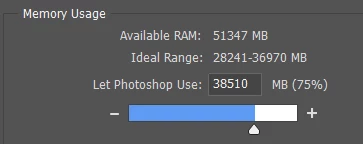
I made sure that Photoshop is allowed to use sufficient memory:
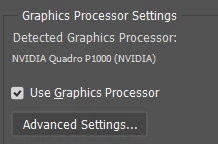
I am on Windows 10 with this these settings for graphics processor:
I've had this PC for a while and I haven't had the issue before. Our IT-dudes suggest rebooting the whole machine which I'd rather not. But it seems like the last resort – unless someone has a suggestion?
I'm on the newest verion of PS.
 AdChoices