



Trevor.Dennis
Community Expert
October 11, 2015
Answered

NVIDIA Pop-Up Grrrrr

  • October 11, 2015
  • 4 replies
  • 17648 views

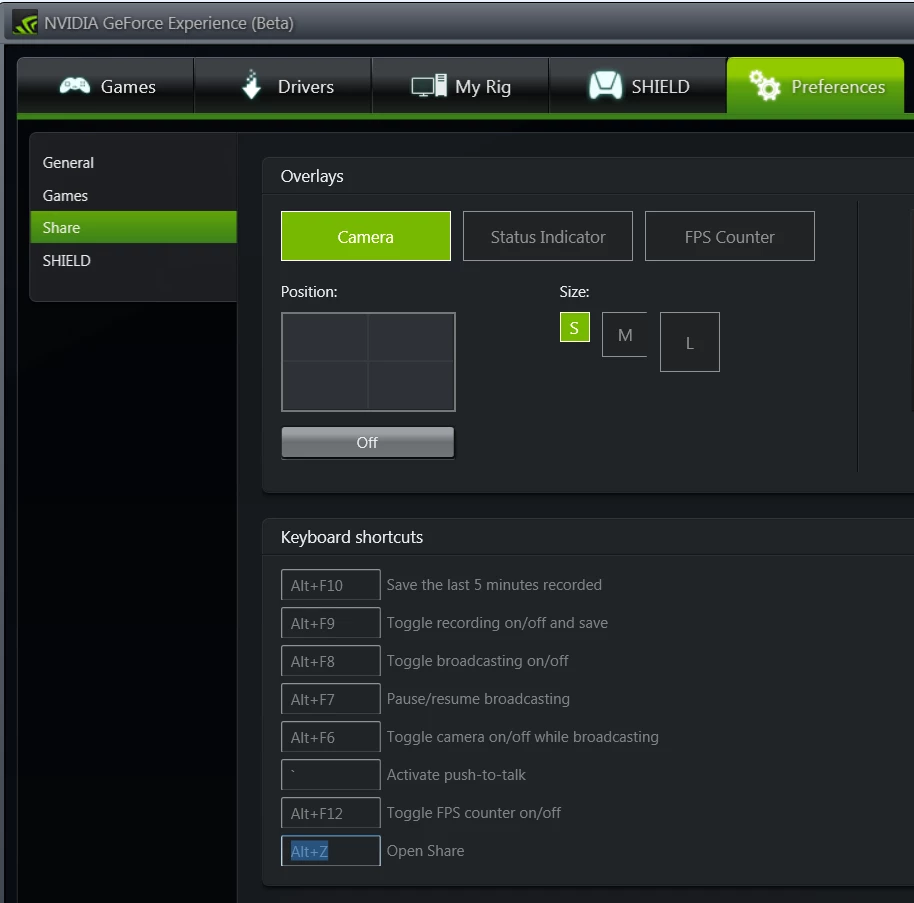
Anyone else encountered this NVIDIA monstrosity and worked out how to disable it?  It is triggered by Ctrl z, and overrides Photoshop's step backwards.  I found a web page about it, and other people are asking how to disable it in the comments, but no one seems to have an answer.  It is intensely annoying because it has broken Photoshop.

It was introduced with 358.50
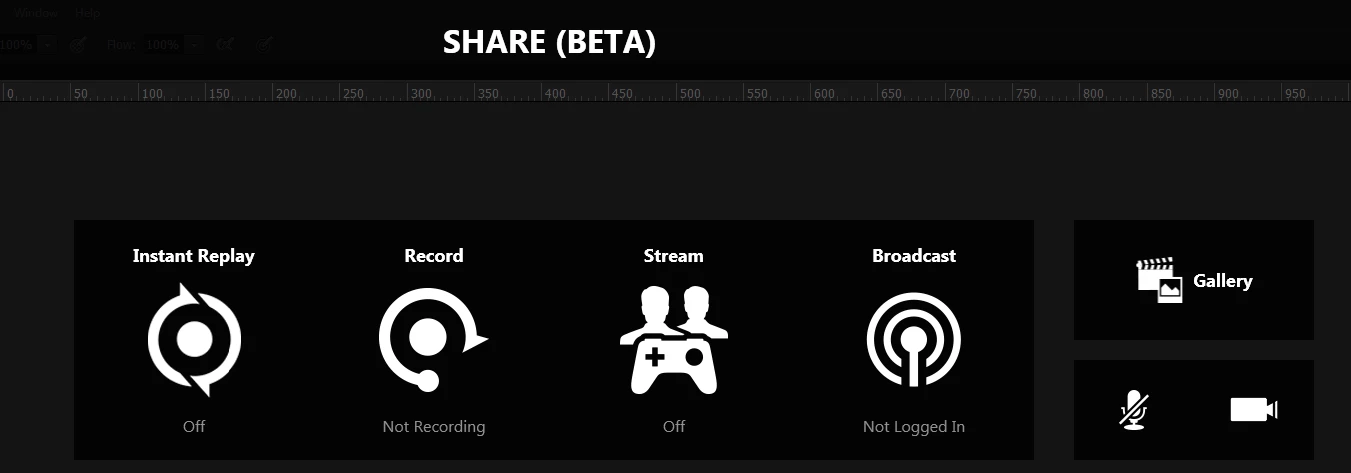
There is a new tab (I assume) in Geforce Experience Preferences > Share, which shows the shortcuts, but I can't remove or disable them so far.
    This topic has been closed for replies.
    Correct answer davidc1815

    Or I guess you can just uninstall Nvidia Experience - I have had it cause other compatibility problems in the past.

    David

    4 replies

    sweaters4dorks
    New Participant
    October 27, 2017

    You can actually change the shortcut for NVIDIA under its settings to something else, like alt+k or something harder to hit lol

    New Participant
    January 31, 2024

    I tried to do that; I could select the shortcut and it would highlight but I couldn't find a way to the shortcut. How did you get it to change? Tried pressing enter etc... 


    New Participant
    September 2, 2017

    1. Turn "in-game overlay" pane on

    2. Hit the Settings button

    3. Select Keyboard shortcuts in the menu that appears

    4. Highlight the in-game overlay keyboard shortcut which is by default mapped to Ctrl+Z and select it

    5. Select some other shortcut combination (i chose Ctrl+Insert)

    6. Go back to main screen and turn "in-game overlay" OFF

    This solved my Photoshop Ctrl+Z and Ctrl+Alt+Z issues

    D Fosse
    Community Expert
    September 2, 2017

    A good case for selecting "custom install", and uncheck everything except the basic driver. That's what I did with my new build.

    It these things are already installed, they should show up as separate entries under Programs and Features, and can be uninstalled there.

    davidc1815
    davidc1815Correct answer
    Brainiac
    October 11, 2015

    Or I guess you can just uninstall Nvidia Experience - I have had it cause other compatibility problems in the past.

    David

    Trevor.Dennis
    Community Expert
    October 11, 2015

    davidc1815 wrote:

    Or I guess you can just uninstall Nvidia Experience - I have had it cause other compatibility problems in the past.

    David

    So it's not an integral part of the driver?  It handles updates as far as I can tell, but as I never play computer games, I don't need it's other aspects if that's all it does.   Thanks for the heads up.  I'll see iff it is doable.

    davidc1815
    Brainiac
    October 12, 2015

    Yes, I have certainly uninstalled it in the past without consequential problems.  I just removed it in the Control Panel/Program and Features.  I get my drivers from Nvidia direct.  As it happens I have N Experience installed at the moment and it's playing nicely with my system.

    Trevor.Dennis
    Community Expert
    October 11, 2015

    OK, I found it.  Open Experience, and use the Share drop down in the top right corner, and uncheck Enable.  Photoshop then gets its shortcuts back