

Object, Property, Method or parameter for new Pixel Layer Properties in Properties Panel
In Photoshop CC 2017 there is a new property panel "Pixel Layer Properties".
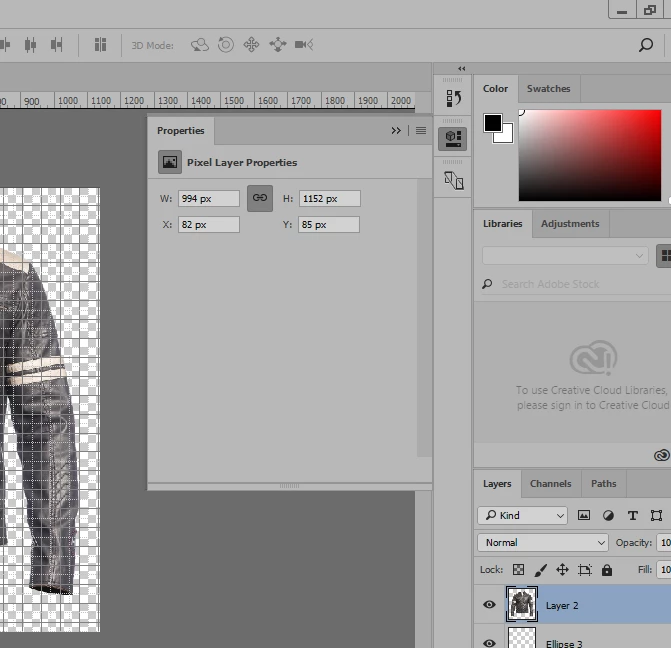
How do I get its values using Photoshop Javascript? I have a script which do certain action based upon layer condition. I want to add a condition at line #37 that if W*H from "Pixel Layer Property" is equal to or greater than 3/4 of Canvas dimension then goto line # 71 and skip the execution of lines #38 to #68 otherwise execute the next line (i.e. # 38). I made it from my other actions and some scripts using ActionToJavascript. I Can do minor manipulation in Javascripts and also I do read the Photoshop Javascript reference 2015, but there is nothing there for "Pixel Layer Properties" because it introduced in 2017.
Here is my script:
#target photoshop
//
// Conditional Layer Removal PSD JPG.jsx
// Conditional Removal of ID Layer based upon number of layer in a PSD
//
// Generated Sat Jul 29 2017 00:59:28 GMT+0500
//
cTID = function(s) { return app.charIDToTypeID(s); };
sTID = function(s) { return app.stringIDToTypeID(s); };
var layerCount = app.activeDocument.layers.length;
if (layerCount > 2)
{
//
//==================== RemoveIDLayer ==============
//
function RemoveIDLayer() {
// Select
function step1(enabled, withDialog) {
if (enabled != undefined && !enabled)
return;
var dialogMode = (withDialog ? DialogModes.ALL : DialogModes.NO);
var desc1 = new ActionDescriptor();
var ref1 = new ActionReference();
ref1.putEnumerated(cTID('Lyr '), cTID('Ordn'), cTID('Frnt'));
desc1.putReference(cTID('null'), ref1);
desc1.putBoolean(cTID('MkVs'), false);
var list1 = new ActionList();
list1.putInteger(9);
desc1.putList(cTID('LyrI'), list1);
executeAction(cTID('slct'), desc1, dialogMode);
};
// Delete
function step2(enabled, withDialog) {
if (enabled != undefined && !enabled)
return;
var dialogMode = (withDialog ? DialogModes.ALL : DialogModes.NO);
var desc1 = new ActionDescriptor();
var ref1 = new ActionReference();
ref1.putEnumerated(cTID('Lyr '), cTID('Ordn'), cTID('Trgt'));
desc1.putReference(cTID('null'), ref1);
var list1 = new ActionList();
list1.putInteger(9);
desc1.putList(cTID('LyrI'), list1);
executeAction(cTID('Dlt '), desc1, dialogMode);
};
// Select
function step3(enabled, withDialog) {
if (enabled != undefined && !enabled)
return;
var dialogMode = (withDialog ? DialogModes.ALL : DialogModes.NO);
var desc1 = new ActionDescriptor();
var ref1 = new ActionReference();
ref1.putEnumerated(cTID('Lyr '), cTID('Ordn'), cTID('Frnt'));
desc1.putReference(cTID('null'), ref1);
desc1.putBoolean(cTID('MkVs'), false);
var list1 = new ActionList();
list1.putInteger(9);
desc1.putList(cTID('LyrI'), list1);
executeAction(cTID('slct'), desc1, dialogMode);
};
// Trim
function step4(enabled, withDialog) {
if (enabled != undefined && !enabled)
return;
var dialogMode = (withDialog ? DialogModes.ALL : DialogModes.NO);
var desc1 = new ActionDescriptor();
desc1.putEnumerated(sTID("trimBasedOn"), sTID("trimBasedOn"), sTID("topLeftPixelColor"));
desc1.putBoolean(cTID('Top '), true);
desc1.putBoolean(cTID('Btom'), true);
desc1.putBoolean(cTID('Left'), true);
desc1.putBoolean(cTID('Rght'), true);
executeAction(sTID('trim'), desc1, dialogMode);
};
// Trim
function step5(enabled, withDialog) {
if (enabled != undefined && !enabled)
return;
var dialogMode = (withDialog ? DialogModes.ALL : DialogModes.NO);
var desc1 = new ActionDescriptor();
desc1.putEnumerated(sTID("trimBasedOn"), sTID("trimBasedOn"), sTID("bottomRightPixelColor"));
desc1.putBoolean(cTID('Top '), true);
desc1.putBoolean(cTID('Btom'), true);
desc1.putBoolean(cTID('Left'), true);
desc1.putBoolean(cTID('Rght'), true);
executeAction(sTID('trim'), desc1, dialogMode);
};
// Scripts
function step6(enabled, withDialog) {
if (enabled != undefined && !enabled)
return;
var dialogMode = (withDialog ? DialogModes.ALL : DialogModes.NO);
var estr = '//@include "~/OneDrive/Business/Website Making/Commands and Scripts/Adobe Scripts/Conditional resizeImage 1100 All.jsx";\r\n';
eval(estr);
};
// Canvas Size
function step7(enabled, withDialog) {
if (enabled != undefined && !enabled)
return;
var dialogMode = (withDialog ? DialogModes.ALL : DialogModes.NO);
var desc1 = new ActionDescriptor();
desc1.putBoolean(cTID('Rltv'), true);
desc1.putUnitDouble(cTID('Wdth'), cTID('#Pxl'), 300);
desc1.putUnitDouble(cTID('Hght'), cTID('#Pxl'), 300);
desc1.putEnumerated(cTID('Hrzn'), cTID('HrzL'), cTID('Cntr'));
desc1.putEnumerated(cTID('Vrtc'), cTID('VrtL'), cTID('Cntr'));
desc1.putEnumerated(sTID("canvasExtensionColorType"), sTID("canvasExtensionColorType"), cTID('BckC'));
executeAction(sTID('canvasSize'), desc1, dialogMode);
};
// Scripts
function step8(enabled, withDialog) {
if (enabled != undefined && !enabled)
return;
var dialogMode = (withDialog ? DialogModes.ALL : DialogModes.NO);
var estr = '//@include "~/OneDrive/Business/Website Making/Commands and Scripts/Adobe Scripts/PSDtoJPG.jsx";\r\n';
eval(estr);
};
// Close
function step9(enabled, withDialog) {
if (enabled != undefined && !enabled)
return;
var dialogMode = (withDialog ? DialogModes.ALL : DialogModes.NO);
var desc1 = new ActionDescriptor();
desc1.putEnumerated(cTID('Svng'), cTID('YsN '), cTID('N '));
desc1.putInteger(cTID('DocI'), 816);
desc1.putBoolean(sTID("forceNotify"), true);
executeAction(cTID('Cls '), desc1, dialogMode);
};
step1(); // Select
step2(); // Delete
step3(); // Select
step4(); // Trim
step5(); // Trim
step6(); // Scripts
step7(); // Canvas Size
step8(); // Scripts
step9(); // Close
};
//=========================================
// RemoveIDLayer.main
//=========================================
//
RemoveIDLayer.main = function () {
RemoveIDLayer();
};
RemoveIDLayer.main();
// EOF
"Conditional Layer Removal PSD JPG.jsx"
// EOF
}
else app.doAction ("< 2 Layer removal PSD", "My Actions")
Message was edited by: Junaid Junaid


 AdChoices