


Inspiring
September 8, 2021
Answered

Older Version of PS To Keep 3D Function

  • September 8, 2021
  • 2 replies
  • 497 views

I tried to install a previous version of PS (21.2), in order to retain the ability to manipulate 3D files. I was not prompted for a target folder & the program started to install files in the same directory as my 22.5. How can I do this? I want to be able to run either version, according to my need -- the older version for 3D, which is a rarity, so it is not worth the extra cost of installing Substance.
This topic has been closed for replies.
Correct answer JJMack

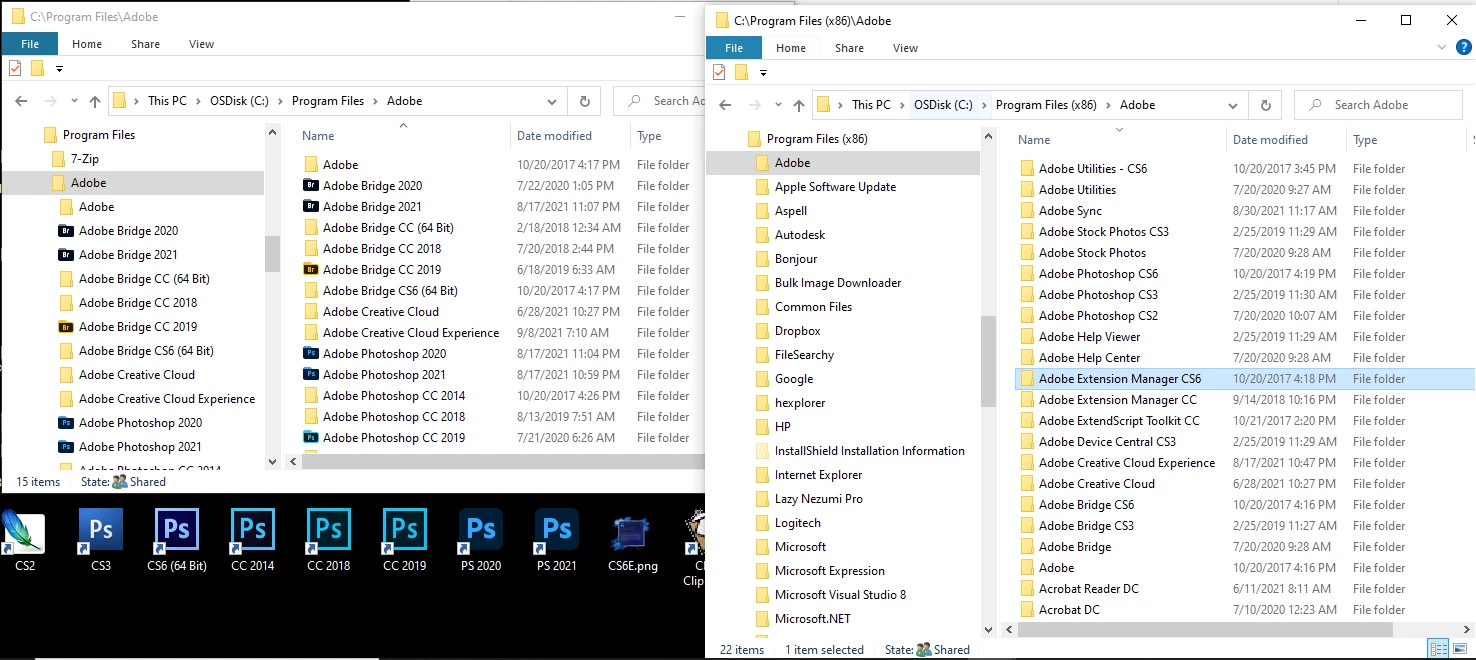
That should not happen. Every Major Photoshop version has different Installation install path. Look at my Windows PC Adobe folders in Programs Files and Program File (x86) for 64bit and 32 bit Applications,

2 replies

JJMack
Community Expert
JJMackCommunity ExpertCorrect answer
Community Expert
September 8, 2021

That should not happen. Every Major Photoshop version has different Installation install path. Look at my Windows PC Adobe folders in Programs Files and Program File (x86) for 64bit and 32 bit Applications,

JJMack
Kevin Stohlmeyer
Community Expert
Community Expert
September 8, 2021

You wont be prompted for a target folder - both versions will reside in the same program files/application directory with separate system resources.

You will end up with a PS 2020 and PS 2021 folder in your program files/application directory.

Inspiring
September 8, 2021

Thank you.  All is well -- I did end up with PS 2020 & 2021 folders in my Program Files>Adobe folder.