



Option to preview before and after effect on image
Hi friends!
I'm working on a script that contains a small dialog box with some buttons to apply some image effects.
It works like this:
When I open the dialog window, add a snapshot1, then I apply some color effects and levels in the image, ...... when I disable the checkbox, it returns to snapshot1 (Function Before) however, my problem is that I have no idea how to add the "After" function every time I enable the chebox, so that the image returns to the last applied effect. Every suggestion is valid. Thank you.
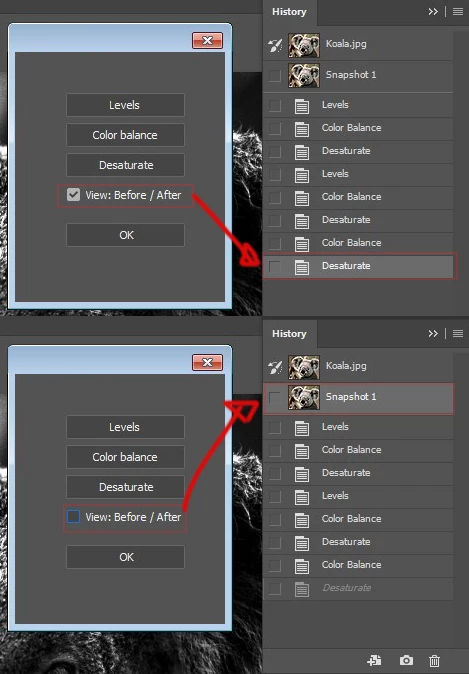
Script:
takeSnapshot(); /// Before
////////////////////
var dlg = new Window("dialog", "Test", {x:0, y:0, width:210, height:250} ,{closeButton: true});
levels = dlg.add('button',{x:50, y:40, width:120,height:25}, 'Levels');
color = dlg.add('button',{x:50, y:70, width:120,height:25}, 'Color balance');
Curves = dlg.add('button',{x:50, y:100, width:120,height:25}, ' Desaturate');
levels.onClick = function() {
levelss ()
app.refresh()
}
color.onClick = function() {
Colorbalance();
app.refresh()
}
Curves.onClick = function() {
Desaturate();
app.refresh()
}
/////// CHECK VIEW REUSE FILE
var check = dlg.add("checkbox", {x:50, y:130, width:93,height:25}, "View: Before / After");
check.onClick = function (){
if(this.value){
alert ("Always return to the last setting in the History palette.")
}
else{
Before () /// Before
app.refresh()
}
}
check.value= true;
Close = dlg.add('button',{x:50, y:170, width:120,height:25}, ' OK');
Close.onClick = function() {
dlg.close();
}
dlg.center();
dlg.show();
/////////
function levelss () {
var descriptor = new ActionDescriptor(); var descriptor2 = new ActionDescriptor(); var list = new ActionList(); var reference = new ActionReference();
descriptor.putEnumerated( stringIDToTypeID( "presetKind" ), stringIDToTypeID( "presetKindType" ), stringIDToTypeID( "presetKindCustom" ));
reference.putEnumerated( charIDToTypeID( "Chnl" ), charIDToTypeID( "Chnl" ), charIDToTypeID( "Cmps" )); descriptor2.putReference( charIDToTypeID( "Chnl" ),
reference ); descriptor2.putDouble( charIDToTypeID( "Gmm " ), 0.550000 ); list.putObject( charIDToTypeID( "LvlA" ), descriptor2 ); descriptor.putList( charIDToTypeID( "Adjs" ), list );
executeAction( charIDToTypeID( "Lvls" ), descriptor, DialogModes.NO );
}
////////
function Colorbalance () {
var descriptor = new ActionDescriptor(); var list = new ActionList(); var list2 = new ActionList(); var list3 = new ActionList();
list.putInteger( 0 ); list.putInteger( 0 ); list.putInteger( 0 ); descriptor.putList( charIDToTypeID( "ShdL" ), list ); list2.putInteger( 0 ); list2.putInteger( 40 );
list2.putInteger( 79 ); descriptor.putList( charIDToTypeID( "MdtL" ), list2 ); list3.putInteger( 0 ); list3.putInteger( 0 ); list3.putInteger( 0 ); descriptor.putList( charIDToTypeID( "HghL" ), list3 );
descriptor.putBoolean( charIDToTypeID( "PrsL" ), true ); executeAction( charIDToTypeID( "ClrB" ), descriptor, DialogModes.NO );
}
///////
function Desaturate() {
executeAction( charIDToTypeID( "Dstt" ), undefined, DialogModes.NO );
}
///////
function takeSnapshot () {
var desc = new ActionDescriptor(); var sref = new ActionReference(); sref.putClass(charIDToTypeID("SnpS")); desc.putReference(charIDToTypeID("null"), sref);
var fref = new ActionReference(); fref.putProperty(charIDToTypeID("HstS"), charIDToTypeID("CrnH")); desc.putReference(charIDToTypeID("From"), fref );
executeAction(charIDToTypeID("Mk "), desc, DialogModes.NO );
}
function revertToLastSnapshot() {
var docRef = app.activeDocument; var hsObj = docRef.historyStates; var hsLength = hsObj.length; for (var i=hsLength - 1;i>-1;i--) { if (hsObj.snapshot) {
docRef.activeHistoryState = docRef.historyStates.getByName('Snapshot ' + i); break;
} } }
/////////
Before ()
function Before () {
var descriptor = new ActionDescriptor(); var reference = new ActionReference(); reference.putName( charIDToTypeID( "SnpS" ), "Snapshot 1" );
descriptor.putReference( charIDToTypeID( "null" ), reference ); executeAction( charIDToTypeID( "slct" ), descriptor, DialogModes.NO );
}

 AdChoices