


March 14, 2018
Question

Outline an image

  • March 14, 2018
  • 3 replies
  • 715 views

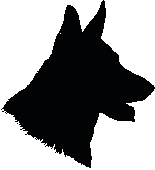
I have a black and white image that I want to place a thin blue line along the outer part of the black image using Hex 0553Fa. Not sure how to do that. The reason for this is that the background is black and I need the image to stand out. Right now you can't even see the dog with the background.
    This topic has been closed for replies.

    3 replies

    Chuck Uebele
    Community Expert
    March 15, 2018

    First you need to separate the dog from the background by using something like the magic wand. You want the dog on it's own layer with a transparent background, Then you can use the layer styles and put an outer glow as Semaphoric mentioned, or a stroke.:

    Semaphoric
    Community Expert
    March 15, 2018

    Working int RGB mode, you could add an Outer Glow effects layer.

    Sue Garibaldi
    Community Manager
    Community Manager
    March 14, 2018

    HI Mark.

    Is this post intended for the Photoshop forum? Let me know and I'll move it for you.

    Sue.

    March 14, 2018

    Yes it is, sorry. Thanks for moving it for me.