


January 8, 2020
Answered

P: Document window resize

  • January 8, 2020
  • 30 replies
  • 9377 views

Since the release of photoshop cc 2018 (photoshop ver 19.0) thru the
current photoshop 2020 (photoshop version 21.0.2) on both windows and mac, although it's most apparent on the mac side when the Application Frame is turned Off, when using floating document windows with the option to Open as Tabs enabled, the document windows resizes depending on the size
(pixel dimensions) of the next document being opened.This also happens i with vertical documents versus horizontal documents and windows with small documents will be sized up if a larger document is opened.

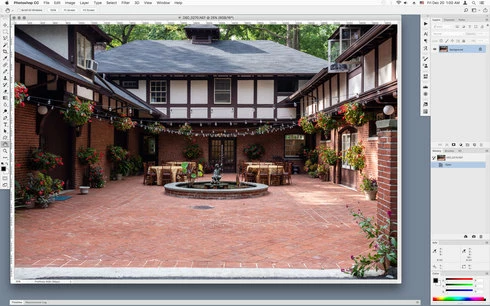
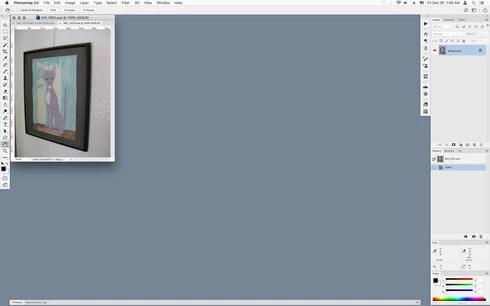
In other words, for example, if you have a larger document of say 8000 px x 4000 px open and you open a much smaller document of say 640 px x 480 px, the document window will resize down to the small file just opened as shown in the screenshots below.


Large document open that fills much of the screen when opened


Document window resizes when much smaller documents is opened


This did not occur on photoshop versions cs4 thru photoshop cc 2017. which would keep the window size of the original opened document.
Is this a deliberate change?

This topic has been closed for replies.
Correct answer Mohit Goyal

Hi all,


We're happy to announce the MAX 2021 release of Photoshop 23.0. This update includes the fix for this issue. To see the list of all fixed issues, click here


To update Photoshop to 23.0, click "Update" in the Creative Cloud desktop app next to Photoshop. More detailed instructions for updating


Let us know if the update resolves the problem for those affected and share your feedback with us.


Thanks,

Mohit

30 replies

New Participant
April 24, 2024

Still not fixed. Ver 25.4.0

24th April 2024

JoseGIHP
Participating Frequently
February 17, 2024

Correct answer 10/26/2021???
It is still happening in 2024, PS 25.4.0
Why are we constantly fed BS?

Participating Frequently
February 8, 2024

Still broken in Photoshop 2024 (25.4.0).

Works perfectly as expected in 2021 (22.5.8) which I keep around for Postscript fonts.

Jeff Arola
Community Expert
September 13, 2023

JoseGIHP,


It still seems to be happening in both Photoshop 2024 (ps ver 25) and Photoshop 2023 (ps ver 24.7.1), so no i guess it's not fixed.

CShubert
Community Manager
Community Manager
September 13, 2023

Hey all, it may take up to 24 hours for the full rollout, you can always go to your CCD app and click on check for update to have CCD go out and pull down the update.


JoseGIHP
Participating Frequently
September 13, 2023

Any update? Currently on V.24.7 and this is still happening.

Inspiring
September 1, 2023

It was only half-fixed in Photoshop 23.  I'm on Photoshop 24.7 and the window size still changes when I change documents that are grouped.  The window size of grouped documents should stick to the size I set it.  This is how it worked when grouped documents were first introduced (Photoshop 11?), and this was before the Windows-like application frame was introduced to Mac.

Known Participant
August 31, 2023

Yes, it's exactly as you write, I've already seen this solved in several discussions and I first encountered it on CC 2022 version 23.3.3 (what a lucky guy I was back then) - and even though it was written that it was solved, nothing is actually solved because it doesn't work on any computer I have access to (there are almost 10 macs). The latest version 23.5.5 (CC2022) nor version 24.7.0 (CC2023) still has this bug and it's really annoying - I want to set the window size once and not set it for each image separately 1000 times a day..

JoseGIHP
Participating Frequently
June 10, 2023

Is there a fix for this? It's annoying have to resize the window each time tabbing through multiple files. Super time suck

Inspiring
January 4, 2023

The issue is improved in version 24, but not fixed, in my opinion, as it's still not behaving as it did years ago.  I'm on a Mac and I keep the App Frame off and like to group documents in a floating tabbed window.  It used to be that such a window would retain the size the user set it to, and opening a new document would not change it.  The original post complained that a new document resizes the window, and that still happens, but now each document 'remembers' it's unique window size, so that switching tabs changes the size of the window...not the behaviour I expect, as it's not giving the user control over the window's size that groups multiple documents (which is how it used to behave).  In other words, when I group documents in a window and resize that window, I want that to stick...I don't want each document to change the window size if they're grouped.