


kathyv29656185
Participant
March 13, 2023
Answered

P: Photoshop 24.3 Strobes in Black and White when Opening files

  • March 13, 2023
  • 200 replies
  • 504667 views

when attempting to open a photo in Photoshop on my HP Laptop, details below, the photo appears in the layers tab bottom right, but not in the workspace /desktop: It is a constant Black / White strobe. The desktop /workspace flashes Black and white

.
Processor Intel(R) Core(TM) i7-8550U CPU @ 1.80GHz 1.99 GHz
Installed RAM 16.0 GB (15.9 GB usable)

System type 64-bit operating system, x64-based processor

Edition Windows 10 Pro
Version 21H2
Installed on ‎24/‎03/‎2021
OS build 19044.2604
Experience Windows Feature Experience Pack 120.2212.4190.0
Correct answer Ged_Traynor

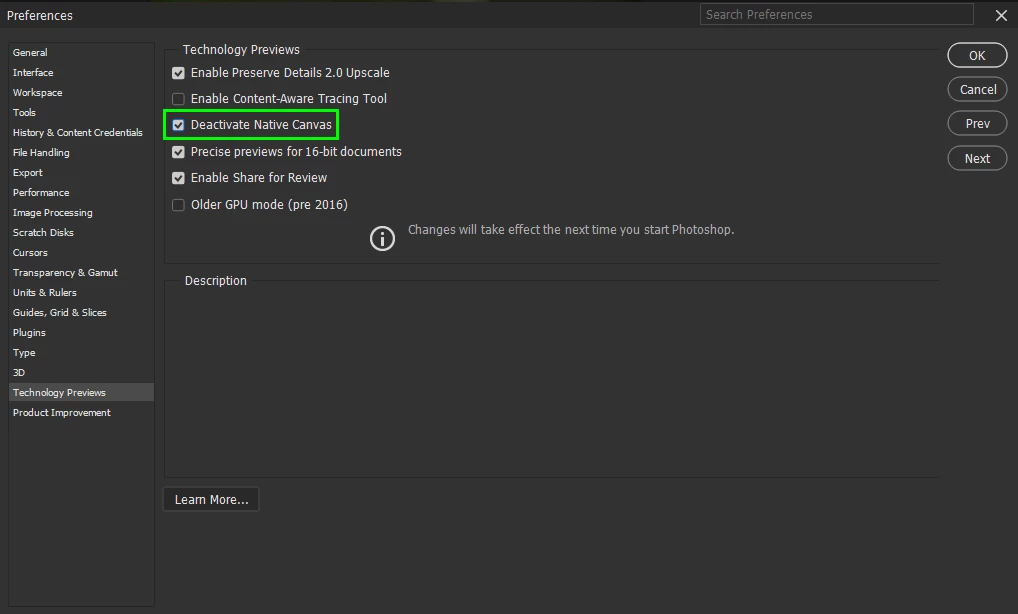
@Elisa29995820fb2q go to Edit > Preferences > Technology Previews and enable this option, then restart Photoshop

200 replies

Participant
March 15, 2024

Kevin Stohlmeyer
Community Expert
Community Expert
March 15, 2024

@STUDIO36097914a69x this is a completely unrelated issue to this post. Please start a new thread with details on your specific issue.

Participant
July 24, 2023

I have the newest version of photoshop and I checked native canvas option but I dont have the “Older GPU mode (pre 2016)” option to check?

Kevin Stohlmeyer
Community Expert
Community Expert
July 24, 2023

HI @lasse98A1 if you are on a Mac that option is not available.

Participant
May 23, 2023

This solved the stobing problem in my Dell Inspirion... 

I was just hinking I might need to buy a new pc... so good news for the bank balance, while dissapointing my inner child wanting a new toy!

thanks

Dave


Participant
May 22, 2023

Hello everyone! 

Since I've updated Adobe Photoshop to it's newest version, 24.4.1, everytime I open the program my screen glitches black to white and viceversa. 

I downgraded but I needed the latest version. I've checked the GPU, ecc. but everything seems okay.

Can someone help me? Right now I can't use the program and I really need it for work!

Ged_Traynor
Community Expert
Community Expert
May 22, 2023

@Milena29997239sdx6 go to Edit > Preferences > Technology Previews and enable this option, then restart Photoshop

Participant
May 22, 2023

instalo photosop y cuando inserto la inagem la pantalla se pone blanca y parpadeo. probe a instalar una versión anterior y también me pasa lo mismo. ¿qué hago?

Ged_Traynor
Community Expert
Ged_TraynorCommunity ExpertCorrect answer
Community Expert
May 22, 2023

@Elisa29995820fb2q go to Edit > Preferences > Technology Previews and enable this option, then restart Photoshop

Participant
May 22, 2023

Checking "Older GPU Mode" fixed the strobing.... However!

The entire program is dramatically slower now. Sad to see you're not supporting older devices. After being loyal to Photoshop since 2010 I will finally have to look for a new graphics editor. 

jane-e
Community Expert
Community Expert
May 22, 2023


@AnnieSinger wrote:

The entire program is dramatically slower now.


Several folks have reported slower performance when checking "older GPU mode". Many with older GPUs have had better success with doing this instead:

Preferences > Technology Previews > Enable "Deactivate Native Canvas" > Restart Photoshop


Jane


Participant
May 20, 2023

English isn't my main language so I hope someone understand what I'm writing. 


Photoshop doesn't work all the time for me. Sometimes it works perfectly fine but most of the time the picture I want to edit only flashes (I don't know how to explain so I'll insert a link to show).

I've tried to search but can't find it. Any ideas? 


I used PS one week ago and it worked all ok. The time before that it flashed. And I've tried again today and one picture works without flashes but the rest does. Doesn't matter if I try to open one picture one by one.


davescm
Community Expert
Community Expert
May 20, 2023

Hi

Go to Preferences > Technology Previews and check Deactivate Native Canvas. Then close and restart Photoshop.


Dave

nikoju2
Participant
May 20, 2023

Had the same issue, fixed with GPU mode.

Participant
May 19, 2023
Olá, estou com um problema no photoshop que gera quadrados brancos ao trabalhar com imagens dentro de uma prancheta. Esses pixels brancos aparecem ao transformar camadas, mover camadas ou usar pincel. Em alguns momentos também ocorreu que a imagem está corrompida. Quando a imagem corrompe dentro do photoshop descobri como escapar do erro. Preciso voltar em um processo (ctrl + z) e converter a imagem em um smartobject, fazendo esse processo consigo transformar a imagem sem que ela seja corrompida.
Isso aconteceu em dois computadores diferentes, um com processador Ryzen 9 de 64 GB, com SSD M.2 e placa de vídeo Raedeon RX5600 XT, e outro com processador Xeon de 44 GB, também com SSD M.2, sem placa de vídeo , ambos os computadores com Windows 10 operacional.
Também tenho problemas com alguns vídeos dentro do After Effects, em alguns casos há falhas na tela dos vídeos.
Já tentei tirar a memória ram e trabalhar só com pendrive, trabalhando direto dentro de um HD externo, tirando a placa de vídeo.
Mas, infelizmente, nada foi possível para corrigir esse erro.
Em anexo print e vídeo do bug.
Não encontro nada parecido na internet e só posso pedir ajuda na comunidade.
Muito obrigado antecipadamente.
Kevin Stohlmeyer
Community Expert
Community Expert
May 19, 2023

@Games29870068fqtf "I couldn't find any specific information about Photoshop version 24.3 strobing in black and white when opening files. " - you are replying on a thread that gives explicit details and a solution to resolve.