

Participant
May 13, 2021
Answered

P: Photoshop 22.4 - Missing Save as formats from the menu

  • May 13, 2021
  • 107 replies
  • 448800 views

I just updated to the mentioned version and the formats dropdown list only shows 3 formats: Photoshop (*.PSD;*.PDD;*.PSDT), *.PSB and TIFF (*.TIF;*.TIFF).
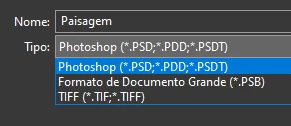

This topic has been closed for replies.
Correct answer Noelle Shamroukh

Hi All,


We appreciate your feedback on the recent “Save a Copy” change. To address your concerns, we have created two new options in Photoshop 22.4.2 that will enable both revert to the legacy “Save As” workflow and/or omit the addended “copy” when saving as a copy. These options can be found in the File Saving Options section under Preferences > File Handling.


To quickly summarize, you will now have the option to revert to the legacy “Save As” workflow (from before recent changes) on both macOS and Windows. Enabling this preference will make both the “Save As” and “Save a Copy” commands operate within the same “Save As” dialog box with all its previous options, including the “as a copy” checkbox. The only difference between the two commands will be whether the checkbox is automatically selected (when using “Save a Copy”). Additionally, you will now have the option to not append copy when saving a copy. On macOS, if you enable the legacy workflow, the option to not append copy will be forced ‘on’ due to the changes made in macOS 10.15 and later. On Windows, the two preferences will operate independently.


We hope these preference options will help ease some of the frustration you encountered using the new “Save a Copy” command.


Please note, reverting to the legacy “Save As” workflow may increase the risk of overwriting file names and lost work. A new dialog will pop-up warning customers of this risk when selecting either one of these preferences on macOS. On Windows, the legacy “Save As” operates in a manner that is safe, so a warning dialog will only pop-up when selecting the option to not append copy to the file name.


For more details on each preference and how they differ by platform, please see our updated new feature summary page.


Thanks, 

Noelle

107 replies

Participant
May 18, 2021

Wow, I read the thread, I am deeply disappointed. Since the MacOS isn't working properly Adobe created another "Workflow" ehm Problem for all other users?! I really had to search to find this answer due to the auto update which I forgot to shut off and then thinking omg all my files are corrupted. @adobe honestly... what made you think that it is proper to change a 25 YEAR OLD WORKLOW because of a macOS fault?! And please, don't answer with stick to the older version and forget about new features or hail all mac users. Hope this will be fixed

D Fosse
Community Expert
Community Expert
May 18, 2021

First of all, it's not a 25 year old workflow. Let me refresh your memory: The ability to save a 16 bit/layered file as jpeg was added in CS5. Prior to that, there was no way to save a 16 bit/layered file as jpeg, until you had removed all the offending properties of the file.


Secondly, it already was broken on the Mac side, since Catalina. If you tried to save over a jpeg, you'd get a separate file, with, yes, "-copy" appended. The damage was already done, and there was nothing Adobe could do about it. See, at the core, the previous "save as jpeg" was in fact also a copy. That fact was just hidden by Photoshop. With Catalina, it was no longer possible to hide.


Platform parity has always been a sacred principle in Photoshop. It's crucial that you can take work between platforms without missing a beat. Actions must work cross-platform. Leaving PS Windows unchanged was not on the table.


Participant
May 18, 2021

There is no longer an option to save my psd file as a PDF. The dropdown only has 3 options.

Bojan Živković11378569
Community Expert
Community Expert
May 18, 2021

You should use Save a Copy instead of Save As, please read official instructions from here https://helpx.adobe.com/photoshop/using/whats-new/2021-4.html

jeffm98059520
Participant
May 19, 2021

This is a terrible "feature" as we do a lot of saving to .pdf and this has broken saved actions. This will not work with current actions and if you want to create a new one you have to use the menu command save as copy instead of using the dialogue box within the save as menu- it would not save to the folder this way. Plus I do not want to save as a copy as it leaves "copy" at the end of the file names and brings up an additional dialogue box if you want to save the original when closing the file. Please change this back! Very inconenient and not a feature.

Inspiring
May 18, 2021

For many many years my workflow has been to save a PSD file then save it as a JPeg. When I press CTRL + SHIFT + S to save as a JPeg the option is no longer there. My mode settings are 8 bit and RGB. There is now a "Save As Copy" button in the save options but it is quite cumbersome and slows down my workflow. Is there any way to get the jpeg option back?


Inspiring
May 18, 2021

I am on windows 10. Photoshop Version 22.4 look like it updated today. It's probably the update.

Participating Frequently
May 17, 2021

Why though? Was this a problem that needed solving? Was anyone genuinely confused as to why their JPG file didn't have layers? Did they really not expect people to be mad when they added an extra step to one of the most common workflows? Also who wants to take bets on the next release having a Settings option to "Use legacy Save As"?

D Fosse
Community Expert
Community Expert
May 17, 2021
quote

Was this a problem that needed solving?


By @mcqueenerboy


Yes it was, very much so. From MacOS Catalina, you couldn't save over a jpeg without getting a separate file, and, yes, with "copy" appended. It wasn't Photoshop, it was MacOS Catalina (and now Big Sur). Apple refused to change this behavior.


This problem has caused about a million threads here in the forum since Catalina came out, and it's been the top complaint from Mac users. It's been a shtstorm, to put it mildly.


And Apple refused to budge. There was nothing Adobe could do about it (and you can rest assured they tried).


No, this was never a problem on Windows, but platform parity has always been an axiom with Photoshop. It has to work the same on both platforms.

ProDesignTools
Community Expert
Community Expert
May 17, 2021

And you can be sure that if Adobe had made the needed fix only on macOS but not on Windows, then we'd have a different problem with significant UI/UX differences between the PC & Mac versions of Photoshop going forward (not supposed to happen) – plus Action and plugin incompatibilities depending on platform...


Which of course wouldn't make people happy either. It's pretty much a no-win situation no matter how you slice it.

Participant
May 17, 2021

What's up with the new save as a copy, can't batch process with a droplet anymore 

c.pfaffenbichler
Community Expert
Community Expert
May 18, 2021

Batch or Droplet? 


Please post screenshots of the fully extended Action in the Actions Panel and the Batch or Droplet settings.

Is the saving part of the Action or the Batch/…?  


Are you aware of the recent changes concerning »Save As« and the introduction of »Save a Copy«? 

Feature summary | Photoshop desktop (May 2021 release)

JJMack
Community Expert
Community Expert
May 17, 2021

Actions do not forget to backup and recover layers. It a stupidity update.  photoshop 2021 the Photoshop the keep on giving us issues.  Adobe's know Photoshop issue list is something like 20 to 30 issues. There are many work arounds in that list and some solution.  The Line tool was broken. The partly restored.  New GPU support that fails to detect many GPU and old GPU with  512MB VRAM are no longer supported.  Save AS now brakes user actions and a "Save As" Action is requited the Save a Jpeg without a copy added.  The script event manager has stopped triggering open document  event handlers.  I know I may have missed others.  I know for sure  Photoshop 2021 is the Photoshop the keeps giving users issues.  Its very frustrating.

JJMack
Sahil.Chawla
Adobe Employee
Adobe Employee
May 17, 2021

Hi All, 


While not a new feature, the “Save a Copy” update was included in the “What’s New” notes for Ps 22.4 to notify users of the workflow change and highlight the new “Save a Copy” file dropdown option.  


This new save workflow is our current best solution to changes that were made to Mac OS since the release of 10.15. Photoshop relies on the operating system for the main operation of the open and save dialogs. Therefore, we have very little control over how they operate. Prior to the release of 10.15 we were able to control the filename text in the save dialog while the dialog was open. This also allowed Photoshop to safely combine the “Save As” and “Save a Copy” operations into one, enabling people to choose which way to go while the dialog was open. But starting with Catalina, we are no longer able to do that.  


In addressing the change in Mac OS functionality, we are now required to separate the “Save As” and “Save a Copy” operations and finalize the base filename before we present the save dialog. The “Save As” command still functions as it did before, only there is no longer a “Save a Copy” checkbox option to select in order to save to a format that would not fully preserve the document’s contents within the “Save As” dialog box. The new “Save a Copy” command now handles the previous “Save As” case where the “Save a Copy” checkbox option was checked.  


In addition to making the required changes for Mac OS, we implemented the changes for Windows users in order to maintain a consistent user experience across platforms. While this is a significant workflow change, it more closely aligns Photoshop with other Adobe product workflows, like Illustrator, that have also had to grapple with these operating system changes. We are currently investigating some options to allow Windows users to continue utilizing the prior Save As dialog behavior and will have more to share soon. 


Thanks,

Sahil

May 18, 2021

el error o mejor lo q dices q no es un error aun persiste no da la opcion de exportar en jpg.

y la opcion de hacer una copia no se como ayuda al flujo de trabajo. en mi opinion no va la opcion o mejor dicha hay q hace u tutortial para ver como ayuda con el flujo de trabajo 


Oreri
Known Participant
May 17, 2021

Hello,

I understand the new "Save a Copy" feature of the new release and I think it's brilliant, but I'm having difficulties in finding the file format I need (DCS 2.0) even in this new menu. I need to save files in this format in order to import them in InDesign and have the spot channels readable individually.

I now have a TIFF file which I have worked on, but are unable to save as DCS 2.0 even in the "Save a Copy" menu, and I can only save as PSD, RAW and Large Format. The strange thing is that a PSD file with spot channels, which I have creaded before the update, can be saved as DCS 2.0. What can be the reason for which 2 ideally identical files (as far as my limited knowledge can tell), can not be saved in the same way?

Thank you for your answer.


c.pfaffenbichler
Community Expert
Community Expert
May 17, 2021

Can you provide the two files? 


Does psd with Spot Channels not work out in Indesign? 

Oreri
Known Participant
May 17, 2021

The PSD that doesn't work can be downloaded at this link (it's 50mb):

https://mega.nz/file/Elh0CDwK#Pk--0jdXUi9V1mUXqUhdKrfQ-wPkaH5O0Y4eWQpxpGI

The other is attached to this post (it's 15mb).


As for the second question, no, as InDesign shows me this dialog when I try to import both PSD files. It's strange because I was told before that PSD can be imported in InDesign.

Participant
May 17, 2021

My images were all able to be saved as JPEG however now when i goto "save as" the jpeg option is not there. I have not changed camera and the file sizes are the same etc so unsure as to if its something to do with the new update. Please do not tell me the file sizes arte too big as they are exactly the same sizes as they were previously, unless PS has now redused the file size able to be saved as a JPEG in which case what a joke...

davescm
Community Expert
Community Expert
May 17, 2021

If your file contains items that are not supported in your required format (e.g. layers or 16 bits/channel) then the file format is moved to the Save a Copy menu. This was driven by changes in the Mac Operating System, although the changes are applied to both Mac and Windows versions to keep the two aligned.

What's new in Photoshop

Dave

Participant
May 17, 2021

Nothing had changed at all, it was set at 8bit with RGB color, it had a background copy and a curves layer nothing I would assume would be not supported. But the save copy thing has worked, dont know why they had to change to that but hey ho... il know for future. Until it changes.

Participant
May 16, 2021

In Photoshop 2021 (Creative Cloud), when I choose File-->SaveAs for a PSD file that I want to save as a jpg, jpg is not a format that appears on the drop down menu with other formats. jpeg2000 is available but that's not the format I want.


Any ideas would be appreciated.


Thanks.

Chick

D Fosse
Community Expert
Community Expert
May 16, 2021

It's because the Save As dialog now only lists formats that support all the current properties of your file.


For any other format with limited support that necessitates stripping some of those properties, use Save A Copy.


Jpeg is an extremely limited file format. It supports very little of what you normally do to an image in Photoshop. So to save as jpeg, you need to discard a lot of data. No layers, no 16 bit depth etc.


Previously, from CS4 onward, Photoshop could save out a copy on the fly, from the Save As menu (while still keeping your full, original data open and unsaved!). MacOS Catalina broke that function, and since Apple wouldn't change it, this change was necessary. It was never a problem on Windows, but the sheer volume of complaints from Mac users forced the issue.


D Fosse
Community Expert
Community Expert
May 16, 2021

Just posted the same complaint before reading this, of the same issue.I create almost all of my files as a psd file to retain the layers and the ability to edit. I then save as jpg for posting to the web. Does this mean that as of this update, it will now require me to use the save a copy function instead, in order to get a saved jpg?


That, or Export/Save For Web.


There really is no practical difference other than using a different menu item. You always saved out a jpeg copy, that hasn't changed. You never saved the original. That would remain open, and you'd get a new save prompt when closing that.


This double save prompt was a lot more confusing to most people.


If anything, the actual process is much clearer now. It's obvious, every step of the way, what actually happens when you turn a layered 16 bit file into a flat 8 bit jpeg. Of course it's a copy, it has to be.