Inspiring
November 4, 2021
解決済み

P: Text changes do not update - Windows

  • November 4, 2021
  • 返信数 35.
  • 56072 ビュー

I recently updated Photoshop to release 23.0. When I went to use the typing tool, it behaves oddly. The tool will create type, but nothing displays until I hit enter, then the typing displays. If you edit a line of text, it is the same thing. You do not see your edits until you hit enter. 


I searched around the web to try and find a solution to this. The closest answer I could find was to disable the GPU in the preferences > general > performance settings. However, the "Use Graphics Processor" is grayed ouot. The GPU is listed as "Unknow GPU (UNKNOWN)". I am running the native CPU graphiics processor, which is the Intel HD Graphics 4000 and I just updated it 10.18.10.5161. The problem with the text existed before and after the GPU update. 


How do I change the text settings so that I can see my typing in real time?


{PS-77978}

このトピックへの返信は締め切られました。
解決に役立った回答 Ged_Traynor

Hi

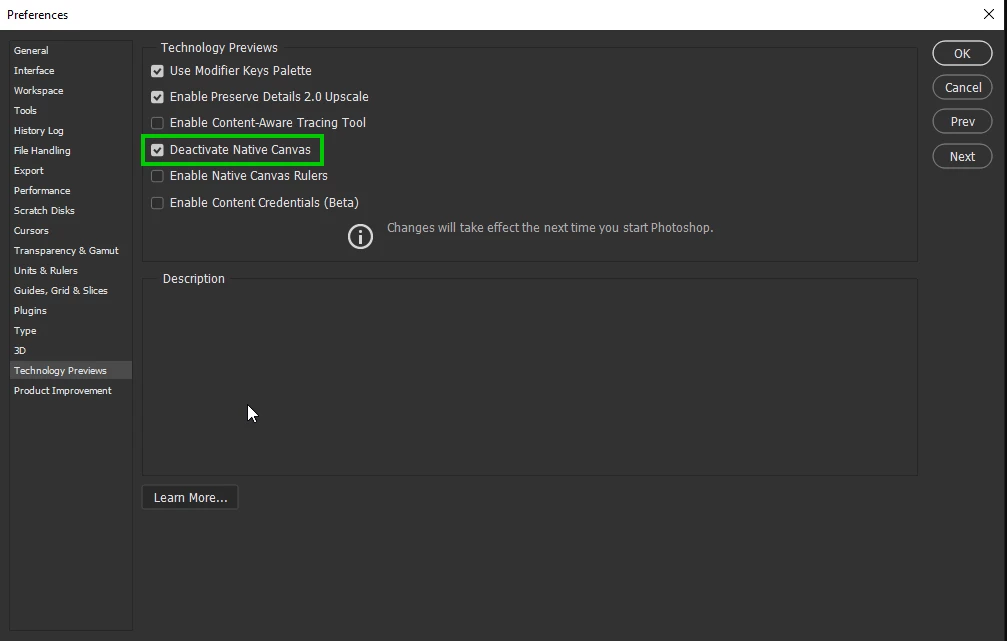
Try enabling this option in preferences and restarting Photoshop to see if it helps

返信数 35

gregmaxx
Participating Frequently
November 17, 2021

Added the .txt file and that fixed the problem! 

Thanks so much for the help!

Participant
November 29, 2021

did you add the text file

Participant
November 16, 2021

Here is my System Info... I Have an AMD Radeon HD5450 GPU with 2Gb Ram but obviously not compatible because the problem goes away if I switch off the GPU in Photshop as per the solution here...


Adobe Photoshop Version: 23.0.1 20211105.r.68 96a498e x64
Number of Launches: 17
Operating System: Windows 10 64-bit
Version: 10 or greater 10.0.19042.1348
System architecture: Intel CPU Family:6, Model:10, Stepping:9 with MMX, SSE Integer, SSE FP, SSE2, SSE3, SSE4.1, SSE4.2, AVX, HyperThreading
Physical processor count: 4
Logical processor count: 8
Processor speed: 3392 MHz
Built-in memory: 15859 MB
Free memory: 10445 MB
Memory available to Photoshop: 11663 MB
Memory used by Photoshop: 72 %
SAM SDK Version: 2.0.0-main.887.2
ACP.local Status:
- SDK Version: 1.50.2
- Core Sync Status: Reachable and compatible
- Core Sync Running: 4.21.1.1
- Min Core Sync Required: 4.3.28.24
ACPL Cache Config: ^4
Live Edit Client SDK Version: 3.86.01
Manta Canvas: Disabled.
Alias Layers: Disabled.
Modifier Palette: Enabled.
Highbeam: Enabled.
Image tile size: 1024K
Image cache levels: 4
Font Preview: Medium
HarfBuzz Version: 2.8.1
TextEngine: Unifed Text Engine
======= GPU
Native API stable: True
OpenGL API stable: True
OpenCL API stable: True
GPUDeny: 0
GPUForce: 0
useGPU: 0
useOpenCL: 0
isGPUCapable: 0
GPUName: Unknown GPU
GPUVendor: UNKNOWN
IsNativeGPUCapable: 0
IsOpenGLGPUCapable: 1
IsOpenCLGPUCapable: 0
HasSufficientRAM: 0
GPU accessible RAM: 0 MB
Required GPU accessible RAM: 1,500 MB
UseGraphicsProcessorChecked: 1
UseOpenCLChecked: 1
Windows remote desktop: 0
Display: 1
Display Bounds: top=0, left=0, bottom=1080, right=1920
Display: 2
Display Bounds: top=0, left=1920, bottom=1080, right=3840
------- Sniffer output
[0 ms]
Launch GPUSnifferThread

[1 ms]
Start RunAllAPIs

[1 ms]
"C:\Program Files\Adobe\Adobe Photoshop 2022\sniffer.exe" -baseTimeMS=337282299 -comment=Photoshop Version: Adobe Photoshop 23.0.1 20211105.r.68 96a498e x64

[706 ms]
Start sniffer 2021-11-16 16:04:08
# Photoshop Version: Adobe Photoshop 23.0.1 20211105.r.68 96a498e x64
C:\Program Files\Adobe\Adobe Photoshop 2022\sniffer.exe -baseTimeMS=337282299 -comment=Photoshop Version: Adobe Photoshop 23.0.1 20211105.r.68 96a498e x64

{74 ms}
Start platform native
# displays: 0

# devices: 0
End platform native
{145 ms}

{145 ms}
Start platform OpenGL
# displays: 2
Display 0
Display: \\.\DISPLAY1
Main: TRUE
Built in: FALSE
Stereo: FALSE
Bounds: ((0 0) -> (1,920 1,080), w=1,920, h=1,080)
Dimensions: (1,920 1,080)
Physical size: (0 0)
Pixel size: (0 0)
Dynamic range: (0 1)
Potential dynamic range: (0 1)
Reference dynamic range: (0 0)
Attached Device: (DeviceID name=AMD Radeon HD 5450 index=0 preferred=1)

Display 1
Display: \\.\DISPLAY2
Main: FALSE
Built in: FALSE
Stereo: FALSE
Bounds: ((1,920 0) -> (3,840 1,080), w=1,920, h=1,080)
Dimensions: (1,920 1,080)
Physical size: (0 0)
Pixel size: (0 0)
Dynamic range: (0 1)
Potential dynamic range: (0 1)
Reference dynamic range: (0 0)
Attached Device: (DeviceID name=AMD Radeon HD 5450 index=0 preferred=1)

# devices: 1
Device 0
Name: AMD Radeon HD 5450
Preferred: TRUE
Power Envelope: INTEGRATED
Attachment: UNKNOWN
# attached displays: 2
\\.\DISPLAY1
\\.\DISPLAY2
GPU accessible RAM: 2,133 MB
VRAM: 2,133 MB
Dedicated System RAM: 0 MB
Shared System RAM: 4,026 MB
API version: 4.5 (4.5.13417 Compatibility Profile Context 15.301.1901.0)
Device version: 4.5 (4.5.13417 Compatibility Profile Context 15.301.1901.0)
Vendor name: AMD
Driver:
amdxc64.dll
aticfx64.dll
Driver date: 2016-02-26 000000.000000-000
Driver age: 69 months
Driver version: 15.301.1901.0
GLSL version: 4.40 (4.40)
End platform OpenGL
{394 ms}

{394 ms}
Start platform OpenCL
# displays: 0

# devices: 0
End platform OpenCL
{628 ms}

Exit code kExitNormal
End sniffer 2021-11-16 16:04:09
[kStatusNormal, kExitNormal]

[706 ms]
Finish RunAllAPIs

[4812 ms]
Start GetSnifferResult

[4812 ms]
Finish GetSnifferResult

------- Sniffer output
======= GPU
License Type: Subscription
Serial number: 90970514359503982618
GUIDBucket:Composite Core (enable_composite_core): onComposite Core GPU (comp_core_gpu): offComposite Core Threads (comp_core_threads): offComposite Core UI (comp_core_ui): offDocument Graph (enable_doc_graph): off
Application folder: C:\Program Files\Adobe\Adobe Photoshop 2022\
Temporary file path: C:\Users\user\AppData\Local\Temp\
Photoshop scratch has async I/O enabled
Scratch volume(s):
Z:\, 465.8G, 439.8G free
C:\, 927.7G, 786.6G free
Required Plugins folder: C:\Program Files\Adobe\Adobe Photoshop 2022\Required\Plug-ins\
Primary Plugins folder: C:\Program Files\Adobe\Adobe Photoshop 2022\Plug-ins\

Installed components:
A3DLIBS.dll A3DLIB Dynamic Link Library 9.2.0.112
ACE.dll ACE 2021/09/16-00:39:08 79.210a024 79.210a024
AdbePM.dll PatchMatch 2021/09/08:20:32:07 1.5c9d4d882447507e35ce742375a02bb2b8f1fafe 1.5c9d4d882447507e35ce742375a02bb2b8f1fafe
AdobeLinguistic.dll Adobe Linguisitc Library 01cbe4a
AdobeOwl.dll Adobe Owl 5.5.0
AdobePDFL.dll PDFL 2021/09/24-00:36:28 79.a094f69 79.a094f69
AdobePDFSettings.dll Adobe PDFSettings 1.07
AdobePIP.dll Adobe Product Improvement Program 8.2.0.16
AdobeSVGAGM.dll AdobeSVGAGM 79.105dedb 79.105dedb
AdobeXMP.dll Adobe XMP Core 2021/09/09-00:37:38 79.a8731b9 79.a8731b9
AdobeXMPFiles.dll Adobe XMP Files 2021/09/09-00:37:38 79.a8731b9 79.a8731b9
AdobeXMPScript.dll Adobe XMP Script 2021/09/09-00:37:38 79.a8731b9 79.a8731b9
adobe_caps.dll Adobe CAPS 10,0,0,6
AGM.dll AGM 2021/09/16-00:39:08 79.210a024 79.210a024
AID.dll AID DLL 1.0.0.33
AIDE.dll AIDE 2021/09/01-00:40:52 79.644b6f3 79.644b6f3
aifm.dll AIFM 1.0 23.68434
AILib.dll Adobe Illustrator 2022 26.0.0
aiport.dll AIPort 1.0 23.68434
ARE.dll ARE 2021/09/16-00:39:08 79.210a024 79.210a024
AXE8SharedExpat.dll AXE8SharedExpat 2021/09/02-00:37:22 79.3a98998 79.3a98998
AXEDOMCore.dll AXEDOMCore 2021/09/02-00:37:22 79.3a98998 79.3a98998
Bib.dll BIB 2021/09/16-00:39:08 79.210a024 79.210a024
BIBUtils.dll BIBUtils 2021/09/16-00:39:08 79.210a024 79.210a024
boost_date_time.dll photoshopdva 14.0.0
boost_filesystem.dll photoshopdva 14.0.0
boost_program_options.dll photoshopdva 14.0.0
boost_regex.dll photoshopdva 14.0.0
boost_system.dll photoshopdva 14.0.0
boost_threads.dll photoshopdva 14.0.0
CoolType.dll CoolType 2021/09/16-00:39:08 79.210a024 79.210a024
CRClient.dll Adobe Crash Reporter Client DLL 4.7.0.0
DirectML.dll DirectML Redistributable Library 1.5.1+210429-0157.1.dml-1.5.adbd007
dnssd.dll Bonjour 3,0,0,2
dvaaccelerate.dll photoshopdva 14.0.0
dvaappsupport.dll photoshopdva 14.0.0
dvaaudiodevice.dll photoshopdva 14.0.0
dvacore.dll photoshopdva 14.0.0
dvacrashhandler.dll Adobe Audition CC 2017 10.0.0
dvamarshal.dll photoshopdva 14.0.0
dvamediatypes.dll photoshopdva 14.0.0
dvametadata.dll photoshopdva 14.0.0
dvametadataapi.dll photoshopdva 14.0.0
dvametadataui.dll photoshopdva 14.0.0
dvanet.dll photoshopdva 14.0.0
dvaplayer.dll photoshopdva 14.0.0
dvascripting.dll photoshopdva 14.0.0
dvatransport.dll photoshopdva 14.0.0
dvaui.dll photoshopdva 14.0.0
dvaunittesting.dll photoshopdva 14.0.0
dvavulcansupport.dll photoshopdva 14.0.0
dynamic-torqnative.dll Unified Extensibility Platform uxp-5.5.4-1-60dbcb9
dynamiclink.dll photoshopdva 14.0.0
ExtendScript.dll ExtendScript 2019/07/29-10:07:31 82.2 82.2
filterport.dll FilterPort 1.1 O
icucnv69.dll International Components for Unicode Build 13.1.a82691a
icudt69.dll International Components for Unicode Build 13.1.a82691a
icuin69.dll International Components for Unicode Build 13.1.a82691a
icuuc69.dll International Components for Unicode Build 13.1.a82691a
igestep30.dll IGES Reader 9.3.0.113
ippcc.dll ippCC. Intel(R) Integrated Performance Primitives. Color Conversion. 2020.0.1 (r0x35c5ec66)
ippcck0.dll ippCC. Intel(R) Integrated Performance Primitives. Color Conversion. 2020.0.1 (r0x35c5ec66)
ippccl9.dll ippCC. Intel(R) Integrated Performance Primitives. Color Conversion. 2020.0.1 (r0x35c5ec66)
ippccy8.dll ippCC. Intel(R) Integrated Performance Primitives. Color Conversion. 2020.0.1 (r0x35c5ec66)
ippcore.dll core. Intel(R) Integrated Performance Primitives. Core Library. 2020.0.1 (r0x35c5ec66)
ippcv.dll ippCV. Intel(R) Integrated Performance Primitives. Computer Vision. 2020.0.1 (r0x35c5ec66)
ippcvk0.dll ippCV. Intel(R) Integrated Performance Primitives. Computer Vision. 2020.0.1 (r0x35c5ec66)
ippcvl9.dll ippCV. Intel(R) Integrated Performance Primitives. Computer Vision. 2020.0.1 (r0x35c5ec66)
ippcvy8.dll ippCV. Intel(R) Integrated Performance Primitives. Computer Vision. 2020.0.1 (r0x35c5ec66)
ippi.dll ippIP. Intel(R) Integrated Performance Primitives. Image Processing. 2020.0.1 (r0x35c5ec66)
ippik0.dll ippIP. Intel(R) Integrated Performance Primitives. Image Processing. 2020.0.1 (r0x35c5ec66)
ippil9.dll ippIP. Intel(R) Integrated Performance Primitives. Image Processing. 2020.0.1 (r0x35c5ec66)
ippiy8.dll ippIP. Intel(R) Integrated Performance Primitives. Image Processing. 2020.0.1 (r0x35c5ec66)
ipps.dll ippSP. Intel(R) Integrated Performance Primitives. Signal Processing. 2020.0.1 (r0x35c5ec66)
ippsk0.dll ippSP. Intel(R) Integrated Performance Primitives. Signal Processing. 2020.0.1 (r0x35c5ec66)
ippsl9.dll ippSP. Intel(R) Integrated Performance Primitives. Signal Processing. 2020.0.1 (r0x35c5ec66)
ippsy8.dll ippSP. Intel(R) Integrated Performance Primitives. Signal Processing. 2020.0.1 (r0x35c5ec66)
ippvm.dll ippVM. Intel(R) Integrated Performance Primitives. Vector Math. 2020.0.1 (r0x35c5ec66)
ippvmk0.dll ippVM. Intel(R) Integrated Performance Primitives. Vector Math. 2020.0.1 (r0x35c5ec66)
ippvml9.dll ippVM. Intel(R) Integrated Performance Primitives. Vector Math. 2020.0.1 (r0x35c5ec66)
ippvmy8.dll ippVM. Intel(R) Integrated Performance Primitives. Vector Math. 2020.0.1 (r0x35c5ec66)
JP2KLib.dll JP2KLib 2021/09/01-00:40:52 79.545e36d 79.545e36d
libifcoremd.dll Intel(r) Visual Fortran Compiler 10.0 (Update A)
libiomp5md.dll Intel(R) OpenMP* Runtime Library 5.0
libmmd.dll Intel(R) C/C++/Fortran Compiler Mainline
libzip.dll photoshopdva 14.0.0
LogSession.dll LogSession 8.2.0.16
mediacoreif.dll photoshopdva 14.0.0
Microsoft.AI.MachineLearning.dll Microsoft® Windows® Operating System 1.8.20210602.2.d4106de
mkl_avx2.dll Intel® Math Kernel Library 2020.0
mkl_avx512.dll Intel® Math Kernel Library 2020.0
mkl_core.dll Intel® Math Kernel Library 2020.0
mkl_def.dll Intel® Math Kernel Library 2020.0
mkl_mc3.dll Intel® Math Kernel Library 2020.0
mkl_sequential.dll Intel® Math Kernel Library 2020.0
mkl_vml_avx2.dll Intel® Math Kernel Library 2020.0
mkl_vml_avx512.dll Intel® Math Kernel Library 2020.0
mkl_vml_def.dll Intel® Math Kernel Library 2020.0
mkl_vml_mc3.dll Intel® Math Kernel Library 2020.0
MPS.dll MPS 2021/09/11-00:41:28 79.6d286d5 79.6d286d5
onnxruntime.dll Microsoft® Windows® Operating System 1.8.20210602.2.d4106de
opencv_world452.dll OpenCV library 4.5.2
pdfport.dll PDFPort 2020/11/19-11:34:27 79.625377 79.625377
Plugin.dll Adobe Photoshop 2022 23.0
PlugPlugExternalObject.dll Adobe(R) CEP PlugPlugExternalObject Standard Dll (64 bit) 11.2.0
PlugPlugOwl.dll Adobe(R) CSXS PlugPlugOwl Standard Dll (64 bit) 11.2.0.100
PSCloud.dll 1.0.0.1
PSRes.dll Adobe Photoshop 2022 23.0
PSViews.dll Adobe Photoshop 2022 23.0
ScCore.dll ScCore 2019/07/29-10:07:31 82.2 82.2
SVGRE.dll SVGRE 79.8a94e6d 79.8a94e6d
svml_dispmd.dll Intel(R) C/C++/Fortran Compiler Mainline
tbb.dll Intel(R) Threading Building Blocks for Windows 2020, 2, 2020, 0311
tbbmalloc.dll Intel(R) Threading Building Blocks for Windows 2020, 2, 2020, 0311
TfKernel.dll Kernel Geom 9.3.0.113
TFUGEOM.dll Adobe, UGeom© 9.3.0.113
utest.dll photoshopdva 14.0.0
VulcanControl.dll Vulcan Application Control Library 6.6.0.000
VulcanMessage5.dll Vulcan Message Library 6.6.0.000
WinRTSupport.dll Adobe Photoshop Windows RT Support 1.0.1.0
WRServices.dll WRServices Build 17.0.0.5f7ac8f 17.0.0.5f7ac8f
wu3d.dll U3D Writer 9.3.0.113
Unified Extensibility Platform uxp-5.5.4-1-60dbcb9
UPIC 2.3.1


Required plugins:

Accented Edges 23.0 - from the file “Filter Gallery.8bf”
Adaptive Wide Angle 23.0 - from the file “Adaptive Wide Angle.8bf”
Angled Strokes 23.0 - from the file “Filter Gallery.8bf”
Average 23.0 - from the file “Average.8bf”
Bas Relief 23.0 - from the file “Filter Gallery.8bf”
BMP 23.0 - from the file “Standard MultiPlugin.8bf”
Camera Raw 14.0 - from the file “Camera Raw.8bi”
Camera Raw Filter 14.0 - from the file “Camera Raw.8bi”
Chalk && Charcoal 23.0 - from the file “Filter Gallery.8bf”
Charcoal 23.0 - from the file “Filter Gallery.8bf”
Chrome 23.0 - from the file “Filter Gallery.8bf”
Cineon 23.0 - from the file “Cineon.8bi”
Clouds 23.0 - from the file “Clouds.8bf”
Color Halftone 23.0 - from the file “Standard MultiPlugin.8bf”
Colored Pencil 23.0 - from the file “Filter Gallery.8bf”
Conté Crayon 23.0 - from the file “Filter Gallery.8bf”
Craquelure 23.0 - from the file “Filter Gallery.8bf”
Crop and Straighten Photos 23.0 - from the file “CropPhotosAuto.8li”
Crop and Straighten Photos Filter 23.0 - from the file “Standard MultiPlugin.8bf”
Crosshatch 23.0 - from the file “Filter Gallery.8bf”
Crystallize 23.0 - from the file “Standard MultiPlugin.8bf”
Cutout 23.0 - from the file “Filter Gallery.8bf”
Dark Strokes 23.0 - from the file “Filter Gallery.8bf”
De-Interlace 23.0 - from the file “Standard MultiPlugin.8bf”
Dicom 23.0 - from the file “Dicom.8bi”
Difference Clouds 23.0 - from the file “Clouds.8bf”
Diffuse Glow 23.0 - from the file “Filter Gallery.8bf”
Displace 23.0 - from the file “Standard MultiPlugin.8bf”
Dry Brush 23.0 - from the file “Filter Gallery.8bf”
Entropy 23.0 - from the file “statistics.8ba”
Export Color Lookup Tables 23.0 - from the file “Export3DLUT.8be”
Extrude 23.0 - from the file “Standard MultiPlugin.8bf”
FastCore Routines 23.0 - from the file “FastCore.8bx”
Fibers 23.0 - from the file “Standard MultiPlugin.8bf”
Film Grain 23.0 - from the file “Filter Gallery.8bf”
Filter Gallery 23.0 - from the file “Filter Gallery.8bf”
Fresco 23.0 - from the file “Filter Gallery.8bf”
Glass 23.0 - from the file “Filter Gallery.8bf”
Glowing Edges 23.0 - from the file “Filter Gallery.8bf”
Grain 23.0 - from the file “Filter Gallery.8bf”
Graphic Pen 23.0 - from the file “Filter Gallery.8bf”
Halftone Pattern 23.0 - from the file “Filter Gallery.8bf”
Halide Bottlenecks 23.0 - from the file “HalideBottlenecks.8bx”
HDRMergeUI 23.0 - from the file “HDRMergeUI.8bf”
HSB/HSL 23.0 - from the file “Standard MultiPlugin.8bf”
IFF Format 23.0 - from the file “Standard MultiPlugin.8bf”
IGES 23.0 - from the file “U3D.8bi”
Ink Outlines 23.0 - from the file “Filter Gallery.8bf”
JPEG 2000 23.0 - from the file “JPEG2000.8bi”
Kurtosis 23.0 - from the file “statistics.8ba”
Lens Blur 23.0 - from the file “Lens Blur.8bf”
Lens Correction 23.0 - from the file “Lens Correction.8bf”
Lens Flare 23.0 - from the file “Standard MultiPlugin.8bf”
Liquify 23.0 - from the file “Liquify.8bf”
Matlab Operation 23.0 - from the file “ChannelPort.8bf”
Maximum 23.0 - from the file “statistics.8ba”
Mean 23.0 - from the file “statistics.8ba”
Measurement Core 23.0 - from the file “MeasurementCore.8me”
Median 23.0 - from the file “statistics.8ba”
Mezzotint 23.0 - from the file “Standard MultiPlugin.8bf”
Minimum 23.0 - from the file “statistics.8ba”
MMXCore Routines 23.0 - from the file “MMXCore.8bx”
Mosaic Tiles 23.0 - from the file “Filter Gallery.8bf”
Multiprocessor Support 23.0 - from the file “MultiProcessor Support.8bx”
Neon Glow 23.0 - from the file “Filter Gallery.8bf”
Note Paper 23.0 - from the file “Filter Gallery.8bf”
NTSC Colors 23.0 - from the file “NTSC Colors.8bf”
Ocean Ripple 23.0 - from the file “Filter Gallery.8bf”
OpenEXR 23.0 - from the file “Standard MultiPlugin.8bf”
Paint Daubs 23.0 - from the file “Filter Gallery.8bf”
Palette Knife 23.0 - from the file “Filter Gallery.8bf”
Patchwork 23.0 - from the file “Filter Gallery.8bf”
Paths to Illustrator 23.0 - from the file “Standard MultiPlugin.8bf”
PCX 23.0 - from the file “PCX.8bi”
Photocopy 23.0 - from the file “Filter Gallery.8bf”
Picture Package Filter 23.0 - from the file “ChannelPort.8bf”
Pinch 23.0 - from the file “Standard MultiPlugin.8bf”
Pixar 23.0 - from the file “Pixar.8bi”
Plaster 23.0 - from the file “Filter Gallery.8bf”
Plastic Wrap 23.0 - from the file “Filter Gallery.8bf”
Pointillize 23.0 - from the file “Standard MultiPlugin.8bf”
Polar Coordinates 23.0 - from the file “Standard MultiPlugin.8bf”
Portable Bit Map 23.0 - from the file “PBM.8bi”
Poster Edges 23.0 - from the file “Filter Gallery.8bf”
PRC 23.0 - from the file “U3D.8bi”
Radial Blur 23.0 - from the file “Standard MultiPlugin.8bf”
Radiance 23.0 - from the file “Radiance.8bi”
Range 23.0 - from the file “statistics.8ba”
Render Color Lookup Grid 23.0 - from the file “Export3DLUT.8be”
Reticulation 23.0 - from the file “Filter Gallery.8bf”
Ripple 23.0 - from the file “Standard MultiPlugin.8bf”
Rough Pastels 23.0 - from the file “Filter Gallery.8bf”
Save for Web 23.0 - from the file “Save for Web.8be”
ScriptingSupport 23.0 - from the file “ScriptingSupport.8li”
Shake Reduction 23.0 - from the file “Shake Reduction.8bf”
Shear 23.0 - from the file “Standard MultiPlugin.8bf”
Skewness 23.0 - from the file “statistics.8ba”
Smart Blur 23.0 - from the file “Standard MultiPlugin.8bf”
Smudge Stick 23.0 - from the file “Filter Gallery.8bf”
Solarize 23.0 - from the file “Solarize.8bf”
Spaces 23.0 - from the file “Spaces.8li”
Spatter 23.0 - from the file “Filter Gallery.8bf”
Spherize 23.0 - from the file “Standard MultiPlugin.8bf”
Sponge 23.0 - from the file “Filter Gallery.8bf”
Sprayed Strokes 23.0 - from the file “Filter Gallery.8bf”
Stained Glass 23.0 - from the file “Filter Gallery.8bf”
Stamp 23.0 - from the file “Filter Gallery.8bf”
Standard Deviation 23.0 - from the file “statistics.8ba”
Sumi-e 23.0 - from the file “Filter Gallery.8bf”
Summation 23.0 - from the file “statistics.8ba”
Targa 23.0 - from the file “Standard MultiPlugin.8bf”
Texturizer 23.0 - from the file “Filter Gallery.8bf”
Tiles 23.0 - from the file “Standard MultiPlugin.8bf”
Torn Edges 23.0 - from the file “Filter Gallery.8bf”
Twirl 23.0 - from the file “Standard MultiPlugin.8bf”
U3D 23.0 - from the file “U3D.8bi”
Underpainting 23.0 - from the file “Filter Gallery.8bf”
Vanishing Point 23.0 - from the file “VanishingPoint.8bf”
Variance 23.0 - from the file “statistics.8ba”
VueScan 1.0.00 - from the file “VueScan.8ba”
Water Paper 23.0 - from the file “Filter Gallery.8bf”
Watercolor 23.0 - from the file “Filter Gallery.8bf”
Wave 23.0 - from the file “Standard MultiPlugin.8bf”
WIA Support 23.0 - from the file “WIASupport.8li”
Wind 23.0 - from the file “Standard MultiPlugin.8bf”
Wireless Bitmap 23.0 - from the file “WBMP.8bi”
ZigZag 23.0 - from the file “Standard MultiPlugin.8bf”

Optional and third party plugins: NONE


Duplicate and Disabled plugins: NONE


Plugins that failed to load: NONE

Unified Extensibility Platform - Extensions:

Home Screen (Loaded) 5.0.0.118 - from the file "C:\Program Files\Common Files\Adobe/UXP/Extensions\com.adobe.ccx.start-5.0.0\"
CDO: 1.102.0
CmdN: 1.9.1
CDP: 1.127.0
Projects: 1.0.46
Discover Panel (Loaded) 1.11.0.33 - from the file "C:\Program Files\Adobe\Adobe Photoshop 2022\Required\UXP/\com.adobe.unifiedpanel\"

ccx-timeline (Prepared) 2.6.41.0 - from the file "C:\Program Files\Adobe\Adobe Photoshop 2022\Required\UXP/\com.adobe.ccx.timeline\"

CCX Commenting UXP Webview (Loaded) 21.4.2.0 - from the file "C:\Program Files\Adobe\Adobe Photoshop 2022\Required\UXP/\com.adobe.ccx.comments-webview\"

CCX Sharesheet UXP (Loaded) 20.5.0.0 - from the file "C:\Program Files\Adobe\Adobe Photoshop 2022\Required\UXP/\com.adobe.ccx.sharesheet\"

CC Libraries Panel (Prepared) 3.14.242.0 - from the file "C:\Program Files\Common Files\Adobe/CEP/Extensions\CC_LIBRARIES_PANEL_EXTENSION_3_14_242\"
CAPTURE: 1.2.18 STOCK: 2.0.30
Photoshop Cloud Value Dialog (Prepared) 1.0.1.0 - from the file "C:\Program Files\Adobe\Adobe Photoshop 2022\Required\UXP/\com.adobe.photoshop.cloudValueDialog\"

Photoshop UXP Export-As (Prepared) 5.5.11.0 - from the file "C:\Program Files\Adobe\Adobe Photoshop 2022\Required\UXP/\com.adobe.photoshop.exportAs\"

Photoshop In App Messaging (Loaded) 2.4.1.0 - from the file "C:\Program Files\Adobe\Adobe Photoshop 2022\Required\UXP/\com.adobe.photoshop.inAppMessaging\"

Photoshop Personalization (Loaded) 2.0.0.0 - from the file "C:\Program Files\Adobe\Adobe Photoshop 2022\Required\UXP/\com.adobe.photoshop.personalization\"

Photoshop Selection Feedback (Prepared) 0.5.0.0 - from the file "C:\Program Files\Adobe\Adobe Photoshop 2022\Required\UXP/\com.adobe.photoshop.selectionFeedback\"

Plugins Panel (Prepared) 1.3.6.0 - from the file "C:\Program Files\Adobe\Adobe Photoshop 2022\Required\UXP/\com.adobe.pluginspanel\"

IC popup message (Loaded) 1.0.0.0

Neural Filters (Registered) 1.9.21.0 - from the file "C:\Program Files\Adobe\Adobe Photoshop 2022\Required\UXP/\com.adobe.nfp.gallery\"


Extensions:

Libraries 1.0.0 - from the file “C:\Program Files\Adobe\Adobe Photoshop 2022\Required\CEP\extensions\com.adobe.DesignLibraryPanel.html\index.html”
New Document 3.5.0 - from the file “C:\Program Files (x86)\Common Files\Adobe\CEP\extensions\com.adobe.ccx.fnft-3.5.0\fnft.html?v=3.5.0.4”
Home 2.16.0 - from the file “C:\Program Files (x86)\Common Files\Adobe\CEP\extensions\com.adobe.ccx.start-2.16.0\index.html?v=2.16.0.8”
com.adobe.stock.panel.licensing-embedded 1.0.0 - from the file “C:\Program Files\Adobe\Adobe Photoshop 2022\Required\CEP\extensions\com.adobe.DesignLibraryPanel.html\extensions\stock-panel-licensing\index.html”
com.adobe.capture.extension 1.0.0 - from the file “C:\Program Files\Adobe\Adobe Photoshop 2022\Required\CEP\extensions\com.adobe.DesignLibraryPanel.html\extensions\capture\capture.html”
Export As 4.8.15 - from the file “C:\Program Files\Adobe\Adobe Photoshop 2022\Required\CEP\extensions\com.adobe.photoshop.crema\index.html”
com.adobe.cclibraries.manager 1.0.0 - from the file “C:\Program Files\Adobe\Adobe Photoshop 2022\Required\CEP\extensions\com.adobe.DesignLibraryPanel.html\manager.html”

Installed TWAIN devices: NONE

Known Participant
November 15, 2021

Legend
November 15, 2021

First quit Photoshop. Then install the attached file (PSUserConfig.txt) in your Photoshop Settings folder:


Windows

  • [Installation Drive]:\Users\[User Name]\AppData\Roaming\Adobe\[Photoshop_version]\[Photoshop_version]Settings\

macOS:

  • //Users/[User Name]/Library/Preferences/[Photoshop_version]Settings/
Participating Frequently
November 15, 2021

Photoshop 23.0.1 (Unable to give you full line because Help > About Photoshop… shows nothing, only restricts me from exiting Ps by any means except Alt+F4)

OS:  Windows 10 (with all updates applied)

  1. Open new document
  2. Select Type (I used New Times Roman, regular, 14 pt)
  3. Left-Click on document (new type layer created, shows Lorem Ipsum highlighted)
  4. Type anything, I used “just typing along”
  5. The cursor jumps but what I’m typing is not shown on the document.
  6. Display the Layers panel and left-click on the Type Layer.
  7. The document now shows what I was typing, “just typing along”
  8. Making changes to the text has the same problem. The same problem exists on new and existing documents.

Expected Action:  That the document will, in real time, show me what I am typing, as it used to.

(This duplicates a post on Nov 12 which no longer appears.)

Participating Frequently
November 15, 2021

Jeffery:

Thanks for removing this.

By the way, my GPU is only 12 years old. Yes, I'm looking for a new computer with GPU RTX 3080 Ti. Should hold me for a year or two -- maybe.

Mark

Participating Frequently
November 13, 2021

Photoshop 23.0.1 (Unable to provide a copy of the complete line since clicking the Help tab and selecting About Photoshop... does nothing but restrict me from exiting Ps by any means except the Alt+F4 keys.)

OS:  Windows 10 (all available updates applied)


Open a new document

Select the Type function (T)

Click on the document

Lorem Ipsum is displayed Highlighted (All OK so far)

Begin typing. What you are typing is not displayed, just Lorem Ipsum no longer highlighted.

Display the Layers panel and click on the text layer.

What you typed is now displayed on the document.

Attempting to edit what you typed will not display on the document until you again click on the layer in the Layers panel.

The same problem exists when adding/editing text in existing documents.

Problem persists after several restarts of Photoshop.

Expectations:  What I am typing will appear on the document as it has previously.

Participating Frequently
November 15, 2021

Jeffery:

Thank you. Added the text line and text now performs as expected.  Sorry about the duplicate, just delete it. I was using Ps ahead of catching up on my e-mails. Guy has got to have priorities.

Appreciate the help.

Mark


Participant
September 23, 2022

Did you find a fix? I am currently having this issue


Legend
November 12, 2021

I suspect your graphics card is very old. First quit Photoshop. Then install the attached file (PSUserConfig.txt) in your Photoshop Settings folder:


Windows

  • [Installation Drive]:\Users\[User Name]\AppData\Roaming\Adobe\[Photoshop_version]\[Photoshop_version]Settings\

macOS:

  • //Users/[User Name]/Library/Preferences/[Photoshop_version]Settings/


Let me know if this solves the problem with text for you.

RemoNonaz作成者
Inspiring
November 12, 2021

Jeffery:

This worked. The text tool now operates normally. Thank you.


Homer Shannon


[website link removed as per forum guidelines]


Participant
November 12, 2021

After installing Version 23 and 23.01 I have problems with the visualisation of text editing. Changes cant't be seen until I deactivate and activate the layer.

Legend
November 12, 2021

I suspect your graphics card is very old. First quit Photoshop. Then install the attached file (PSUserConfig.txt) in your Photoshop Settings folder:


Windows

  • [Installation Drive]:\Users\[User Name]\AppData\Roaming\Adobe\[Photoshop_version]\[Photoshop_version]Settings\

macOS:

  • //Users/[User Name]/Library/Preferences/[Photoshop_version]Settings/


Let me know if this solves the problem with text for you.

Participant
November 10, 2021

Hi

I have the very same issues... I've tried the reset process as suggested and I'm using the very latest update 23.0.1

I have no GPU (I do but it isn't recognised so therefore already off).

It is driving me nuts and making me consider cancellation of my subscription!!


RemoNonaz作成者
Inspiring
November 10, 2021

I just rolled Ps back to version 22.5.2, which is very easily done from the Creative Cloud Desktop control panel, and the text tool works perfectly normally. I will stay at this version until version 23 has a few updates and, hopefully, fixes whatever is causing this issue. 


Participant
November 10, 2021

I just got the 23.0.0 update, and I can't see any live preview of the text I'm editing. I found a post about this with the "solution" to update to 23.0.1, but I'm still having the same issue. Help?

Legend
November 11, 2021

Go to Preferences > Technology Previews... and check "Disable Native Canvas" - then restart Photoshop. Does the problem still occur?

Participant
November 12, 2021

No change, but thanks for your response.--
[email signature removed]

Participant
November 9, 2021

Just updated to 2022 version and every time I make a change with text, I'm not actually able to see what I'm doing. eg. changing the font, adding text.


I make the change. Nothing visible happens. I can only see what I've done once I click the top left button in the tool bar (auto select button, not sure what it's called!) Why is this happening? I can't be going back and clicking this button every time I need to see the changes I've made! Why am I not seeing the text I'm writing AS I'm writing it? Why am I not seeing the font change AS I'm changing it? Please help! 

Mylenium
Legend
November 9, 2021

Check your hardware acceleration preferences and update your systems graphics driver. Such a behavior indicates issues in that area and no doubt you would encounter more problems with other such features as well if you used them.


Mylenium

Participant
November 12, 2021

Same problem.  I have two computers with the exact same config.  On the computer that I updated adding text does NOT work.  On the computer with the older version of Photoshop adding text works perfectly.  There is NO graphic driver update...