
Inspiring
November 4, 2021
Answered

P: Text changes do not update - Windows

  • November 4, 2021
  • 35 replies
  • 56593 views

I recently updated Photoshop to release 23.0. When I went to use the typing tool, it behaves oddly. The tool will create type, but nothing displays until I hit enter, then the typing displays. If you edit a line of text, it is the same thing. You do not see your edits until you hit enter. 


I searched around the web to try and find a solution to this. The closest answer I could find was to disable the GPU in the preferences > general > performance settings. However, the "Use Graphics Processor" is grayed ouot. The GPU is listed as "Unknow GPU (UNKNOWN)". I am running the native CPU graphiics processor, which is the Intel HD Graphics 4000 and I just updated it 10.18.10.5161. The problem with the text existed before and after the GPU update. 


How do I change the text settings so that I can see my typing in real time?


{PS-77978}
This topic has been closed for replies.
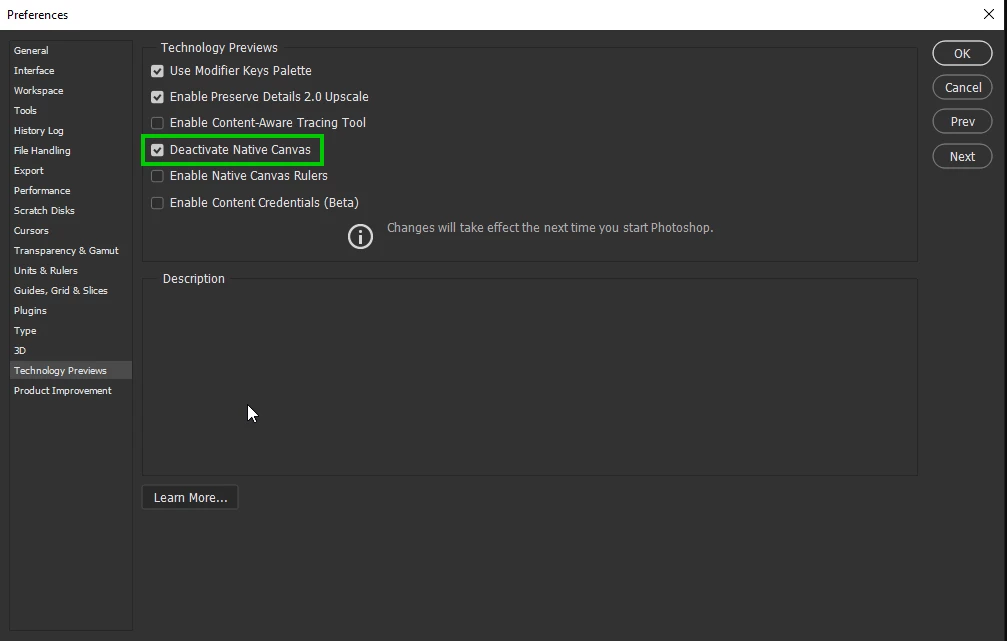
Correct answer Ged_Traynor

Hi

Try enabling this option in preferences and restarting Photoshop to see if it helps

35 replies

Tarun Saini
Community Manager
Community Manager
November 8, 2021

Hi there,

We're sorry for the trouble with Photoshop while using the Type tool.


Could you please share some information based on the questions below in order to narrow down the issue?

  • Are you seeing a similar issue while working on other applications?
  • Since when are you experiencing the problem? Did it start happening after the latest Photoshop update?
  • Is it happening with all the files or some specific files?


Could you please try resetting the preferences of Photoshop and let us know how it goes? https://helpx.adobe.com/photoshop/using/preferences.html


Please backup your settings prior to resetting the preferences: https://helpx.adobe.com/photoshop/using/preferences.html#BackupPhotoshoppreferences


You may check this similar conversation: https://community.adobe.com/t5/photoshop-ecosystem-discussions/text-not-displaying-in-photoshop-cc-2018/td-p/10059046


Regards,

Tarun


RemoNonazAuthor
Inspiring
November 8, 2021

To answer your questions:


I do not have this problem with any other application.


This is new with V23.0. Prior to now, when you typed text it was visible. Now it is only visible once you hit enter. The layer is correctly named the new text. 


I first saw this issue with a new document in V23.0. I pulled up an old document with text layers and it now behaves the same way. I did not have this issue when I created the documents. 


I have reset my preferences and it made no effect on the problem.


RemoNonazAuthor
Inspiring
November 8, 2021

I have also doen the suggested settings changes in https://community.adobe.com/t5/photoshop-ecosystem-discussions/text-not-displaying-in-photoshop-cc-2018/td-p/10059046, but to no avail. I can still only see the text I have typed after hitting the enter key. This is for new text and for editing existing text. 

Amelia Wysocki
Inspiring
November 5, 2021

When I do something in Photoshop, such as manually resizing text or an image, I can't see it being done until after I deselect the layer and click somewhere within the window. This is a serious issue.

"Amelia the Neek" Wysocki
nikunj.m
Legend
November 5, 2021

Hi,


We're sorry about the trouble with Photoshop. Would you mind sharing the exact version of Photoshop you're using? You can try updating Photoshop to the latest version to the latest version (23.0) to check if it helps.


You can try disabling the option to Use Graphics Processor from Photoshop by going to Preferences, then Performance to check if that helps.


If the issue persists, you can try to reset the preferences of Photoshop using the steps mentioned here: https://helpx.adobe.com/photoshop/using/preferences.html#reset_preferences

Please backup your settings prior to resetting the preferences. You can check: https://helpx.adobe.com/photoshop/using/preferences.html#BackupPhotoshoppreferences


Let us know how it goes!

Regards,

Nikunj

Participant
November 5, 2021

Text tool not working properly

Error/bug:
When you select the text tool and start to type "Lorem Ipsum" stays there without updating and no text shows up despite the cursor moving to the right

Fixes tried so far:
Removing and reinstalling graphics card drivers
Resetting Text Tool
Resetting preferences on exit
Clearing Photoshop on startup using (Ctrl-Alt-Shift)

System:
CPU: AMD Ryzen 3900X
Motherboard: MSI MPG X570 GAMING PLUS
RAM: 64GB
SSD: WD 1TB NVME drive
HDD: WD Black 10TB
GPU: Visiontek 2GB Radeon HD 5450


Ged_Traynor
Community Expert
Community Expert
November 5, 2021

Hi

It's working fine for me with Photoshop version 23.0 running Windows 10 with or without the placeholder text, try disabling the placeholder text from the preferences to see if you still have the issue

Participant
November 4, 2021

Hi I am trying to make a name badge using Photoshop, it will be 9cmx6cm but when I try to use the type tool it doesn't work, can anyone advice me as to what I am doing wrong please. Thank you

Regards

Sheila

PECourtejoie
Community Expert
Community Expert
November 4, 2021

Hello, "does't work" tells us almost nothing.

Do you see the text cursor? what is the resolution of the document, and the type tool setting? maybe the type is too big to fit, and you do not see it.

Are you using Ps 2022? 

Maybe post a screenshot with the entire interface to illustrate the issue.

gregmaxx
Participating Frequently
November 4, 2021

When typing with text tool in Photoshop, my text does not appear until I leave the text tool by clicking another tool and coming back to my text tool or when I click on another layer and come back to the original text layer.

I uninstalled and installed the latest version of Photoshop.

I also followed tool reset proceedures and reset workspace essencials and that did not worked.

I do not have the same problem typing in Illustrator.

I have been running Photoshop on my computer for quite a while with no problems.

This problem appeared reciently.

My computer is Windows 10 pro. 

Any ideas about what could make this happen.

Legend
November 12, 2021

I suspect your graphics card is very old. First quit Photoshop. Then install the attached file (PSUserConfig.txt) in your Photoshop Settings folder:


Windows

  • [Installation Drive]:\Users\[User Name]\AppData\Roaming\Adobe\[Photoshop_version]\[Photoshop_version]Settings\

macOS:

  • //Users/[User Name]/Library/Preferences/[Photoshop_version]Settings/


Let me know if this solves the problem with text for you.

Participating Frequently
November 13, 2021

Teresa, could you please post the contents of your system in as requested by Daniel?

this would help the team if they knew the driver/GPU combo that encounter the problem.


Versión de Adobe Photoshop: 23.0.1 20211105.r.68 96a498e x64
Número de inicios: 2
Sistema operativo: Windows 10 64 bits
Versión: 10 o posterior 10.0.19042.1348
Arquitectura del sistema: AMD Familia CPU:15, Modelo:3, Versión:1 con MMX, Número entero SSE, SSE FP, SSE2, SSE3, SSE4.1, SSE4.2, HyperThreading
Cantidad de procesadores físicos: 2
Cantidad de procesadores lógicos: 4
Vel. del procesador: 3493 MHz
Memoria incorporada: 7626 MB
Memoria libre: 4872 MB
Memoria disponible para Photoshop: 5077 MB
Memoria usada por Photoshop: 70 %
SAM SDK Version: 2.0.0-main.887.2
Estado local de ACP:
- Versión de SDK: 1.50.2
- Estado de Core Sync: Accesible y compatible
- Ejecución de Core Sync: 4.21.1.1
- Valor mínimo de Core Sync necesario: 4.3.28.24
Configuración de caché de ACPL: ^4
Versión de SDK de cliente de edición en directo: 3.86.01
Lienzo Manta: Habilitado.
Capas de alias: Deshabilitado.
Paleta de teclas modificadoras: Habilitado.
Highbeam: Habilitado.
Entradas de PSUserConfig:
- U GPUDeny 1
Tamaño de azulejos de la imagen: 132K
Niveles de caché de imagen: 4
Vista previa de fuentes: Medio
Versión de HarfBuzz: 2.8.1
TextEngine: Motor de texto unificado
======= GPU
GPUDeny is set. No GPU information is available.
======= GPU
Tipo de licencia: Suscripción
Número de serie: 90970397226097250849
GUIDBucket:Composite Core (enable_composite_core): onComposite Core GPU (comp_core_gpu): offComposite Core Threads (comp_core_threads): offComposite Core UI (comp_core_ui): offDocument Graph (enable_doc_graph): off
Carpeta de la aplicación: C:\Program Files\Adobe\Adobe Photoshop 2022\
Ruta de archivo temporal: C:\Users\Usuario\AppData\Local\Temp\
Memoria virtual de Photoshop con E/S asíncrona habilitada
Volúmenes de memoria virtual:
De arranque, 908,8 G , 210,6 G libre
Carpeta de plugins obligatorios: C:\Program Files\Adobe\Adobe Photoshop 2022\Required\Plug-ins\
Carpeta principal de plugins: C:\Program Files\Adobe\Adobe Photoshop 2022\Plug-ins\

Componentes instalados:
A3DLIBS.dll A3DLIB Dynamic Link Library 9.2.0.112
ACE.dll ACE 2021/09/16-00:39:08 79.210a024 79.210a024
AdbePM.dll PatchMatch 2021/09/08:20:32:07 1.5c9d4d882447507e35ce742375a02bb2b8f1fafe 1.5c9d4d882447507e35ce742375a02bb2b8f1fafe
AdobeLinguistic.dll Adobe Linguisitc Library 01cbe4a
AdobeOwl.dll Adobe Owl 5.5.0
AdobePDFL.dll PDFL 2021/09/24-00:36:28 79.a094f69 79.a094f69
AdobePDFSettings.dll Adobe PDFSettings 1.07
AdobePIP.dll Adobe Product Improvement Program 8.2.0.16
AdobeSVGAGM.dll AdobeSVGAGM 79.105dedb 79.105dedb
AdobeXMP.dll Adobe XMP Core 2021/09/09-00:37:38 79.a8731b9 79.a8731b9
AdobeXMPFiles.dll Adobe XMP Files 2021/09/09-00:37:38 79.a8731b9 79.a8731b9
AdobeXMPScript.dll Adobe XMP Script 2021/09/09-00:37:38 79.a8731b9 79.a8731b9
adobe_caps.dll Adobe CAPS 10,0,0,6
AGM.dll AGM 2021/09/16-00:39:08 79.210a024 79.210a024
AID.dll AID DLL 1.0.0.33
AIDE.dll AIDE 2021/09/01-00:40:52 79.644b6f3 79.644b6f3
aifm.dll AIFM 1.0 23.68434
AILib.dll Adobe Illustrator 2022 26.0.0
aiport.dll AIPort 1.0 23.68434
ARE.dll ARE 2021/09/16-00:39:08 79.210a024 79.210a024
AXE8SharedExpat.dll AXE8SharedExpat 2021/09/02-00:37:22 79.3a98998 79.3a98998
AXEDOMCore.dll AXEDOMCore 2021/09/02-00:37:22 79.3a98998 79.3a98998
Bib.dll BIB 2021/09/16-00:39:08 79.210a024 79.210a024
BIBUtils.dll BIBUtils 2021/09/16-00:39:08 79.210a024 79.210a024
boost_date_time.dll photoshopdva 14.0.0
boost_filesystem.dll photoshopdva 14.0.0
boost_program_options.dll photoshopdva 14.0.0
boost_regex.dll photoshopdva 14.0.0
boost_system.dll photoshopdva 14.0.0
boost_threads.dll photoshopdva 14.0.0
CoolType.dll CoolType 2021/09/16-00:39:08 79.210a024 79.210a024
CRClient.dll Adobe Crash Reporter Client DLL 4.7.0.0
DirectML.dll DirectML Redistributable Library 1.5.1+210429-0157.1.dml-1.5.adbd007
dnssd.dll Bonjour 3,0,0,2
dvaaccelerate.dll photoshopdva 14.0.0
dvaappsupport.dll photoshopdva 14.0.0
dvaaudiodevice.dll photoshopdva 14.0.0
dvacore.dll photoshopdva 14.0.0
dvacrashhandler.dll Adobe Audition CC 2017 10.0.0
dvamarshal.dll photoshopdva 14.0.0
dvamediatypes.dll photoshopdva 14.0.0
dvametadata.dll photoshopdva 14.0.0
dvametadataapi.dll photoshopdva 14.0.0
dvametadataui.dll photoshopdva 14.0.0
dvanet.dll photoshopdva 14.0.0
dvaplayer.dll photoshopdva 14.0.0
dvascripting.dll photoshopdva 14.0.0
dvatransport.dll photoshopdva 14.0.0
dvaui.dll photoshopdva 14.0.0
dvaunittesting.dll photoshopdva 14.0.0
dvavulcansupport.dll photoshopdva 14.0.0
dynamic-torqnative.dll Unified Extensibility Platform uxp-5.5.4-1-60dbcb9
dynamiclink.dll photoshopdva 14.0.0
ExtendScript.dll ExtendScript 2019/07/29-10:07:31 82.2 82.2
filterport.dll FilterPort 1.1 O
icucnv69.dll International Components for Unicode Build 13.1.a82691a
icudt69.dll International Components for Unicode Build 13.1.a82691a
icuin69.dll International Components for Unicode Build 13.1.a82691a
icuuc69.dll International Components for Unicode Build 13.1.a82691a
igestep30.dll IGES Reader 9.3.0.113
ippcc.dll ippCC. Intel(R) Integrated Performance Primitives. Color Conversion. 2020.0.1 (r0x35c5ec66)
ippcck0.dll ippCC. Intel(R) Integrated Performance Primitives. Color Conversion. 2020.0.1 (r0x35c5ec66)
ippccl9.dll ippCC. Intel(R) Integrated Performance Primitives. Color Conversion. 2020.0.1 (r0x35c5ec66)
ippccy8.dll ippCC. Intel(R) Integrated Performance Primitives. Color Conversion. 2020.0.1 (r0x35c5ec66)
ippcore.dll core. Intel(R) Integrated Performance Primitives. Core Library. 2020.0.1 (r0x35c5ec66)
ippcv.dll ippCV. Intel(R) Integrated Performance Primitives. Computer Vision. 2020.0.1 (r0x35c5ec66)
ippcvk0.dll ippCV. Intel(R) Integrated Performance Primitives. Computer Vision. 2020.0.1 (r0x35c5ec66)
ippcvl9.dll ippCV. Intel(R) Integrated Performance Primitives. Computer Vision. 2020.0.1 (r0x35c5ec66)
ippcvy8.dll ippCV. Intel(R) Integrated Performance Primitives. Computer Vision. 2020.0.1 (r0x35c5ec66)
ippi.dll ippIP. Intel(R) Integrated Performance Primitives. Image Processing. 2020.0.1 (r0x35c5ec66)
ippik0.dll ippIP. Intel(R) Integrated Performance Primitives. Image Processing. 2020.0.1 (r0x35c5ec66)
ippil9.dll ippIP. Intel(R) Integrated Performance Primitives. Image Processing. 2020.0.1 (r0x35c5ec66)
ippiy8.dll ippIP. Intel(R) Integrated Performance Primitives. Image Processing. 2020.0.1 (r0x35c5ec66)
ipps.dll ippSP. Intel(R) Integrated Performance Primitives. Signal Processing. 2020.0.1 (r0x35c5ec66)
ippsk0.dll ippSP. Intel(R) Integrated Performance Primitives. Signal Processing. 2020.0.1 (r0x35c5ec66)
ippsl9.dll ippSP. Intel(R) Integrated Performance Primitives. Signal Processing. 2020.0.1 (r0x35c5ec66)
ippsy8.dll ippSP. Intel(R) Integrated Performance Primitives. Signal Processing. 2020.0.1 (r0x35c5ec66)
ippvm.dll ippVM. Intel(R) Integrated Performance Primitives. Vector Math. 2020.0.1 (r0x35c5ec66)
ippvmk0.dll ippVM. Intel(R) Integrated Performance Primitives. Vector Math. 2020.0.1 (r0x35c5ec66)
ippvml9.dll ippVM. Intel(R) Integrated Performance Primitives. Vector Math. 2020.0.1 (r0x35c5ec66)
ippvmy8.dll ippVM. Intel(R) Integrated Performance Primitives. Vector Math. 2020.0.1 (r0x35c5ec66)
JP2KLib.dll JP2KLib 2021/09/01-00:40:52 79.545e36d 79.545e36d
libifcoremd.dll Intel(r) Visual Fortran Compiler 10.0 (Update A)
libiomp5md.dll Intel(R) OpenMP* Runtime Library 5.0
libmmd.dll Intel(R) C/C++/Fortran Compiler Mainline
libzip.dll photoshopdva 14.0.0
LogSession.dll LogSession 8.2.0.16
mediacoreif.dll photoshopdva 14.0.0
Microsoft.AI.MachineLearning.dll Microsoft® Windows® Operating System 1.8.20210602.2.d4106de
mkl_avx2.dll Intel® Math Kernel Library 2020.0
mkl_avx512.dll Intel® Math Kernel Library 2020.0
mkl_core.dll Intel® Math Kernel Library 2020.0
mkl_def.dll Intel® Math Kernel Library 2020.0
mkl_mc3.dll Intel® Math Kernel Library 2020.0
mkl_sequential.dll Intel® Math Kernel Library 2020.0
mkl_vml_avx2.dll Intel® Math Kernel Library 2020.0
mkl_vml_avx512.dll Intel® Math Kernel Library 2020.0
mkl_vml_def.dll Intel® Math Kernel Library 2020.0
mkl_vml_mc3.dll Intel® Math Kernel Library 2020.0
MPS.dll MPS 2021/09/11-00:41:28 79.6d286d5 79.6d286d5
onnxruntime.dll Microsoft® Windows® Operating System 1.8.20210602.2.d4106de
opencv_world452.dll OpenCV library 4.5.2
pdfport.dll PDFPort 2020/11/19-11:34:27 79.625377 79.625377
Plugin.dll Adobe Photoshop 2022 23.0
PlugPlugExternalObject.dll Adobe(R) CEP PlugPlugExternalObject Standard Dll (64 bit) 11.2.0
PlugPlugOwl.dll Adobe(R) CSXS PlugPlugOwl Standard Dll (64 bit) 11.2.0.100
PSCloud.dll 1.0.0.1
PSRes.dll Adobe Photoshop 2022 23.0
PSViews.dll Adobe Photoshop 2022 23.0
ScCore.dll ScCore 2019/07/29-10:07:31 82.2 82.2
SVGRE.dll SVGRE 79.8a94e6d 79.8a94e6d
svml_dispmd.dll Intel(R) C/C++/Fortran Compiler Mainline
tbb.dll Intel(R) Threading Building Blocks for Windows 2020, 2, 2020, 0311
tbbmalloc.dll Intel(R) Threading Building Blocks for Windows 2020, 2, 2020, 0311
TfKernel.dll Kernel Geom 9.3.0.113
TFUGEOM.dll Adobe, UGeom© 9.3.0.113
utest.dll photoshopdva 14.0.0
VulcanControl.dll Vulcan Application Control Library 6.6.0.000
VulcanMessage5.dll Vulcan Message Library 6.6.0.000
WinRTSupport.dll Adobe Photoshop Windows RT Support 1.0.1.0
WRServices.dll WRServices Build 17.0.0.5f7ac8f 17.0.0.5f7ac8f
wu3d.dll U3D Writer 9.3.0.113
Plataforma de extensibilidad unificada uxp-5.5.4-1-60dbcb9
UPIC 2.3.1


Plugins obligatorios:

Ángulo ancho adaptable 23.0 - del archivo “Adaptive Wide Angle.8bf”
Azulejo de mosaico 23.0 - del archivo “Filter Gallery.8bf”
Azulejos 23.0 - del archivo “Standard MultiPlugin.8bf”
Bajorrelieve 23.0 - del archivo “Filter Gallery.8bf”
BMP 23.0 - del archivo “Standard MultiPlugin.8bf”
Bordes acentuados 23.0 - del archivo “Filter Gallery.8bf”
Bordes añadidos 23.0 - del archivo “Filter Gallery.8bf”
Bordes rasgados 23.0 - del archivo “Filter Gallery.8bf”
Bordes resplandecientes 23.0 - del archivo “Filter Gallery.8bf”
Camera Raw 14.0.1 - del archivo “Camera Raw.8bi”
Carboncillo 23.0 - del archivo “Filter Gallery.8bf”
Cineon 23.0 - del archivo “Cineon.8bi”
Color diluido 23.0 - del archivo “Filter Gallery.8bf”
Colores NTSC 23.0 - del archivo “NTSC Colors.8bf”
Compatibilidad con secuencias de comandos 23.0 - del archivo “ScriptingSupport.8li”
Conté Crayon 23.0 - del archivo “Filter Gallery.8bf”
Contornos con tinta 23.0 - del archivo “Filter Gallery.8bf”
Coordenadas polares 23.0 - del archivo “Standard MultiPlugin.8bf”
Corrección de lente 23.0 - del archivo “Lens Correction.8bf”
Cristal 23.0 - del archivo “Filter Gallery.8bf”
Cristalizar 23.0 - del archivo “Standard MultiPlugin.8bf”
Cromo 23.0 - del archivo “Filter Gallery.8bf”
Cuarteado 23.0 - del archivo “Filter Gallery.8bf”
Curtosis 23.0 - del archivo “statistics.8ba”
Desenfoque de lente 23.0 - del archivo “Lens Blur.8bf”
Desenfoque radial 23.0 - del archivo “Standard MultiPlugin.8bf”
Desenfoque suavizado 23.0 - del archivo “Standard MultiPlugin.8bf”
Desentrelazar 23.0 - del archivo “Standard MultiPlugin.8bf”
Desplazar 23.0 - del archivo “Standard MultiPlugin.8bf”
Destello 23.0 - del archivo “Standard MultiPlugin.8bf”
Desviación estándar 23.0 - del archivo “statistics.8ba”
Dicom 23.0 - del archivo “Dicom.8bi”
Distorsionar 23.0 - del archivo “Standard MultiPlugin.8bf”
Encoger 23.0 - del archivo “Standard MultiPlugin.8bf”
Entropía 23.0 - del archivo “statistics.8ba”
Escayola 23.0 - del archivo “Filter Gallery.8bf”
Esferizar 23.0 - del archivo “Standard MultiPlugin.8bf”
Espátula 23.0 - del archivo “Filter Gallery.8bf”
Esponja 23.0 - del archivo “Filter Gallery.8bf”
Estabilizador de imagen 23.0 - del archivo “Shake Reduction.8bf”
Estilográfica 23.0 - del archivo “Filter Gallery.8bf”
Exportar tablas de consulta de colores 23.0 - del archivo “Export3DLUT.8be”
Extrusión 23.0 - del archivo “Standard MultiPlugin.8bf”
Fibras 23.0 - del archivo “Standard MultiPlugin.8bf”
Filtro Conjunto de imágenes 23.0 - del archivo “ChannelPort.8bf”
Filtro de Camera Raw 14.0.1 - del archivo “Camera Raw.8bi”
Filtro para recortar y enderezar fotografías 23.0 - del archivo “Standard MultiPlugin.8bf”
Formato IFF 23.0 - del archivo “Standard MultiPlugin.8bf”
Fotocopia 23.0 - del archivo “Filter Gallery.8bf”
Fresco 23.0 - del archivo “Filter Gallery.8bf”
Galería de filtros 23.0 - del archivo “Filter Gallery.8bf”
Grabado 23.0 - del archivo “Standard MultiPlugin.8bf”
Granulado 23.0 - del archivo “Filter Gallery.8bf”
Grietas 23.0 - del archivo “Filter Gallery.8bf”
Guardar para Web 23.0 - del archivo “Save for Web.8be”
Halide Bottlenecks 23.0 - del archivo “HalideBottlenecks.8bx”
HDRMergeUI 23.0 - del archivo “HDRMergeUI.8bf”
HSB/HSL 23.0 - del archivo “Standard MultiPlugin.8bf”
IGES 23.0 - del archivo “U3D.8bi”
Interpretar consulta de cuadrícula de colores 23.0 - del archivo “Export3DLUT.8be”
JPEG 2000 23.0 - del archivo “JPEG2000.8bi”
Lápiz de color 23.0 - del archivo “Filter Gallery.8bf”
Licuar 23.0 - del archivo “Liquify.8bf”
Manchas 23.0 - del archivo “Filter Gallery.8bf”
Mapa de bits inalámbrico 23.0 - del archivo “WBMP.8bi”
Matlab Operation 23.0 - del archivo “ChannelPort.8bf”
Máxima 23.0 - del archivo “statistics.8ba”
Media 23.0 - del archivo “Average.8bf”
Mediana 23.0 - del archivo “statistics.8ba”
Mínima 23.0 - del archivo “statistics.8ba”
Modelo de semitono 23.0 - del archivo “Filter Gallery.8bf”
Molinete 23.0 - del archivo “Standard MultiPlugin.8bf”
Nubes 23.0 - del archivo “Clouds.8bf”
Nubes de diferencia 23.0 - del archivo “Clouds.8bf”
Núcleo de medida 23.0 - del archivo “MeasurementCore.8me”
Oblicuidad 23.0 - del archivo “statistics.8ba”
Onda 23.0 - del archivo “Standard MultiPlugin.8bf”
Ondas marinas 23.0 - del archivo “Filter Gallery.8bf”
OpenEXR 23.0 - del archivo “Standard MultiPlugin.8bf”
Papel con relieve 23.0 - del archivo “Filter Gallery.8bf”
Papel húmedo 23.0 - del archivo “Filter Gallery.8bf”
PCX 23.0 - del archivo “PCX.8bi”
Película granulada 23.0 - del archivo “Filter Gallery.8bf”
Pincel seco 23.0 - del archivo “Filter Gallery.8bf”
Pinceladas 23.0 - del archivo “Filter Gallery.8bf”
Pintar debajo 23.0 - del archivo “Filter Gallery.8bf”
Pixar 23.0 - del archivo “Pixar.8bi”
Plastificado 23.0 - del archivo “Filter Gallery.8bf”
Portable Bit Map 23.0 - del archivo “PBM.8bi”
PRC 23.0 - del archivo “U3D.8bi”
Promedio 23.0 - del archivo “statistics.8ba”
Puntillista 23.0 - del archivo “Standard MultiPlugin.8bf”
Punto de fuga 23.0 - del archivo “VanishingPoint.8bf”
Radiance 23.0 - del archivo “Radiance.8bi”
Rango 23.0 - del archivo “statistics.8ba”
Recortar y enderezar fotografías 23.0 - del archivo “CropPhotosAuto.8li”
Resplandor de neón 23.0 - del archivo “Filter Gallery.8bf”
Resplandor difuso 23.0 - del archivo “Filter Gallery.8bf”
Retazos 23.0 - del archivo “Filter Gallery.8bf”
Reticulación 23.0 - del archivo “Filter Gallery.8bf”
Rizo 23.0 - del archivo “Standard MultiPlugin.8bf”
Rutinas FastCore 23.0 - del archivo “FastCore.8bx”
Rutinas MMXCore 23.0 - del archivo “MMXCore.8bx”
Salpicaduras 23.0 - del archivo “Filter Gallery.8bf”
Semitono de color 23.0 - del archivo “Standard MultiPlugin.8bf”
Solarizar 23.0 - del archivo “Solarize.8bf”
Sombreado 23.0 - del archivo “Filter Gallery.8bf”
Soporte multiprocesador 23.0 - del archivo “MultiProcessor Support.8bx”
Soporte WIA 23.0 - del archivo “WIASupport.8li”
Spaces 23.0 - del archivo “Spaces.8li”
Suma 23.0 - del archivo “statistics.8ba”
Sumi-e 23.0 - del archivo “Filter Gallery.8bf”
Tampón 23.0 - del archivo “Filter Gallery.8bf”
Targa 23.0 - del archivo “Standard MultiPlugin.8bf”
Texturizar 23.0 - del archivo “Filter Gallery.8bf”
Tiza y carboncillo 23.0 - del archivo “Filter Gallery.8bf”
Trazados a Illustrator 23.0 - del archivo “Standard MultiPlugin.8bf”
Trazos angulares 23.0 - del archivo “Filter Gallery.8bf”
Trazos con spray 23.0 - del archivo “Filter Gallery.8bf”
Trazos oscuros 23.0 - del archivo “Filter Gallery.8bf”
Trazos pastel 23.0 - del archivo “Filter Gallery.8bf”
U3D 23.0 - del archivo “U3D.8bi”
Varianza 23.0 - del archivo “statistics.8ba”
Vidriera 23.0 - del archivo “Filter Gallery.8bf”
Viento 23.0 - del archivo “Standard MultiPlugin.8bf”
Zigzag 23.0 - del archivo “Standard MultiPlugin.8bf”

Plugins opcionales y de terceros: NINGUNO


Plugins duplicados y desactivados: NINGUNO


Plugins que no se han podido cargar: NINGUNO

Plataforma de extensibilidad unificada - Extensiones:

Home Screen (Cargado) 5.0.0.118 - del archivo "C:\Program Files\Common Files\Adobe/UXP/Extensions\com.adobe.ccx.start-5.0.0\"
CDO: 1.102.0
CmdN: 1.9.1
CDP: 1.127.0
Projects: 1.0.46
Discover Panel (Cargado) 1.11.0.33 - del archivo "C:\Program Files\Adobe\Adobe Photoshop 2022\Required\UXP/\com.adobe.unifiedpanel\"

ccx-timeline (Preparado) 2.6.41.0 - del archivo "C:\Program Files\Adobe\Adobe Photoshop 2022\Required\UXP/\com.adobe.ccx.timeline\"

CCX Commenting UXP Webview (Cargado) 21.4.2.0 - del archivo "C:\Program Files\Adobe\Adobe Photoshop 2022\Required\UXP/\com.adobe.ccx.comments-webview\"

CCX Sharesheet UXP (Cargado) 20.5.0.0 - del archivo "C:\Program Files\Adobe\Adobe Photoshop 2022\Required\UXP/\com.adobe.ccx.sharesheet\"

CC Libraries Panel (Preparado) 3.14.242.0 - del archivo "C:\Program Files\Common Files\Adobe/CEP/Extensions\CC_LIBRARIES_PANEL_EXTENSION_3_14_242\"
CAPTURE: 1.2.18 STOCK: 2.0.30
Photoshop Cloud Value Dialog (Preparado) 1.0.1.0 - del archivo "C:\Program Files\Adobe\Adobe Photoshop 2022\Required\UXP/\com.adobe.photoshop.cloudValueDialog\"

Photoshop UXP Export-As (Preparado) 5.5.11.0 - del archivo "C:\Program Files\Adobe\Adobe Photoshop 2022\Required\UXP/\com.adobe.photoshop.exportAs\"

Photoshop In App Messaging (Cargado) 2.4.1.0 - del archivo "C:\Program Files\Adobe\Adobe Photoshop 2022\Required\UXP/\com.adobe.photoshop.inAppMessaging\"

Photoshop Personalization (Cargado) 2.0.0.0 - del archivo "C:\Program Files\Adobe\Adobe Photoshop 2022\Required\UXP/\com.adobe.photoshop.personalization\"

Photoshop Selection Feedback (Preparado) 0.5.0.0 - del archivo "C:\Program Files\Adobe\Adobe Photoshop 2022\Required\UXP/\com.adobe.photoshop.selectionFeedback\"

Plugins Panel (Cargado) 1.3.6.0 - del archivo "C:\Program Files\Adobe\Adobe Photoshop 2022\Required\UXP/\com.adobe.pluginspanel\"

IC popup message (Cargado) 1.0.0.0

Neural Filters (Registrado) 1.9.21.0 - del archivo "C:\Program Files\Adobe\Adobe Photoshop 2022\Required\UXP/\com.adobe.nfp.gallery\"


Extensiones:

Sblended (Demo) 1.7.4 - del archivo “C:\Program Files (x86)\Common Files\Adobe\CEP\extensions\com.grixel.sblendeddemo\dist\index.html”
Bibliotecas 1.0.0 - del archivo “C:\Program Files\Adobe\Adobe Photoshop 2022\Required\CEP\extensions\com.adobe.DesignLibraryPanel.html\index.html”
Nuevo Documento 3.5.0 - del archivo “C:\Program Files (x86)\Common Files\Adobe\CEP\extensions\com.adobe.ccx.fnft-3.5.0\fnft.html?v=3.5.0.4”
Inicio 2.16.0 - del archivo “C:\Program Files (x86)\Common Files\Adobe\CEP\extensions\com.adobe.ccx.start-2.16.0\index.html?v=2.16.0.8”
com.adobe.capture.extension 1.0.0 - del archivo “C:\Program Files\Adobe\Adobe Photoshop 2022\Required\CEP\extensions\com.adobe.DesignLibraryPanel.html\extensions\capture\capture.html”
com.adobe.stock.panel.licensing-embedded 1.0.0 - del archivo “C:\Program Files\Adobe\Adobe Photoshop 2022\Required\CEP\extensions\com.adobe.DesignLibraryPanel.html\extensions\stock-panel-licensing\index.html”
Exportar como 4.8.15 - del archivo “C:\Program Files\Adobe\Adobe Photoshop 2022\Required\CEP\extensions\com.adobe.photoshop.crema\index.html”
LogiOptions version 9.40.13.0 7.0.0 - del archivo “C:\Program Files\Common Files\Adobe\CEP\extensions\LogiOptionsAdobe\index.html”
com.adobe.cclibraries.manager 1.0.0 - del archivo “C:\Program Files\Adobe\Adobe Photoshop 2022\Required\CEP\extensions\com.adobe.DesignLibraryPanel.html\manager.html”

Dispositivos TWAIN instalados: NINGUNO