


Participant
March 19, 2020
Question

Pen tool "fill" is not selectable

  • March 19, 2020
  • 2 replies
  • 747 views

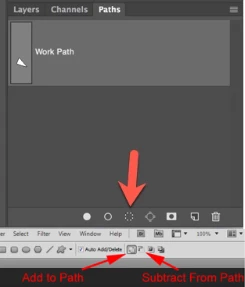
Hi Guys pls share your knowledge with me on this one I selected a path with the pen tool and I want to use the fill option but the option of "fill" is not selectable I tried the ones that I could find about this but nothing worked, I tried making a selection it said there are no pixels selected and tried these ones too
This topic has been closed for replies.

2 replies

jane-e
Community Expert
Community Expert
March 22, 2020

Hi

In your first image (shown here) you have drawn with the Path mode. The icon you are pointing to will convert the Path to a selection. The Fill button is the solid one on the left, and it will put pixels on the current layer.


In your second screen shot you have drawn with the Shape mode. Changing the fill for a Shape layer is done as in the post from Dave — in the options bar (or Properties panel). 


While Paths and Shapes can both be drawn with the Pen tool, the way they handle Fills and Strokes are very different.


~ Jane

Grant H
Community Expert
Community Expert
March 19, 2020

Hi,

Okay you doing this wrong.

With your path selected, click the contextual menu flyout:

Then select "fill path" and Choose how you want to fill etc


/G


Participant
March 22, 2020

Hi I did it but it's still the same thing the "fill path" option is still not selectable 

davescm
Community Expert
Community Expert
March 22, 2020

Hi

You can't use fill path on a shape layer.

Instead select the shape layer in the layers panel, and select a shape tool (any will do e.g the rectangular shape tool). Now in the options bar change the fill and stroke values/colours

Dave