Quitter
  • Communauté internationale
    • Langue:
      • Deutsch
      • English
      • Español
      • Français
      • Português
  • 日本語コミュニティ
  • 한국 커뮤니티

Persistent Blinking Blue Circle on “Starter Tutorials” After Photoshop 26.10.0 Update (macOS)

Nouveau ici ,
Aug 26, 2025 Aug 26, 2025

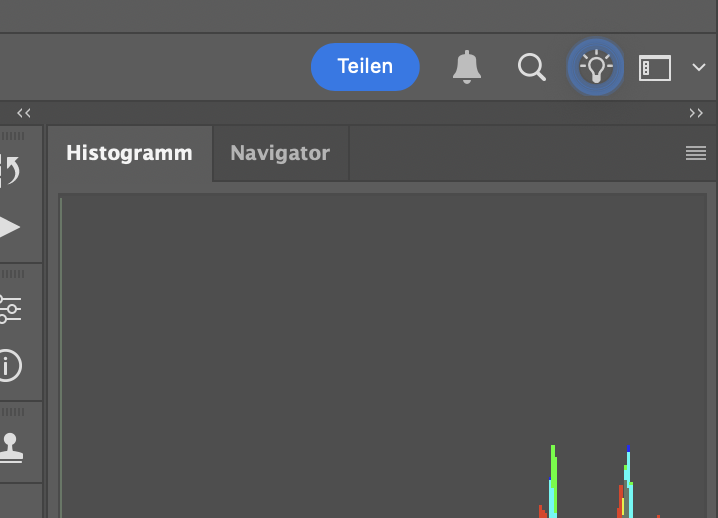
Hello, I have a question. Since updating Photoshop to version 26.10.0, I’ve noticed a software bug. The “Starter Tutorials” feature in the top right corner is permanently active and surrounded by a blinking blue circle. It cannot be closed or disabled.


When minimizing Photoshop (on the latest macOS version), the blue circle also appears in the Dock next to Photoshop itself, as if it were a separate application. This is quite annoying, as it also makes the program slower to minimize.


Does anyone know a solution for this issue, or is there a way to completely disable it?

Best regards,
Patrick

SUJETS
macOS
257
Traduire
Signaler
Directives de la communauté
Restez bienveillant et courtois, ne vous attribuez pas la paternité des créations d’autrui et assurez-vous de l’absence de doublons avant de poster du contenu. En savoir plus
community guidelines

correct answers 1 bonne réponse

Community Expert , Aug 27, 2025 Aug 27, 2025

@patrickp28802797 not sure if this will help, but try enabling this option in preferences and restarting Photoshop

2025-08-27 08_29_26-Preferences.png

If that doesn't help, try manually resetting your Photoshop preferences
https://helpx.adobe.com/ie/photoshop/using/preferences.html#Manually
Remember to back up your settings before doing the preference reset
https://helpx.adobe.com/ie/photoshop/using/preset-migration.html

Traduire
Adobe
Community Expert ,
Aug 27, 2025 Aug 27, 2025

@patrickp28802797 not sure if this will help, but try enabling this option in preferences and restarting Photoshop

2025-08-27 08_29_26-Preferences.png

If that doesn't help, try manually resetting your Photoshop preferences
https://helpx.adobe.com/ie/photoshop/using/preferences.html#Manually
Remember to back up your settings before doing the preference reset
https://helpx.adobe.com/ie/photoshop/using/preset-migration.html

Traduire
Signaler
Directives de la communauté
Restez bienveillant et courtois, ne vous attribuez pas la paternité des créations d’autrui et assurez-vous de l’absence de doublons avant de poster du contenu. En savoir plus
community guidelines
Employé Adobe ,
Aug 27, 2025 Aug 27, 2025
LA PLUS RÉCENTE

@Ged_Traynor just a FYI, but turning on and off Enable Quiet Mode does not need a computer restart.  Customers should feel free to turn it or, or just the ones below it that they want, and close prefs and go about their work.  


Thanks,

Cory - Photoshop Product Manager

Traduire
Signaler
Directives de la communauté
Restez bienveillant et courtois, ne vous attribuez pas la paternité des créations d’autrui et assurez-vous de l’absence de doublons avant de poster du contenu. En savoir plus
community guidelines