


Inspiring
October 23, 2018
Answered

Photoshop 2019 crop locked ratio

  • October 23, 2018
  • 14 replies
  • 62947 views

I can't seem to freeform crop, the aspect ratio is locked, I tried holding down shift, ctrl, or alt but it's still locked.

I went to crop options, it doesn't have a freeform or no restriction option.

Only way I can freeform crop now is select with marquee then crop....PLEASE help!
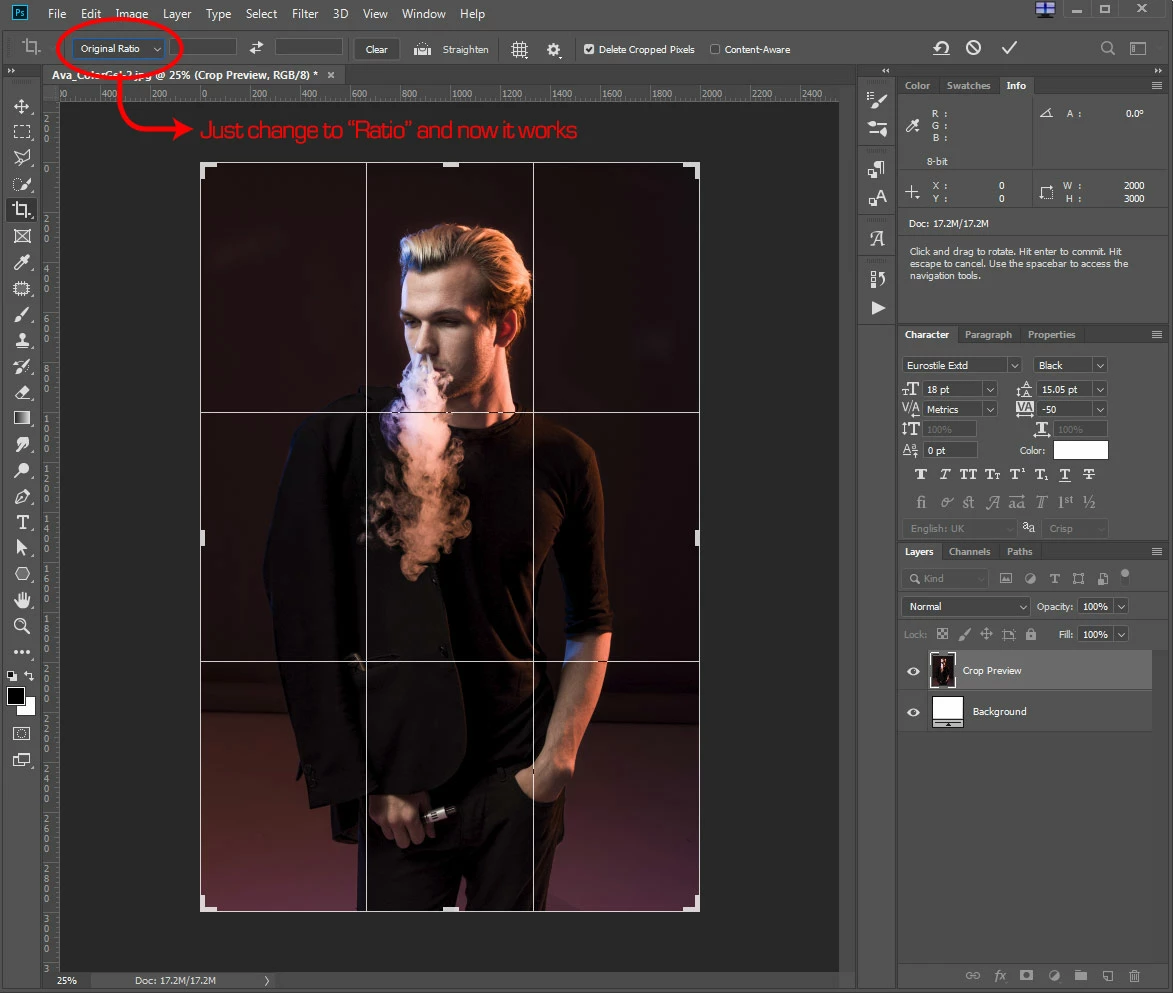
    Correct answer JamesHHL

    I don't have the problem anymore, during initial PS 2019 install the crop default to "Original Ratio". Thus I couldn't freeform transform the crop even holding down shift.  Just had to change it to "Ratio" and everything work as it should now.

    14 replies

    Participating Frequently
    November 8, 2018

    These are my settings:

    I've pressed "clear" a thousand times. Switched between "ratio" and all the other options. It still won't break the original ratio when I try to resize.

    Went back to 2018 using the same settings. Works as expected there. Is my 2019 corrupt or something? Because this is not the only bug in that version.

    EDIT: some more things I've tried:

    Resetting Photoshop's preferences

    Resetting the crop tool

    I'm on Windows 7 64bit

    Trevor.Dennis
    Community Expert
    Community Expert
    November 7, 2018

    Are you referring to Camera RAW, or images inside Photoshop?

    If the latter, do you have any values in the crop fields?

    If yes, click on clear

    If those fields are empty, and you still have this issue, can you confirm you are talking about the normal Crop tool, and not the Perspective Crop tool?

    A screenshot  of your workspace might help.

    JamesHHLAuthorCorrect answer
    Inspiring
    November 7, 2018

    I don't have the problem anymore, during initial PS 2019 install the crop default to "Original Ratio". Thus I couldn't freeform transform the crop even holding down shift.  Just had to change it to "Ratio" and everything work as it should now.

    Daniel E Lane
    Inspiring
    November 7, 2018

    You can also just hit the Clear button off to the right of the ratio and it will work fine as well. And its easier than doing the drop down menu to change from Original Ratio to just ratio

    josephlavine
    Community Expert
    Community Expert
    November 6, 2018

    Have you attempted to reset the Crop Tool?  see attached

    Participating Frequently
    November 7, 2018

    Tried it. Made no difference

    I've ditched 2019 and am using 2018 again. Everything works as expected there.

    Participating Frequently
    November 6, 2018

    It's the same for me since updating to 2019...

    But you can ignore the original ratio IF you hold down shift AFTER you've begun moving one of the box's sides/corners.