



dreadPF
Participant
May 8, 2020
Question

Photoshop 2020 on Windows 10 won't run unless launching as Administrator

  • May 8, 2020
  • 2 replies
  • 5696 views

When I launch Photoshop 2020 (21.1.2) on my Windows 10 PC (1909), it loads to the Ps splash screen and hangs at "Initializing".  Eventually it fails with the error in the screenshot below.


If I launch Ps using the "Run As Administrator" option, it loads fine.


Not sure if it is related but my Windows user profile folders (Documents, Downloads, Favourites etc) have been relocated to a different drive to where Windows 10 is installed (i.e. these folders are no longer located in C:\users\username).


At the moment I've set the Ps Start Menu shortcut to always "Run As Administrator" but I'd prefer to get it loading without needing it to elevate to administrator.


Appreciate any help or advice on this...
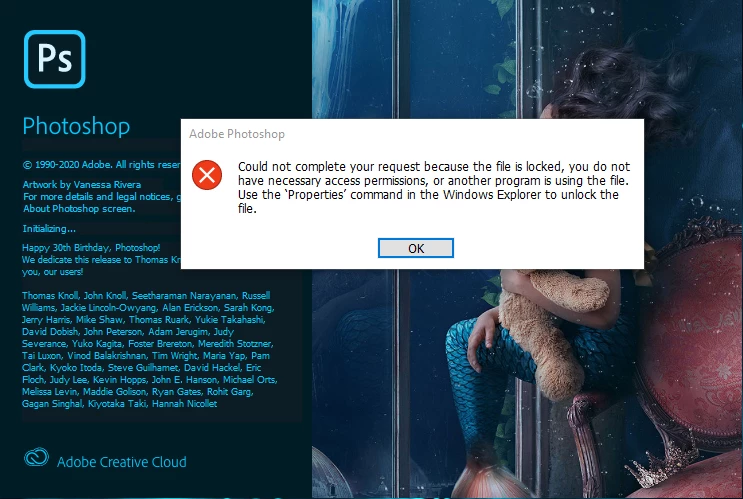
 

This topic has been closed for replies.

2 replies

Participant
October 2, 2020

Oct 2020 same issue. Spent hours with support and changes all shortcuts to run as admin, but no apps will run from the cloud app.

I'm not joiking, 5 hours on the chat with support. Still not fixed. Was told my CPU is too olf, yet all apps work with my CPU if ran as admin.

No comment.

Participant
October 2, 2020

Well, not quite the same error message, but...

nikunj.m
Community Manager
Community Manager
May 8, 2020

Hi there,


We are sorry about the experience due to the Photoshop. Would you mind checking the permissions for the folders and the permissions for Photoshop? You can check the details here: https://helpx.adobe.com/photoshop/kb/required-permissions-photoshop-cs5-windows.html


Regards,

Nikunj

Participant
May 15, 2020

Have had the same problem and the only thing that works for me is to launch Photoshop 2020 as an Administrator.  Then it starts just fine. I was not getting the complete time out nor the error message indicating it was file permissions issue.  I went through Adobe's help article on required permissions and made sure that I as a regular user on my PC had access to those folders, but that didn't help.  Still need to run as an Administror.  Something happened with one of the Photoshop 2020 updates that created this problem. Sure wish Adobe would figure it out for us and fix it. Across multiple threads on the internet, hundreds of people are having this problem. 

nikunj.m
Community Manager
Community Manager
May 16, 2020

Hi Tom,

We are sorry about the experience with Photoshop 2020. Would you mind creating a new administrative user account on the computer to check if you are able to launch Photoshop there?

You can check the steps here: https://support.microsoft.com/en-us/help/4026923/windows-10-create-a-local-user-or-administrator-account


Regards,

Nikunj