Known Participant
October 2, 2023
Answered

Photoshop 2024 [v25.1] - Color Sliders don't work [Color picker issue -merged]

  • October 2, 2023
  • 142 replies
  • 51160 views

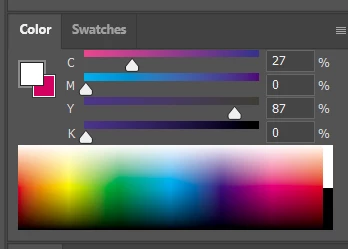
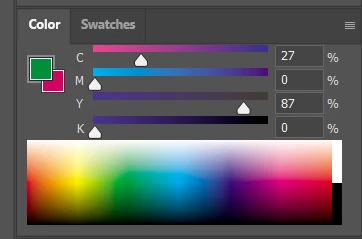
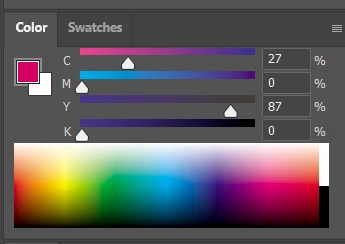
Color Sliders in my new Photoshop 2024 don't work at all - they don't change when i pick a color from the Spectrum or when i change Foreground/Bacground color with X key.

I reset Preferences, reinstaled PS and nothing works. Any ideas?

Photoshop 25.1.0, Windows 10.


This topic has been closed for replies.
Correct answer Kevin Stohlmeyer

@robzartworx there is a phased roll out for update 25.2 happening globally.

If you are in a managed environment (Enterprise/Teams/Edu) you may have to reach out to your plan admin to allow access to new updates within 30 days of release.

142 replies

Sartharion
Participant
October 27, 2023

After recent PS update (27/10/2023) to version 25.1 color palette and slider do not show proper color when eyedropper tool is used.

Ged_Traynor
Community Expert
Community Expert
October 28, 2023

@Sartharion it's a bug that Adobe introduced with version 25.1, you may want to revert back to version 25.0 until Adobe address the issue.

https://community.adobe.com/t5/photoshop-ecosystem-bugs/photoshop-2024-color-sliders-don-t-work/idc-...

Apparently Adobe knew about the bug in the Beta version but in their wisdom decided not to fix it and still roll out version 25.1 to the public.

https://community.adobe.com/t5/photoshop-beta-bugs/p-photoshop-beta-25-1-0-color-picker-not-updating/idc-p/14190744

Participating Frequently
October 27, 2023

Hello! I updated photoshop tonight to version 25.1, and when I went to eyedropper colors from my image, I noticed that the Color window wasn't updating to reflect those colors. (The foreground color was updating, however.)


Windows 11. 


Video of color palette not updating 

Ged_Traynor
Community Expert
Community Expert
October 27, 2023
Participant
October 27, 2023

I reinstalled 25.0 and it's working fine now. Imma hold off on updating to new versions til I know this is fixed

Participant
October 26, 2023

 This is what happens when I try to use the color picker tool. It won’t change the color instead it stays whatever color I put it to on the color wheel itself. It also dosent change the color if I use color select so it’s not purely a color picker problem. I can make it show the correct color by switching from the color wheel to another option like the default square and back again but I haven't found any other way. How do I fix this so it goes back to normal?

Known Participant
October 26, 2023

Yup exactly problem for me. And I'm using the Hue Cube.

Participant
October 26, 2023

PS 2024 version 25.1.0 on Windows 10. Having a similar problem.

If I select a color in the wheel, the sliders don't change (first image). If I use the eyedropper tool, it picks up the color but the color wheel and sliders don't change (second image).


reltcstone
Participant
October 31, 2023

When you use the eyedropper tool to pick colors, the color wheel or hue cube aren't updating the new color location.  the preview of the color in the upper left of the color wheel tab shows the new color but it isnt updated on the sliders or triangle or circle.

Ged_Traynor
Community Expert
Community Expert
October 31, 2023

@reltcstone if you're using Photoshop version 25.1, it's a known bug

https://community.adobe.com/t5/photoshop-ecosystem-bugs/photoshop-2024-color-sliders-don-t-work/idc-...

You can revert back to version 25.0 until Adobe address the issue

acompanhia
Participant
October 26, 2023

Same problem here. 25.1.0, Mac OS Sonoma

Ged_Traynor
Community Expert
Community Expert
October 26, 2023

Same issue for me with Photoshop version 25.1 on Windows 10 and 11

Semaphoric
Community Expert
Community Expert
October 26, 2023

2024 under Windows 10 here, and it's working fine for me.

Solar99Author
Known Participant
October 26, 2023

In Color Picker TAB key doesn't highlight numerical value after changing field as it was in PS 2023.

I hope it's a bug not a feature...


Ged_Traynor
Community Expert
Community Expert
October 26, 2023
Solar99Author
Known Participant
October 26, 2023

Great! 🙂
I thought it was just not working for me, because on another workstation, also PS 2024, Windows 10, the sliders work normally.