


Photoshop 2025: "Quick Export as PNG" and "Export As" buttons broken after moving AppData folder
Hello,
I recently moved my AppData folder to another drive as it was taking up a lot of space. The old path was C:\Users\<myname>\AppData\Roaming as is the default, and the new path is E:\Windows\AppData\Roaming. Moving the folder like this is a functionality supported by Windows, and Photoshop is the only application that has had a problem with it.
After the move, certain functions in Photoshop cause the following error to appear:
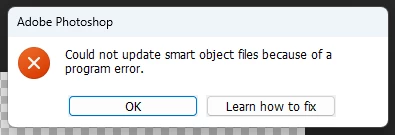
There are not any smart objects in this file, I just made a 16x16 canvas and immediately clicked "Quick Export as PNG." I have also noticed that the error message depends on what I do before first clicking Quick Export as PNG. For example, if I open a canvas, draw on it with the pencil too, and then try to export, I see this:
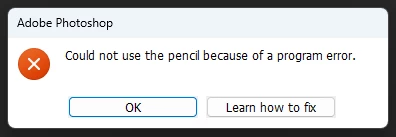
Other export options such as saving a one-layer image as a PNG work but this is very inconvenient.
Another thing I've noticed is when I open Photoshop now I don't see the typical Home screen with recent files and everything, it just jumps straight into the normal photoshop page even though there isn't any document or canvas open.
Here's what I've tried to do to fix this issue:
- Taken every step in the Learn how to fix article
- Restarting my computer
- Reset Preferences by dragging the Roaming\Adobe\Adobe Photoshop 2025\Adobe Photoshop 2025 Settings folder to the desktop and relaunching
- Deleting the Roaming\Adobe\UXP\PluginsStorage\PHSP\25 (or your version)\Internal folder
- Doing both 2 and 3 at once
- Uninstalling and reinstalling Photoshop via Creative Cloud
- Copying the contents of the correct E:\...\Roaming\Adobe folder to the old C:\...\Roaming\Adobe folder at the original path that Adobe apps should not be accessing but keep creating
8. Using the command line to create a symbolic link from C:\...\Roaming\Adobe to E:\...\Roaming\Adobe
This issue is extremely inconvenient for me and I would really appreciate some help. Thanks!
 AdChoices