Participant
December 10, 2022
Answered

Photoshop 24.0 default file location to local computer option

  • December 10, 2022
  • 2 replies
  • 5590 views

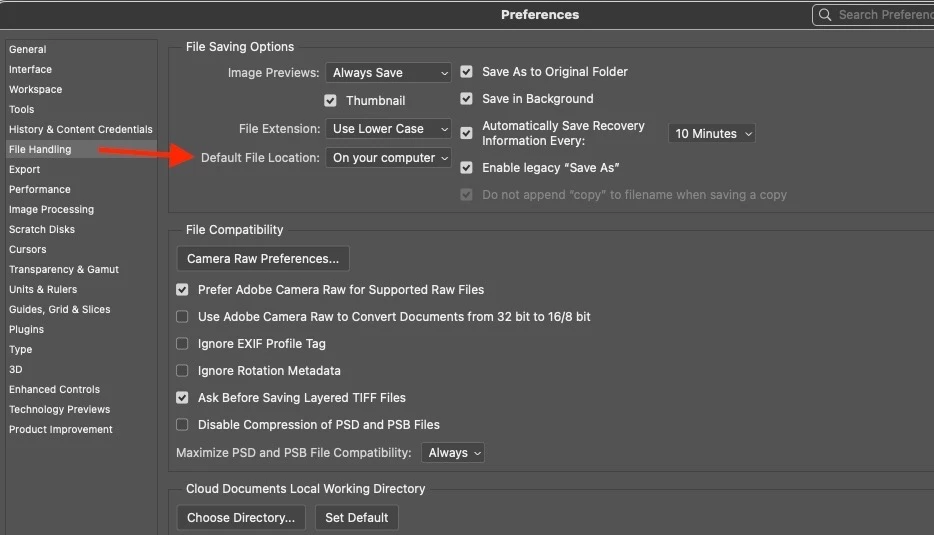
Hi, I'm trying to find the "Default File Location" in the options that enable save without ever seeing this annoying cloud save popup on Photoshop, but after updating to 24.0 I cannot find and change it to be able to save only locally without having to click "On your computer" button each time I want to save.

It's super annoying. I've checked other tabs but cannot find it. Is it named something different this time?

PS Version: 24.0.0, Windows 10

Thanks for help 
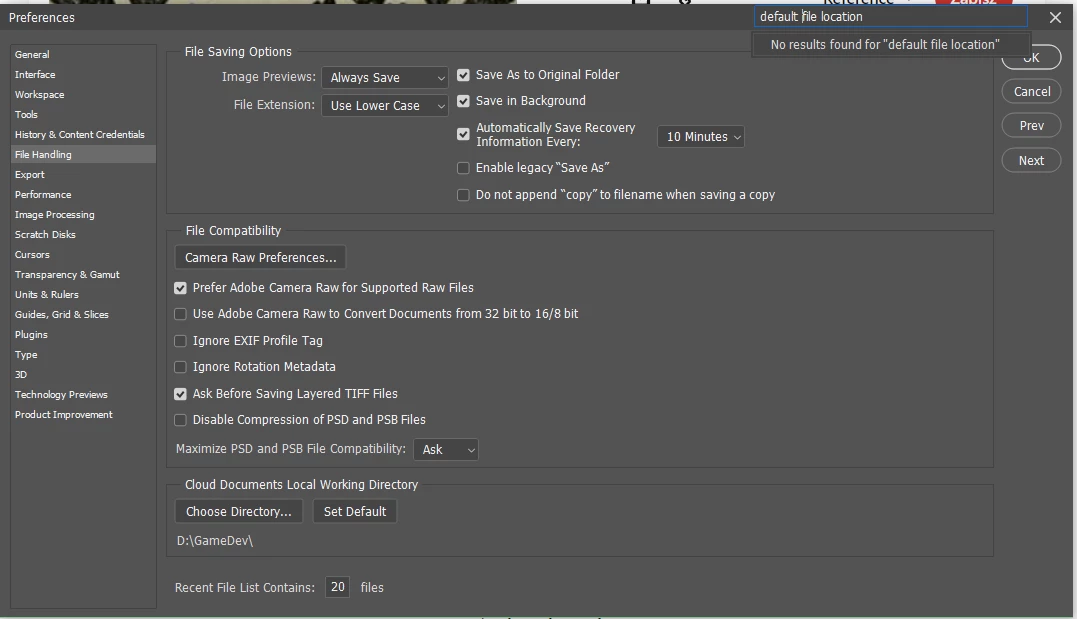


This topic has been closed for replies.
Correct answer TheDigitalDog

The issue is (and I don't know why) you don't see this:

If you select "Enable Legacy "Save As" do you see the option above? 

2 replies

TheDigitalDog
TheDigitalDogCorrect answer
Inspiring
December 12, 2022

The issue is (and I don't know why) you don't see this:

If you select "Enable Legacy "Save As" do you see the option above? 

Author “Color Management for Photographers" & "Photoshop CC Color Management/pluralsight"
Participant
December 15, 2022

Hi, after updating Photoshop and restarting the computer the option shows up. Really don't know what happened. I'm really glad that this option is still there. 

Still. If Adobe wouldn't force its cloud on us there wouldn't be multiple topics on forums. 

TheDigitalDog
Inspiring
January 24, 2023

I have updated, rebooted my PC and reopened Photoshop and it still isn't there. Incredibly frustrating! Takes an extra step to save. Hate it!!


quote

I have updated, rebooted my PC and reopened Photoshop and it still isn't there. Incredibly frustrating! Takes an extra step to save. Hate it!!


By @slmayhew77

Try resetting your Photoshop preferences. Press and hold Alt+Control+Shift (Windows) or Option+Command+Shift (macOS) immediately after launching Photoshop. You will be prompted to delete the current settings. You can also reset preferences on quit if Photoshop is running by going into General Preferences>General>Reset on Quit.


Author “Color Management for Photographers" & "Photoshop CC Color Management/pluralsight"
Nancy OShea
Community Expert
Community Expert
December 10, 2022

My computer defaults to whichever location was last opened.

If was a file opened from an external drive, it defaults to that when I save.  If it was opened from a folder on my primary HD, it defaults to that location.  And so on...


Nancy O'Shea— Product User & Community Expert
Participant
December 10, 2022

Hi! Can you elaborate on what you mean by having the last opened location? Do you have a popup like this or it goes straight to save as window?


Nancy OShea
Community Expert
Community Expert
December 12, 2022

That's showing Cloud Documents.  I typically save and open work files from local computer HD so they can be backed up nightly by my file backup/recovery service.


Click On Your Computer button.


Nancy O'Shea— Product User & Community Expert