


Known Participant
March 6, 2023
Question

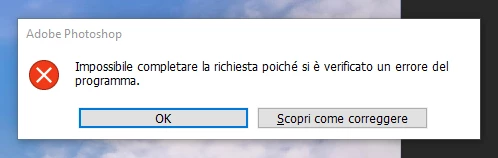
Photoshop 24.2 when trying to resize gives an error

  • March 6, 2023
  • 2 replies
  • 2072 views

Photoshop 24.2 when trying to resize gives an error
(Translation: "The request could not be completed because an error has occurred")
I tried do de-install and re install back but it keeps occurring.

I am on Win10 64 

This topic has been closed for replies.

2 replies

Ranjisha Sengupta
Legend
March 6, 2023

Hi @LunaBarak 


Thanks for reaching out. 

How are you trying to resize the file? What type of file are you working with?

You can try to reset the preferences of Photoshop using the steps mentioned here: https://helpx.adobe.com/photoshop/using/preferences.html#reset_preferences

Please back up your settings prior to resetting the preferences. You can check: https://helpx.adobe.com/photoshop/using/preferences.html#BackupPhotoshoppreferences


Let us know how it goes.


Ranjisha

LunaBarakAuthor
Known Participant
March 6, 2023

Hello Ranjisha ty for reply.
I have just now updated PS to this new version so preferences are untouched no need to reset.
I have a simple PSD file open, I added a layer and on this layer I have made a dot with the brush, if I try to resize the dot with the resize tool I get an error.

Kevin Stohlmeyer
Community Expert
Community Expert
March 6, 2023

Hi @LunaBarak how much free HD space do you have in your Preferences/Scratch Disk??

Kevin Stohlmeyer
Community Expert
Community Expert
March 6, 2023

Hi @LunaBarak how much free HD space do you have in Preferences/Scratch Disk?