


- Home
- Photoshop ecosystem
- Discussions
- Photoshop always opens images in wrong tab order
- Photoshop always opens images in wrong tab order
Photoshop always opens images in wrong tab order

Copy link to clipboard
Copied
I remember this issue was being discussed many years ago, but I don't see that anything changed.
If I open a sequence of numbered images in Photoshop, they always open in a reversed order. Which means that the last image will always appear in the foremost tab in Photoshop. I would expect some kind of option to arrange that in >Windows>Arrange, but it's not there. This is strange and counter intuitive. I often need to perform repetitive actions on series of images and this problem is driving me nuts, and slows down the workflow... Is there any way dealing with that?
thanks



Explore related tutorials & articles
 21
Replies
21
21
Replies
21


Copy link to clipboard
Copied
I don’t know the answer to your question off hand. However, you mention repetitive Actions on a batch of images. Perhaps you could use the Batch script along with your Actions to simplify the process?


Copy link to clipboard
Copied
Benjamin Root Hmmm.... that name rings a bell.  So where have you been?
Copy link to clipboard
Copied
Thanks Benjamin
of course I use Batch actions when I can, but in many cases I need to eye control each image before applying the actions, or before saving and closing them. And I prefer to go over them in the correct order. What happens now is that every time I close an earlier image, it switches back immediately to the last image, and not to the next in sequence, as one would expect...
Copy link to clipboard
Copied
Yes, I have to agree this can be annoying. It’d be nice if there was an option to arrange the tabs by filename (alphabetically/numerically).
Feature requests can be made at feedback.photoshop.com. If you post a feature request,be sure to post a link here so we can “me too” the request.
Copy link to clipboard
Copied
Thanks! Actually somebody has already posted the same question, so I marked Me Too myself there: Photoshop CC2019: Images opening in the wrong order | Photoshop Family Customer Community

Copy link to clipboard
Copied
because in each tab it opens the first one that ir managed to import first and so on. if you need specific order of tabs , open images in photoshop saperately.
Copy link to clipboard
Copied
I've just had an idea. Find the images in Bridge, and drag them into the order you want the tabs to appear. Open with Photoshop, and they will open the rearranged order. A bit of messing, but it works. The problem is that if you are going to drag to rearrange them in Bridge, you might as well drag into the required order inside Photoshop.



Copy link to clipboard
Copied
What are these guys making, Trevor.Dennis?
Copy link to clipboard
Copied
Well, that could work, but not when they are hundreds... and I am not using Bridge at all. maybe I should start...?
Copy link to clipboard
Copied
soom1976 wrote
I am not using Bridge at all. maybe I should start...?
I'd hate to be without it. Everything from basic Digital Asset Management through to some very useful tools
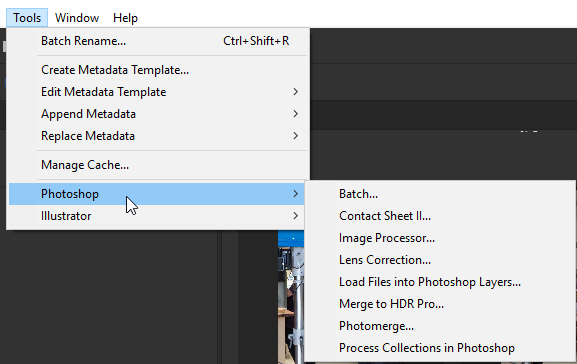
We use it the same was you can use Lightroom to select sets of images for interclub competitions. You give images star ratings and sort them accordingly. For me, anything with one star goes to the Recycle Folder. I love Bridge.
Copy link to clipboard
Copied
Thing is that I am already using PathFinder for most file operations, and I don't really need Bridge. I can invoke all the batch actions directly from Photoshop anyway. I am also not a photographer, so I don't use ratings, etc. (I do animation). Anyway, thanks for the suggestions, I will definitely have to try Bridge for the purpose of opening files in correct order.
Copy link to clipboard
Copied
Hey that’s an idea. I wonder if one simply reversed the sort order in Bridge, if the files would open in the correct order in Photoshop? Hmm...
Copy link to clipboard
Copied
https://forums.adobe.com/people/Benjamin+Root wrote
Hey that’s an idea. I wonder if one simply reversed the sort order in Bridge, if the files would open in the correct order in Photoshop? Hmm...
Yep. If you open from Bridge, they open in the order they appear in.
Jane, I had the camera there to get pictures for poster for one of our sponsors, who help pay for the equipment. The lad in the background is covered by another picture, so this is how the images appeared on the poster.

Copy link to clipboard
Copied
Trevor.Dennis wrote
Jane, I had the camera there to get pictures for poster for one of our sponsors, who help pay for the equipment. The lad in the background is covered by another picture, so this is how the images appeared on the poster.
Trevor, the compostion of the pictures looks nice, and do you get to use those tools for whatever you want to make whenever you want to make them?
soom1976 , yes use Bridge! You can do so much with it, including batch renaming pictures, ranking, keywording, filtering, and more.
Copy link to clipboard
Copied
jane-e wrote
Trevor.Dennis wrote
Jane, I had the camera there to get pictures for poster for one of our sponsors, who help pay for the equipment. The lad in the background is covered by another picture, so this is how the images appeared on the poster.
Trevor, the compostion of the pictures looks nice, and do you get to use those tools for whatever you want to make whenever you want to make them?
We do work for schools, community organisations, elderly etc. but we have free use of all the equipment for our own projects. As well as the fully equipped wood shop, we have an engineering shed with lathe, mill, sheet metal machine and a decent welder. Some of the lads just come along for a natter, and to be insulted — you miss the banter when you retire. I'm secretary, but as you can imagine, I take pictures and produce graphics, but I have been doing that for community organisations since I moved here 14 years ago.

Copy link to clipboard
Copied
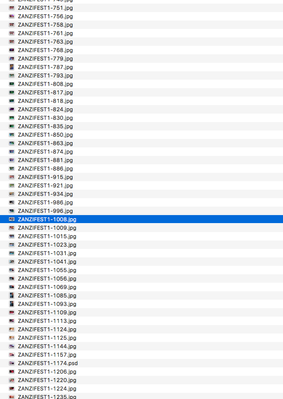
I noticed the same when using batch. I had a list folder of photos with random numbers going up to 1048 orso.
I noticed it started with the files with 4 digits, then 3 digits, 2digiats and then 1 digit. Nowhere did i found why that is.
I used OSX function to rename everyhting, so i made suffix with 5 digits. Now the order is correct
PS in CS 2018 if i drag it inside the app. The order is correct. This is on OSX though

Copy link to clipboard
Copied
I wrote a script for that here:

Copy link to clipboard
Copied
Have you found a solution to this?
Copy link to clipboard
Copied
Have you found a solution to this?
By @Chimli Retouch & Motion

I believe that the answer depends on the filenames and where/how the images are being opened.
More information on filenames, exactly how images are opened and screenshots may help.
Copy link to clipboard
Copied
I open them from Lightroom with "Edit in Photoshop". The files are named "Custom name - filename". It has just started to be a problem, they did open after Capture time before, but now when I open them it's no order at all. I want them to be opened after each other since I manually merge bracket photos. Now I have to go to the list and look for filenames and then place correct files togheter. It is very time consuming. Before I could just use ctrl+tab to select next image.
Copy link to clipboard
Copied
That you open from Lr is a key point, however, I can't help there as I don't use it.
If you can open using Photoshop's File > Open command or use Adobe Bridge to sort and open then you should have more control.
Good luck!


Find more inspiration, events, and resources on the new Adobe Community
Explore Now
 AdChoices