


- Home
- Photoshop ecosystem
- Discussions
- Re: Photoshop Artboards and CMYK on updated Photos...
- Re: Photoshop Artboards and CMYK on updated Photos...

Copy link to clipboard
Copied
While I set up a new document, checking off Artboards takes away my option to choose CMYK Color Mode. Why?


 1 Correct answer


I believe it because Artboards support was added for web development which is a RGB world not a print CMYK world.


Explore related tutorials & articles
 15
Replies
15
15
Replies
15

Copy link to clipboard
Copied
I believe it because Artboards support was added for web development which is a RGB world not a print CMYK world.

Copy link to clipboard
Copied
But WHY? Is there a place where I can find documentation that shows WHY they would not allow an Artboard to be CMYK? Is the same true for Illustrator or InDesign? Just wondering. Thanks!

Copy link to clipboard
Copied
This still appears to be an issue in Photoshop as of October 2020, and I wasn't able to find a more recent answer to this question. However, I did some testing on a workaround: 1) Set up a file, selecting CMYK at the start. Artboard option is not available at this stage. 2) Once the file is open, I turned it into an artboard (Layer > New > Artboard). 3) I double checked Image > Mode and it still appears to be in CMYK.
Not as convenient as it could be, but hopefully this helps someone else!

Copy link to clipboard
Copied
I've found that this way doesn't allow you to use the artboard feature as you normally would e.g. to place reference images/objects around the artboard 😞 I'd LOVE this option in photoshop for CYMK!

Copy link to clipboard
Copied
This is awesome

Copy link to clipboard
Copied
THANK YOU!!

Copy link to clipboard
Copied
so smart! thank you for this!
Copy link to clipboard
Copied
Happy to hear it was helpful!

Copy link to clipboard
Copied
Thanks, Digital1834!

Copy link to clipboard
Copied
This is a start, but then how do you export individual artboards as CMYK?
Copy link to clipboard
Copied
File > Export > Artboards to Files or Artboards to PDF
Since you're working in CMYK the work is presumably destined for print, in which case I'm typically wanting a PDF, not a collection of individual JPG's or PNG's
But if you wanted that, and it's forcing you to export your collection of JPG/PNG's in a single PDF, you could always open up that PDF in Acrobat afterwards, and separate the pages there
Copy link to clipboard
Copied
Yeah, I'm looking for CMYK JPGs unfortunately. I understand it's an edge case. Thanks for following up. In a perfect world I would just use InDesign pages instead of Photoshop artboards, but the anti-aliasing in ID is far inferior to PS... But that's a different topic entirely.

Copy link to clipboard
Copied
Copy link to clipboard
Copied
@Stephen Marsh Disregard, Artboards to Files seems to do the trick. I misunderstood that suggestion on first read.

Copy link to clipboard
Copied
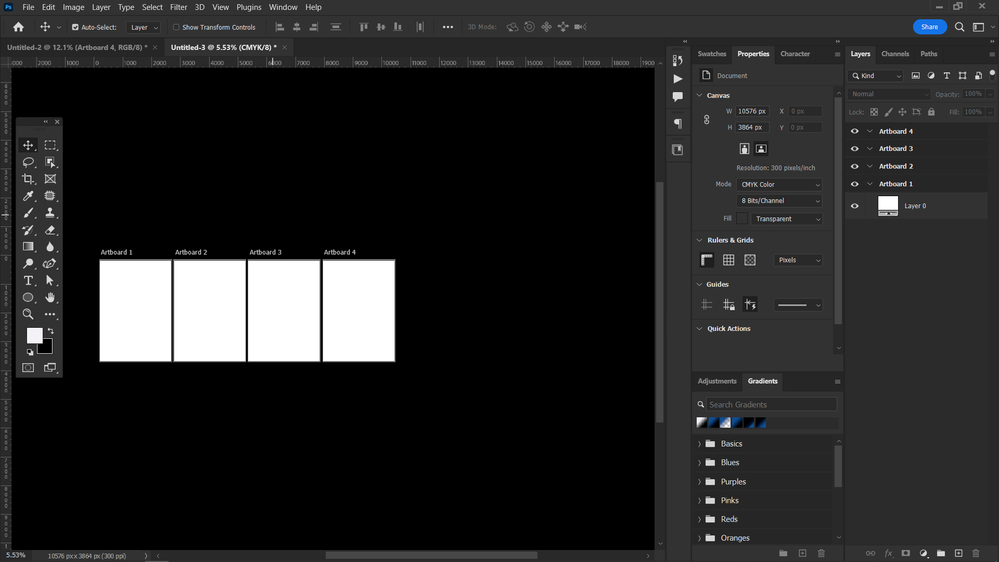
there is a workaround it makes a new document without checking the Artboard box then choose your color mode and makes the new document then using the Artboard tool hidden behind the Move tool make an Artboard.
note: using the artboard tool will make your document disappear but don't worry you can use the properties panel to adjust the width and height of the artboard.
after that use your move tool to select the artboard from the layer panel and use the plus signs on each side of your Artboard to make a new artboard in that direction, now you have a document with multiple artboard and CMYK color mode


Find more inspiration, events, and resources on the new Adobe Community
Explore Now
 AdChoices