



gener7
Community Expert
Community Expert
September 9, 2013
Answered

Photoshop CC 14.1 GPU not detected (MacOS)

  • September 9, 2013
  • 13 replies
  • 38480 views

So I upgraded to Photoshop CC 14.1  Mid 2009 Macbook, 10.8.4 6GB ram/NVDIA 9400M GPU 236 MB ram.

When I launch PS by itself, my GPU is detected. If I double click on a file, there is a delay in opening and I get this message:
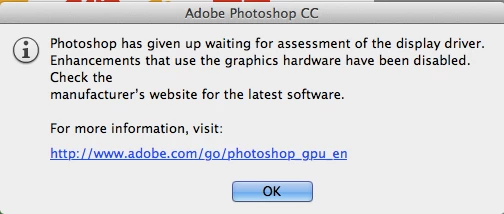
All my OpenGL functions are disabled. So now what can be done to get my GPU working as it did in 14.0?

I'll guess I'm out of luck since NVDIA doesn't issue updated drivers for my GPU.

Just tell me what logfiles you need and how I can get them for you. I'm thinking maybe 14.1 is too much for this system and I'll have to dial back if this is not a bug.

Gene

    This topic has been closed for replies.
    Correct answer Adam Jerugim

    We have a workaround that should get the GPU working again with 14.1 on affected Mac systems...

    1.  Navigate to the folder where the application is installed <OS Volume>\Applications\Adobe Photoshop CC\

    2.  select the Adobe Photoshop CC application and right-click or control click on it - then select Show Package Contents from the menu options

    3.  Navigate to the following location (within the app package):  Contents\MacOS\

    4.  in that folder you should see something called sniffer - rename that by simply adding a '~' at the begginning of the file name

    Do not delete this file.  You'll likely need to remove the '~' in the future in order for future updates to work for 14.x.

    We'll make sure this gets properly fixed soon.

    Thanks,

    Adam

    13 replies

    Mr_Critterfur
    Inspiring
    November 29, 2018

    I don't know if this matters, but I've actually had this problem since CS6 on 3 different computers with 3 different GPUs.

    Participant
    December 4, 2015

    Hi I have a macbook pro retina model 2014 and I have the same problem... pretty sure is not the graphic card cuse I play every game without trouble and I can do the same action in Fireworks that works perfectly... the problem is in photoshop CC 100%.... Does someone could fix it?

    Participant
    February 25, 2015

    Okay guys i have a solution that worked for me after lots of investigation. The issue is probably with OS X. If you are on yosemite do the following. Go to system preferences > energy saver and deselect "Automatic graphics switching" if it is already selected. Now go to photoshop preferences and and turn on enable graphics. Hope this helps!

    gener7
    Community Expert
    gener7Community ExpertAuthor
    Community Expert
    February 25, 2015

    Thanks very much for posting the solution, I'll make note of it.

    I'm glad you are out of the virtual tar pits and back to work.

    Gene

    Freyjad1706
    Participating Frequently
    January 31, 2015

    I get this warning, but I'm not a Mac user  -  I have windows 8 .  Is there a similar fix for that too?

    Trevor.Dennis
    Community Expert
    Community Expert
    February 25, 2015

    Freyjad1706 wrote:

    I get this warning, but I'm not a Mac user  -  I have windows 8 .  Is there a similar fix for that too?

    Make sure you have the most recent video card driver from the card maker's site.

    https://helpx.adobe.com/photoshop/kb/photoshop-cs6-gpu-faq1.html

    Freyjad1706
    Participating Frequently
    January 28, 2015

    I don't have the mac  - I'm windows. However after closing Photoshop and re-booting my machine a couple of times the problem went away.  Hopefully for good.

    Adam Jerugim
    Community Manager
    Community Manager
    September 12, 2013

    We just released an update (14.1.1) that addresses this issue for Mac users (Windows users who continue to experience any GPU-related issues should rename sniffer.exe for the time being). 

    For more information on the update please visit:  http://blogs.adobe.com/crawlspace/2013/09/photoshop-cc-14-1-1-update-now-available.html

    Thanks,

    Adam

    Chris Cox
    Legend
    September 12, 2013

    Make sure to return the ~sniffer back to it's normal name before trying to update.

    Illustrative_Mark
    Participating Frequently
    September 12, 2013

    Thanks Adobe, got the Ps 14-1-1update this AM and the GPU and all 3D functionality are officialy on board.

    I had seen all the responces to this thread in my mail box. After quickly scanning them, I hadn't seen the warning to switch the "~sniffer.exe" back, removing the tilde accent prefix "~". However after the update had completed, I reviewed the folder in which it resides and see that this update, at least in OS X, simply and not surprisingly, duplicated the amended tilde file with a  presumably up-dated (and non-accented) vertion.

    Thanks again Adobe, for your swift attention in this mater, not to mention franck discussion regarding it here.

    Mark S

    Participant
    September 11, 2013

    Thanks for the workaround, did the trick for me. I've got the exact same system/setup as the original poster. I have had nothing but troubles for the last 2 days getting updated to 14.1, but I'm glad this takes care of what is hopefully my last problem.

    Participating Frequently
    September 11, 2013

    Does anybody know, if it is possible to update an ATI Radeon HD 4850 card on Mac,

    I have an iMac 9,1 with this card, Sytem Mountain Lion.

    On the AMD site I did´nt find anything.

    Participating Frequently
    September 11, 2013

    And also I would be interested to know, why the mentioned workarounds here do not work on my iMac with ATI radeon Hd 4850 card. Anybody knows?

    Adam Jerugim
    Community Manager
    Adam JerugimCommunity ManagerCorrect answer
    Community Manager
    September 9, 2013

    We have a workaround that should get the GPU working again with 14.1 on affected Mac systems...

    1.  Navigate to the folder where the application is installed <OS Volume>\Applications\Adobe Photoshop CC\

    2.  select the Adobe Photoshop CC application and right-click or control click on it - then select Show Package Contents from the menu options

    3.  Navigate to the following location (within the app package):  Contents\MacOS\

    4.  in that folder you should see something called sniffer - rename that by simply adding a '~' at the begginning of the file name

    Do not delete this file.  You'll likely need to remove the '~' in the future in order for future updates to work for 14.x.

    We'll make sure this gets properly fixed soon.

    Thanks,

    Adam

    Participating Frequently
    September 9, 2013

    Workaround confirmed to work for me. You'll obviously need to restart Photoshop for the change to take effect

    Thanks, Adam.

    Participating Frequently
    September 9, 2013

    OK guys, oh gosh, at last... the renaming of the sniffer by deleting the s to"niffer" worked, MANY thanks. Now everything works beatifully and FASTER all with multi GPU installed. All tested.

    But please fix the sniffer app... ;-P

    Because my GTX 680 setup supports any actual OpenGL feature, i guess PS without the sniffer starts fully featured, assuming MAX OpenGL/CL settings... and THEN Guys like predharma who have limited GPUs wont work cause without the sniffer, it cant sniff and will not adjust and limit the PS OpenGL features... so PS quits with the above message i guess... look into it.

    Known Participant
    September 9, 2013

    Rebooting and clearing Photoshop CC 14.1 prefs didn't work for me either.

    On the NVIDIA website the most recent 9M series driver for OS X  is for 10.6.8, which seems a little old.

    MacBook Pro

    15-inch, Mid 2009

    Processor  2.8 GHz Intel Core 2 Duo

    Memory  8 GB 1067 MHz DDR3

    Graphics  NVIDIA GeForce 9600M GT 512 MB

    Software  OS X 10.8.4 (12E55)

    System Report > Graphics/Displays info gives more details:

    NVIDIA GeForce 9600M GT:

      Chipset Model:          NVIDIA GeForce 9600M GT

      Type:          GPU

      Bus:          PCIe

      PCIe Lane Width:          x16

      VRAM (Total):          512 MB

      Vendor:          NVIDIA (0x10de)

      Device ID:          0x0647

      Revision ID:          0x00a1

      ROM Revision:          3448

      gMux Version:          1.8.8

      Displays:

    Color LCD:

      Display Type:          LCD

      Resolution:          1440 x 900

      Pixel Depth:          32-Bit Color (ARGB8888)

      Mirror:          Off

      Online:          Yes

      Built-In:          Yes

    Cinema HD Display:

      Display Type:          LCD

      Resolution:          1920 x 1200

      Pixel Depth:          32-Bit Color (ARGB8888)

      Main Display:          Yes

      Mirror:          Off

      Online:          Yes

      Rotation:          Supported

    Hope this helps troubleshoot.

    Participating Frequently
    September 9, 2013

    FYI, I have also an expansion PCIe card for external dual GTX, Cuda (octane render) for unbiased heavy-duty rendering... but my primary internal card is 680 GTX, so this shouldnt matter... maybe the new 14.1 sniffer has problems if more graphics cards are in the Mac present ?

    September 9, 2013

    If the cards are identical it is OK, otherwise can cause problems.  PS does not use CUDA.

    Adam Jerugim
    Community Manager
    Community Manager
    September 9, 2013

    I'm running PS CC 14.1 on Mac systems with nVidia Geforce 650M and 680 GTX cards with full GPU capabilities.

    This appears to be a Mac OS X problem only - is anyone experiecing this issue running Windows?

    Here's a possible workaround if you are seeing this:

    Try logging out and back into your user account (or better yet, restarting your system), then launch PS while resetting the preferences (shft-opt-cmd during launch).  Now check Performance preferences in PS and see if the card is recognized and GPU features are working as expected.

    If this doesn't work to mitigate the issue, please post your system specs here (OS, video card GPU, Mac model) and we'll see if we can reproduce the issue here.


    Thanks,

    Adam

    Participating Frequently
    September 9, 2013

    doesn't help

    Macbook Pro

    9600M GT

    10.8.4

    Participating Frequently
    September 9, 2013

    Reverted to 14.0, and will stay on it... works flawless. Until you guys fix 14.1 or only in 14.2 ? Whatever...

    Still i dont get how such highend standard components like Mac Pro,10.8.4,CUDA, GTX 680 arent tested enough... Especially on the Mac where you dont have Millions of Models like in the PC World (and ironically this problem is only on Mac!).. LOL

    In case that there were some modifications for 10.9 that caused the problem, ok, but still watch out for production-ready 10.8 binaries, we users DEPEND on it, even if tomorrow 10.9 would be presented at the Apple keynote, MOST user WILL NOT SWITCH for a LONG time (like me). Because to have a battle-tested OS (10.8) often is more important than a new OS (10.9). I will maybe switch when 10.x.2,3 or.4 comes out and bugs are ironed out, did that on the previous systems too.

    Also i wanna add that 14.1 it launches SLOWER and is somehow sluggish even at processing CPU-only effects... 14.0 is fast like a flash.