



guidos50720937
Inspiring
October 20, 2017
Answered

Photoshop CC 2018 IGNORES TABLET PROPERTIES

  • October 20, 2017
  • 34 replies
  • 127508 views

I just updated Photoshop to the latest update ( 19.0 20170929.r.165 2017/09/29: 1138933  x64)
and it completely ignores the tablet properties such as:

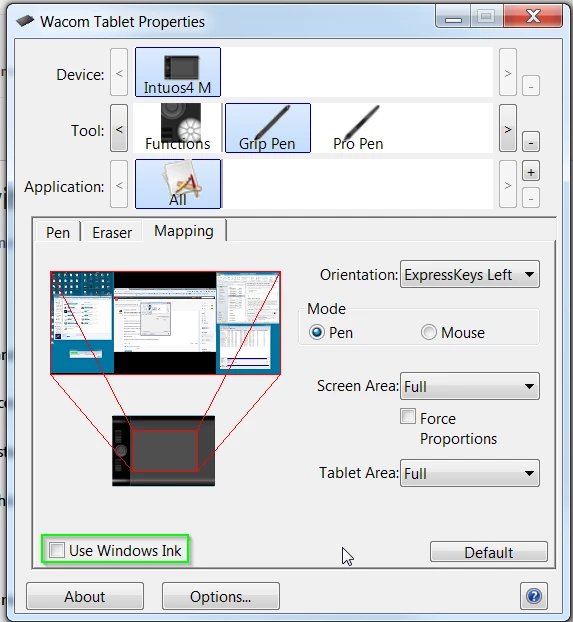
a) Pen Pressure (the pen no longer have pen pressure, no matter if windows ink is turned on or of)
b) Screen Lock (the tablet should lock on Monitor 1 while using Photoshop, and it doesn't)

Every other software i'm using such as Clip studio Paint, zBrush and so on are working fine.

While photoshop completely ignores them.

The previous version used to work fine, but it's been overwritten by the new one without even asking.

The software, no matter the new features, has got worse with every update in terms of performance,
stability, and usability.

Introducing the standard windows Alt key behaviour was already driving me nuts.

i still have not tried the windows ink workaround
i hope this gets fixed TODAY because as it is, PS is useless to me, and i'll be moving to
any alternative available.
    This topic has been closed for replies.
    Correct answer guidos50720937

    Update, the previous Win Ink workaround fix pen pressure and the screen lock

    Trevor.Dennis  ha scritto

    hansb90361119 wrote:

    If you check the "use windows ink" for wacom intous 5 (most likly all of the models) you are getting a REALLY annoying lag with zoom and pen size adjuster etc. If you turn it off, it works perfect, but the downside is the pen pressure opacity don't work.

    You've turned off Windows Ink, so without supplying an alternative, pen pressure is not going to work.  You have to enable WinTab.

    If Windows Ink is disabled

    1. Create a file that contains instructions to revert to the WinTab functionality.

    2. Create a text file in a text editor such as Notepad.

    Type in the following lines:

    # Use WinTab

    UseSystemStylus 0

    3. Save the file as a plain text file named PSUserConfig.txt

    4. Put (copy) the file into the Photoshop settings folder: C:\Users\[User Name]\AppData\Roaming\Adobe\Adobe Photoshop CC 2015\Adobe Photoshop CC 2015 Settings\

    5. Restart Photoshop and check the pen pressure and overall performance.

    34 replies

    Participant
    January 23, 2018

    I have an issue with Lightroom cc [latest update] where the sliders won't grab with the pen on my Wacom Intuos Pro. It doesn't seem to effect Photoshop which works fine. I've updated the Wacom driver but this has only partially fixed the problem.

    Barry

    JaniYlinen
    Participant
    January 4, 2018

    The file does not exist there by default. You have to create it. in folder right click with mouse and choose "new text document". the Text editor opens and you have to write in the document two lines

    # Use WinTab

    UseSystemStylus 0

    Save the document by name PSUserConfig.txt

    Restart photoshop

    Participant
    December 18, 2017

    I ran into the same pressure sensitivity issue, and the PSUserConfig.txt fix worked for me.

    It's kind of crazy to me that every time Photoshop, Wacom drivers, or Windows is updated, all three break compatibility with each other. Software development can't be easy, but how is it that the two biggest companies in the art industry still can't play nice with each other after all these years?

    JaniYlinen
    Participant
    December 5, 2017

    In photoshop 2018 there is quite nice and adjustable brush smoothing now.

    If that is not enough I really recommend trying Lazy Nezumi... It is pretty much amazing... and works with any drawing app and even with substance painter and such ...https://lazynezumi.com/

    Paula Shin
    Inspiring
    February 20, 2018

    Lazy Nezumi is still a must.   

    JaniYlinen
    Participant
    December 5, 2017

    You have to disable windows ink from wacom settings and from windows 10 settings.

    Then make PSUserConfig.txt  containing following two lines

    # Use WinTab

    UseSystemStylus 0

    Save PSUserConfig.txt  to following location

    C:\Users\YOUR_USERNAME\AppData\Roaming\Adobe\Adobe Photoshop CC 2018\Adobe Photoshop CC 2018 Settings

    Restart photoshop

    Participating Frequently
    December 5, 2017

    Ok so this helped for me. Windows Ink bugs are gone and pen pressure works.

    Nice! Perfect? No.

    Brush smoothing got worse. It's not as bad as smoothing disabled but something between that and what it was before when it worked. I had this same problem couple of Wacom driver updates ago. Still... I prefer this rather than those Windows Ink bugs.

    Trevor.Dennis
    Community Expert
    Community Expert
    December 16, 2017

    Try replicate (closing of arc) with a brush that has no transfer and no shape dynamics. Just make it fast enough.

    My Windows Ink bugs:

    - Closing arc.

    - ALT, SHIFT, CONTROL pop-ups on screen when ever I use them while painting.

    - I'm using double click in my lower pen button. It's very unreliable. If I press the pen button to get brush list it works maybe 70% at the time. Really annoying since it is used a lot.

    All these bugs together makes painting very frustrating.


    Blimey, there are some funny old posts in this thread.

    The WinTab text file is not a workaround, so much as choosing to use a different API.  I don't know about Mac systems, but Windows 8.1 and 10 seem to work better with WinTab.  Guillaume, the author of Lazi Nezumi Pro used to be of the opinion that WinTab is the best choice with Windows 8.1 and 10, but now says that later versions of Photoshop CC support Windows Ink, so use whichever works best for you.

    Remember to turn off Windows Ink in Tablet Properties if you want to go with the WinTab API

    Someone asked where to put the WinTab text file, and they are going to kick themselves if they have not already worked it out.  CC 2015 was current when the thread some people have linked to was written. 

    C:\Users\[User Name]\AppData\Roaming\Adobe\Adobe Photoshop CC 2015\Adobe Photoshop CC 2015 Settings\

    So when each new version of Photoshop is released, you have to copy the WinTab file to the new location:

    C:\Users\[User Name]\AppData\Roaming\Adobe\Adobe Photoshop CC 2017\Adobe Photoshop CC 2017 Settings\

    C:\Users\[User Name]\AppData\Roaming\Adobe\Adobe Photoshop CC 2018\Adobe Photoshop CC 2018 Settings\

    If you have an issue that is of a general nature, then it is usually worth checking the forum Overview page, where all sorts of guides and links can be found.  Jeff Tranberry's Trouble Shooting guide, various FAQs, and this Tablet Set-Up guide.  I think some of this info is also helpful with non-Wacom tablets.

    Tablet support for Photoshop on Windows 8

    I'm sorry but I don't know how it works with Macs.

    Participant
    December 5, 2017

    Just got 2018 on my cintiq companion, only to find i have this same issue.  

    Participating Frequently
    December 5, 2017

    This is the most annoying thing that Windows Ink (and Photoshop) does. The upper side of that image is Windows Ink OFF and the down side in Ink ON. If you paint that shape fast enough (regular drawing speed) It combines the strokes for absolutely no reason. It makes these stupid triangles. I can get rid of it if I disable Windows Ink but then there is no pen pressure

    I have Cintiq 24HD, Photoshop CC 2018 and Win 10 and all the latest drivers. The same bug is in My Wacom Mobile Studio (Win10, CC 2018).

    I have the same setup in my iMac and there is NO bug. So it's this lovely Windows ink + Photoshop that just makes me wanna cry

    Participant
    November 17, 2017

    Same problem here, I have to go back to 2017 until it gets fixed. Because this problem just keeps coming back in new upgrades, would it be possible to check and fix this issue always before the publication?

    Best,

    Janne

    nicolashe
    Participant
    November 6, 2017

    The issue of pen pressure and setting from wacom with photoshop has been present in windows since I have memory.... How many of this post are needed for the team of both major players in Digital painting decide is a big worth fixing?

    Participating Frequently
    November 1, 2017

    I just (11/1/17) had Adobe tech remote to my computer to fix this issue. He tried everything and in the end said that I just needed to use 2017 until Wacom updates their drivers. Ummm, Yeah, so my Wacom works flawlessly with every other software but PS2018. Maybe Adobe should look into it and own the problem at their end.

    Known Participant
    November 3, 2017

    I too am reverting to using only PS CC 2017 (not the upgrade 2018, which I already did install) until SOMEONE fixes this.

    I put the PSUserConfig.txt file in the PS settings folder [see thread above] for the upgrade, which did not help. (My memory of problems since installing the upgrade is now fuzzy since I've encountered so many problems, but it's possible it DID help with a problem in 2017 when I RE-installed it after upgrading2018+uninstalling2017.)

    I have the latest Wacom driver (as of this moment) for my Intuos Pro 4M, which seems to work fine in other apps (LR and plug-ins; OS and browser, etc).
    Have also installed latest video card driver at various times when advised that could be THE problem, too. But was not.

    [Not being able to use the Alt-key in some instances is one thing, but I can NOT function in PS without an accurate Wacom pen!]

    Optional rant:

    To TPTB: I'm just a user and not a software engineer, but please don't tell me how 'this stuff is so complicated.' PLEASE try harder to debug your products (even though you already have our money with the subscription model, hmmmm...) and not just shove whatever you have done so far out the door because you want to hype the latest 'features' at your latest conference, etc. Failing that, could you make it easier for us users to report these bugs and then get some feedback from you as to when we may expect a correction? (as in: quickly, please... IMO the subscription model was partly sold on 'we can get new things out to you so much faster' but I do not feel that is also the case for corrections!).

    And it would be even better if these companies (Adobe, MS, Wacom, video card manufacturers) stopped blaming each other's products/drivers for errors (even if true, at least partly) and started to work together to either fix the OVERALL problem or at least inform the customer who ends up VERY FRUSTRATED.

    Thanks for anyone reading this whole msg. ;-)

    Participant
    October 29, 2017

    This solution has not helped me.  I was previously using an intuos pro medium but a couple of months ago purchased a new Wacom and now have the Wacom intuos pro PTH-660 with the latest drivers.  I am using Windows 7.  Unfortunately the advice has not helped and I am unable to use any function with the Wacom in photoshop 2018 and have had to revert to photoshop 2017 until this issue is resolved.