twinbrush
Inspiring
November 29, 2018
Answered

Photoshop CC 2019 New document window not working

  • November 29, 2018
  • 13 replies
  • 30029 views

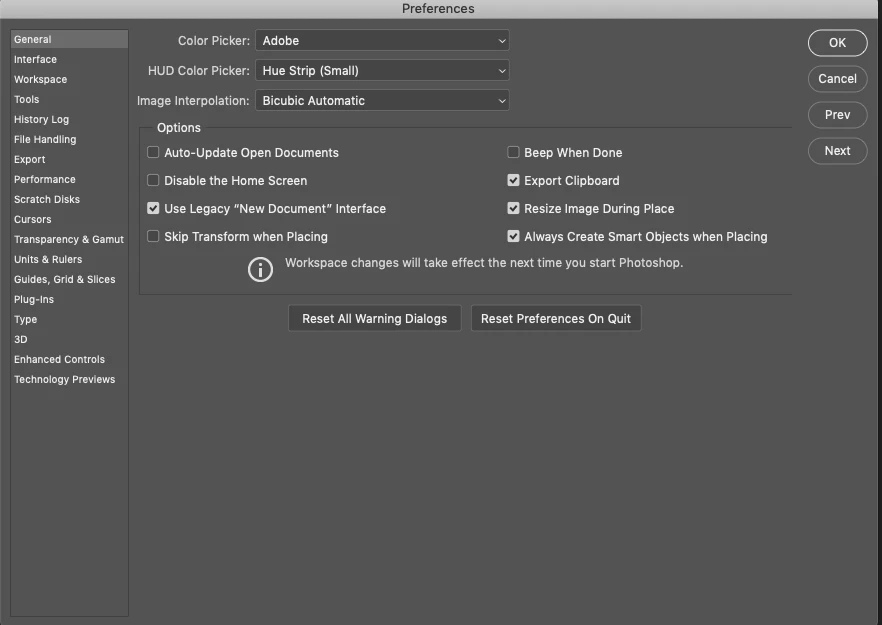
For anybody having trouble creating new documents in the latest 2019 build of Photoshop, you're not alone. Doesn't matter if I select a custom document or a saved template the New Document interface only provides options to 'Cancel' or 'Save Preset'...neither of which allow you to create a new document. The only work around I've found so far is to go to preferences > general and select 'Use legacy "New document" Interface'. Photoshop has been reinstalled, computer restarted and still remains an issue.

The amount of bugs in this new version really makes me think Adobe should invest in some hardcore exterminators....or maybe test the update first before rolling this out to paying customers. I understand its a seriously complex bit of software, but being unable to create a new document....that's one of the first tasks and apparently has been overlooked. Performance is so slow compared to previous versions (which have been getting slower anyway)...on top of that changing the way undo and transform works is just bizarre. Don't get me wrong I'm 100% an advocate for having consistency across the shortcuts in the suite, but the fact there's not even consistency in how the transform command works within Photoshop itself is inexcusable. Don't hold shift to constrain proportions on image layers, but do hold it for shape or Photoshop vector layers.....what!?!

Rant over....for now

    This topic has been closed for replies.
    Correct answer kathyking333

    Yes, this is an issue with the new version, but this is the work around that solved the issue. Not ideal, since you don't get the same "new" window as the update, but it works. Go to your Preferences and under General, check the box Use Legacy "New Document" Interface.

    13 replies

    Participant
    December 28, 2018

    Similar issue here. I hit new document and it's completely blank. Brand new install, reset preferences to no avail.

    This post showing to change to the legacy dialog has been extremely helpful. I can't believe photoshop even made it past any kind of quality control.

    November 29, 2018

    Hi

    Have you tried resetting Photoshop preferences

    Also try updating your GPU driver from the manufacturers website

    Shawn Zeilenga
    Known Participant
    December 14, 2018

    I also have a problem with the "Create New" Dialogue Window.  I can't select the color mode (which isn't the biggest issue since it can also be changed in the Image>Mode Menu) The area is unresponsive.

    The other issue is that when I select "Create" nothing happens.  I can click it 5 times and it doesn't do anything.  It only happens when I select "Close" after clicking "Create" that a new document is created.  Also, however many times I clicked the "Create" button before clicking "Close", that is how many documents will open.  Seems to be an annoying bug.


    Thanks

    Shawn

    Muqqarib Hassan
    Inspiring
    November 29, 2018

    Hi,

    Can you please tell us which error you are facing when you try to create new doc ?

    Thanks.

    twinbrush
    twinbrushAuthor
    Inspiring
    December 18, 2018

    Its all in the original post mate

    I don't get an 'error'...I just don't get a new document when I click 'create' nothing happens. Its fine, im going back in time to a version that worked

    technicale47785008
    Participant
    March 25, 2020

    I get the same problem, the Create new window comes up but the Create button simply doesn't work. Everything else works, you can set image size etc, just the button is dead. Using the legacy window fixes it. You would really think that something this basic wouldn't get through bug testing...