


Known Participant
March 21, 2021
Answered

Photoshop CC Javascript to count number of frames in timeline

  • March 21, 2021
  • 2 replies
  • 868 views

I want to find a number of frames on the timeline and move the indicator to read the first frame and so on using javascript. I have tried with the below script which is not working on photoshop cc 2019. I can get only 0 as a number of frames.


var r = new ActionReference();

r.putProperty(charIDToTypeID('Prpr'), stringIDToTypeID('frameCount'));

r.putClass(stringIDToTypeID('timeline'));

var ret = executeActionGet(r);

alert( ret.getInteger(stringIDToTypeID('frameCount')) );


I am attaching the timeline and screenshot and PSD for reference.
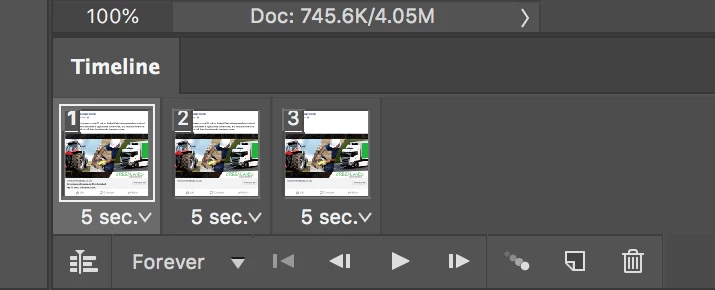


Thanks

This topic has been closed for replies.
Correct answer Chuck Uebele

As r-bin gave you the code to get the number of frames, here is that plus how to go to a particular frame:


var r = new ActionReference();
r.putProperty(charIDToTypeID('Prpr'), stringIDToTypeID('frameCount'));
r.putClass(stringIDToTypeID('animationClass'));
var ret = executeActionGet(r);

goToFrame(1)//enter frame you want to goto here. now it shows the first frame;

function goToFrame(frameNum){
    var idslct = charIDToTypeID( "slct" );
        var desc2 = new ActionDescriptor();
        var idnull = charIDToTypeID( "null" );
            var ref1 = new ActionReference();
            var idanimationFrameClass = stringIDToTypeID( "animationFrameClass" );
            ref1.putIndex( idanimationFrameClass, frameNum );
        desc2.putReference( idnull, ref1 );
    executeAction( idslct, desc2, DialogModes.NO );
    }


2 replies

Chuck Uebele
Community Expert
Chuck UebeleCommunity ExpertCorrect answer
Community Expert
March 21, 2021

As r-bin gave you the code to get the number of frames, here is that plus how to go to a particular frame:


var r = new ActionReference();
r.putProperty(charIDToTypeID('Prpr'), stringIDToTypeID('frameCount'));
r.putClass(stringIDToTypeID('animationClass'));
var ret = executeActionGet(r);

goToFrame(1)//enter frame you want to goto here. now it shows the first frame;

function goToFrame(frameNum){
    var idslct = charIDToTypeID( "slct" );
        var desc2 = new ActionDescriptor();
        var idnull = charIDToTypeID( "null" );
            var ref1 = new ActionReference();
            var idanimationFrameClass = stringIDToTypeID( "animationFrameClass" );
            ref1.putIndex( idanimationFrameClass, frameNum );
        desc2.putReference( idnull, ref1 );
    executeAction( idslct, desc2, DialogModes.NO );
    }


Known Participant
March 21, 2021

Thank you very much for helping me with this Chuck Uebele. It's working as expected.

Legend
March 21, 2021
Known Participant
March 21, 2021

Thanks r-bin. It works great. I also need to move the indicator to read the first frame and so on using javascript. Can you please help me with that?