


Inspiring
January 18, 2018
Answered

Photoshop CC - Layer Style Dialog - Contours Disappear

  • January 18, 2018
  • 1 reply
  • 452 views

I've been struggling with this one for months, ever since upgrading to the Cloud - my Contours drop down menu is too tiny to see all of the contours:
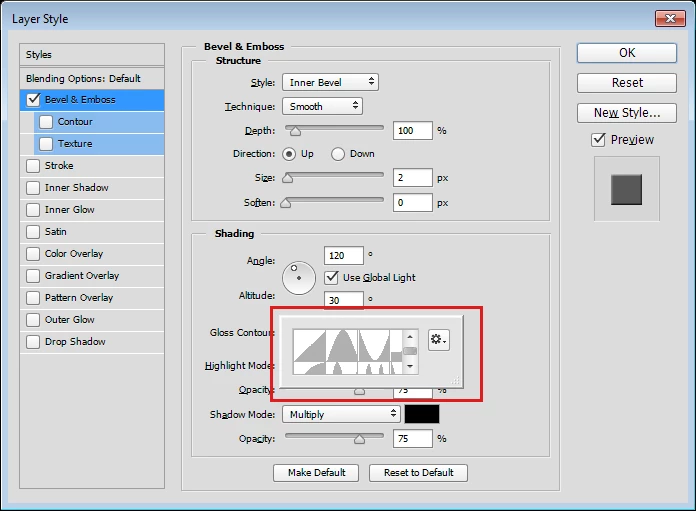
In laymen's terms (please don't get too techy for me, I don't do networking stuff) - how do I fix this? I cannot see the choices to the far right more than a fraction, there is no way to scroll over.
This topic has been closed for replies.
Correct answer gener7

It's the "Panel Flyout" bug, where a flyout panel shrinks. I've only seen it with Patterns, but this solution should fix it.

There's a "gripper" on the lower right of that panel. Try dragging it out to resize it. If that doesn't work,

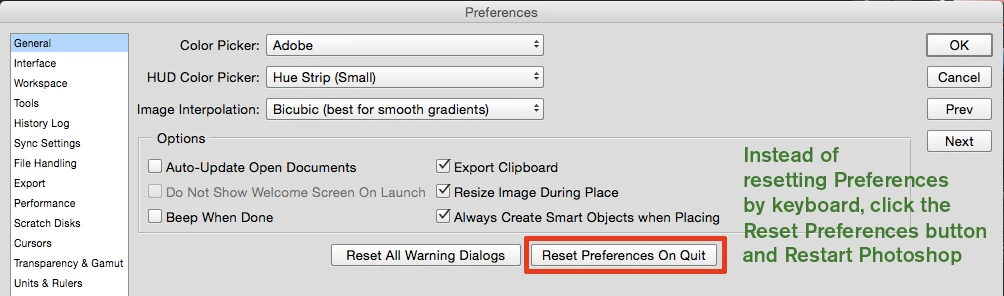
Reset your Preferences.

1 reply

gener7
Community Expert
gener7Community ExpertCorrect answer
Community Expert
January 18, 2018

It's the "Panel Flyout" bug, where a flyout panel shrinks. I've only seen it with Patterns, but this solution should fix it.

There's a "gripper" on the lower right of that panel. Try dragging it out to resize it. If that doesn't work,

Reset your Preferences.