Exit
  • Global community
    • Language:
      • Deutsch
      • English
      • Español
      • Français
      • Português
  • 日本語コミュニティ
  • 한국 커뮤니티
Locked
1

Photoshop CC2018-Freezing

Community Beginner ,
Jun 14, 2018 Jun 14, 2018

Hey Im not sure if anyone else has had this problem, but after a recent update my photoshop freezes if I use chrome or any other program then photoshop while photoshop is open. Example would be im working on a storyboarding thing in photoshop- pop over to chrome to check an email for a couple minutes- pop back over to photoshop and its is now completely unresponsive. My computer isnt running out of memory or under any extreme or even mild level of stress at the time or before it happens. I've lost lots and lots of progress with this happening over the last few weeks which is very frustrating. And I cant even send crash reports because the software doesnt even crash crash it just sits there perpetually frozen until I force quit the application. The stability of this software has been getting worse and worse lately. Not to mention the weird bugs with using the brush tool and tablets about a month ago, where the brush tool would only grabby hand when trying to paint. Gr.

Anyways if anyone has any tips or has experienced this problem and fixed it- please help:(

2.3K
Translate
Report
Community guidelines
Be kind and respectful, give credit to the original source of content, and search for duplicates before posting. Learn more
community guidelines
Adobe
Engaged ,
Jun 15, 2018 Jun 15, 2018

Hi - What are your system specs? I have several systems that I run Photoshop on and the only one that I get the "grabby hand" stuck cursor problem on is an old Mac Mini with minimal RAM and vRAM.

One thought though - check that you don't have Export Clipboard checked in the Preferences > General, in case you have something copied into the clipboard that is using up RAM when you switch out of Photoshop.

In Preferences > Performance, try assigning most of your RAM to Photoshop and not using other programs when Photoshop is open. If Photoshop doesn't crash at all then it probably is a lack or available RAM to run the OS, Photoshop, and whatever else you have running.

Steve

Translate
Report
Community guidelines
Be kind and respectful, give credit to the original source of content, and search for duplicates before posting. Learn more
community guidelines
Community Beginner ,
Jun 21, 2018 Jun 21, 2018

I have a gigabyte 14 laptop with 16 gb ram, GTX 970 m and I dont rememeber the processor. But with the low res docs im painiting on I shoudnt be having  any problems ram wise, I havent seen any issues  with memory when my task bar is running on my second monitor. And yesterday it froze then crashed when I just had photoshop open-low res doc just for a thumbnail sketch.

Translate
Report
Community guidelines
Be kind and respectful, give credit to the original source of content, and search for duplicates before posting. Learn more
community guidelines
Community Beginner ,
Jun 21, 2018 Jun 21, 2018

And i dont even have grabby hand there when it freezes. the whole photoshop application locks out I cant touch anything anymore. I can only get out of it by swapping to a different application and then I have to force quit photoshop from there.

Translate
Report
Community guidelines
Be kind and respectful, give credit to the original source of content, and search for duplicates before posting. Learn more
community guidelines
Guest
Jun 21, 2018 Jun 21, 2018

Hi

You haven't mentioned the exact version of Photoshop CC 2018 that you have but have you installed the latest release 19.1.5

More than likely you have dual GPU's on that Laptop, along with the GTX970m you'll have an onboard GPU this is known to cause issues with Photoshop

Take a look here especially sections 7 and 8

Troubleshoot Photoshop graphics processor (GPU) and graphics driver issues

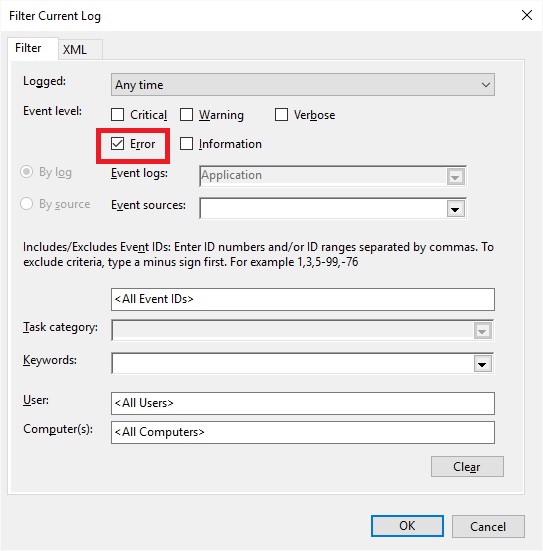
Can you take a look in Windows event viewer and check for Photoshop.exe errors

On the left hand side select Application and on the right click on Filter Current Log

Event Log1.jpg

Then put a check mark in Error and click OK, look for errors relating to Photoshop.exe and copy and paste the info into this thread

Event Log2.jpg

Translate
Report
Community guidelines
Be kind and respectful, give credit to the original source of content, and search for duplicates before posting. Learn more
community guidelines
Community Beginner ,
Jul 10, 2018 Jul 10, 2018

Hello, I checked through the log and didnt see any for photoshop- but in the beginning post i mentioned that its not like straight up crashing. It just freezes and doesnt crash, just locks up until i force quit it, never gives me the prompt to send a crash report either since it never closes from the freezing event. I also noticed that when it happens my tablet messes up as well and stops responding- or sometimes ill notice pressure sensitvity goes away and then right after that photoshop freezes and then is stuck there. I switched over to using my nvidia card like you mentioned- but photoshop just chugs when I have that setup.

my photoshop is up to date, whatever number that is now.

Translate
Report
Community guidelines
Be kind and respectful, give credit to the original source of content, and search for duplicates before posting. Learn more
community guidelines
New Here ,
Dec 16, 2019 Dec 16, 2019
LATEST

same thing is happening to me... I just lost so much progress!!!! 

Translate
Report
Community guidelines
Be kind and respectful, give credit to the original source of content, and search for duplicates before posting. Learn more
community guidelines