


Inspiring
July 10, 2024
Question

Photoshop Color Picker functionality in UI

  • July 10, 2024
  • 2 replies
  • 642 views

Hi,
I'm working on UI, where I want a Photoshop color picker like functionality (see a snapshot from the Photoshop Toolbar). The default color-picker functionality of Photoshop updates the color palette in real time as the user hovers the eye-dropper tool on an image.


The below code rightly opens the color picker and updates the Hex value, but it is not reflecting the selected color in the preview box.  I think the problem is that the color-picker or the color palette is not updating parallelly with the eye-dropper. Neither the palette is taking any color values once the eye-dropper is released.

Can anyone please look into this and fix the behaviour of the 'Pick Color' button and the 'Color Preview' box.
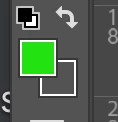
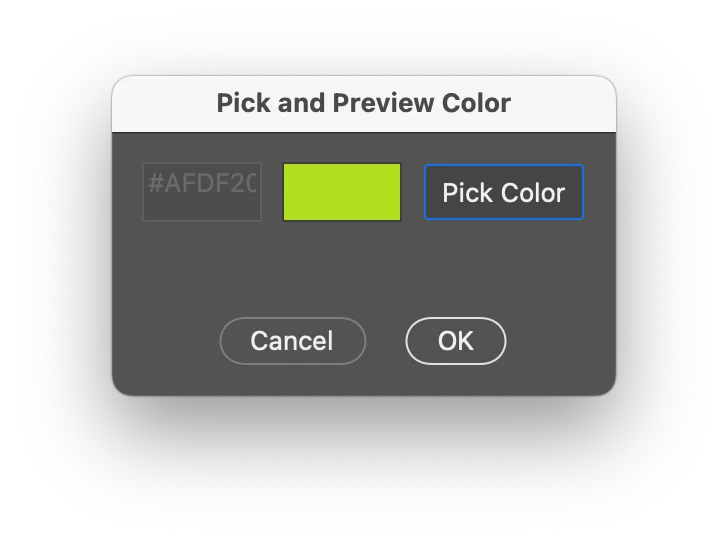


// Simplified color picker and preview update script

function showDialog() {
  var dialog = new Window("dialog", "Pick and Preview Color");

  // Function to update the preview panel color
  function updatePreviewColor(previewPanel, color) {
    previewPanel.graphics.backgroundColor = previewPanel.graphics.newBrush(
      previewPanel.graphics.BrushType.SOLID_COLOR,
      [color.red / 255, color.green / 255, color.blue / 255, 1]
    );
    previewPanel.graphics.foregroundColor = previewPanel.graphics.newBrush(
      previewPanel.graphics.BrushType.SOLID_COLOR,
      [color.red / 255, color.green / 255, color.blue / 255, 1]
    );
    previewPanel.notify("onDraw"); // Force the panel to redraw
  }

  // Function to convert RGB values to hex color
  function rgbToHex(r, g, b) {
    return (
      "#" +
      ((1 << 24) + (r << 16) + (g <<  + b).toString(16).slice(1).toUpperCase()
    );
  }

  // Group and elements for color picking
  var colorGroup = dialog.add("group");
  colorGroup.orientation = "row";

  var colorInput = colorGroup.add("edittext", undefined, "#000000");
  colorInput.size = [60, 30];
  colorInput.enabled = false; // Disable until checkbox is selected

  var colorPreview = colorGroup.add("panel", undefined, "");
  colorPreview.size = [60, 30];
  colorPreview.enabled = true; // Enable the panel

  var colorButton = colorGroup.add("button", undefined, "Pick Color");
  colorButton.size = [, 30];

  // Add color picker functionality
  colorButton.onClick = function() {
    var initialColor = app.foregroundColor.rgb; // Store the initial foreground color
    var pickedColor = app.showColorPicker();

    if (pickedColor !== -1) {
      // Wait until the color picker is closed and then get the foreground color
      $.sleep(100); // Add a short delay to ensure the color picker updates
      var color = app.foregroundColor.rgb;
      var hexColor = rgbToHex(color.red, color.green, color.blue);
      colorInput.text = hexColor;
      updatePreviewColor(colorPreview, color);
    } else {
      // Revert to the initial color if the picker is canceled
      app.foregroundColor.rgb = initialColor;
    }
  };

  // Add buttons
  dialog.add("statictext", undefined, " "); // Adding a line gap before buttons

  var buttons = dialog.add("group");
  buttons.alignment = "center"; // Center align the buttons
  buttons.add("button", undefined, "Cancel", { name: "cancel" });
  buttons.add("button", undefined, "OK", { name: "ok" });

  dialog.show();
}

showDialog();


    This topic has been closed for replies.

    2 replies

    Inspiring
    July 15, 2024

    Please help me on this, please. I need a Color Picker functionality, just like Photoshop.

    Disposition_Dev
    Community Expert
    Community Expert
    August 22, 2024

    Here you go. This seems to work fine for me. Let me know if you still have issues with it.


    function showDialog ()
    {
    	var dialog = new Window( "dialog", "Pick and Preview Color" );
    	var initialColor;
    
    	// Function to update the preview panel color
    	function updatePreviewColor ( previewPanel, color )
    	{
    		previewPanel.graphics.backgroundColor = previewPanel.graphics.newBrush(
    			previewPanel.graphics.BrushType.SOLID_COLOR,
    			[ color.red / 255, color.green / 255, color.blue / 255, 1 ]
    		);
    		// previewPanel.graphics.foregroundColor = previewPanel.graphics.newBrush(
    		// 	previewPanel.graphics.BrushType.SOLID_COLOR,
    		// 	[ color.red / 255, color.green / 255, color.blue / 255, 1 ]
    		// );
    		// previewPanel.notify( "onDraw" ); // Force the panel to redraw
    	}
    
    	// Function to convert RGB values to hex color
    	function rgbToHex ( r, g, b )
    	{
    		return "#" + ( ( 1 << 24 ) + ( r << 16 ) + ( g << + b ).toString( 16 ).slice( 1 ).toUpperCase() );
    	}
    
    	// Group and elements for color picking
    	var colorGroup = dialog.add( "group" );
    	colorGroup.orientation = "row";
    
    	var colorInput = colorGroup.add( "edittext", undefined, "#000000" );
    	colorInput.size = [ 60, 30 ];
    	colorInput.enabled = false; // Disable until checkbox is selected
    
    	var colorPreview = colorGroup.add( "panel", undefined, "" );
    	colorPreview.size = [ 60, 30 ];
    	colorPreview.enabled = true; // Enable the panel
    
    	var colorButton = colorGroup.add( "button", undefined, "Pick Color" );
    	colorButton.size = [ , 30 ];
    
    	// Add color picker functionality
    	colorButton.onClick = function ()
    	{
    		initialColor = app.foregroundColor.rgb; // Store the initial foreground color
    		var pickedColor = app.showColorPicker();
    
    		if ( pickedColor !== -1 )
    		{
    			// Wait until the color picker is closed and then get the foreground color
    			$.sleep( 100 ); // Add a short delay to ensure the color picker updates
    			var color = app.foregroundColor.rgb;
    			var hexColor = rgbToHex( color.red, color.green, color.blue );
    			colorInput.text = hexColor;
    			updatePreviewColor( colorPreview, color );
    		}
    		// else
    		// {
    		// 	// Revert to the initial color if the picker is canceled
    		// 	app.foregroundColor.rgb = initialColor;
    		// }
    	};
    
    	// Add buttons
    	dialog.add( "statictext", undefined, " " ); // Adding a line gap before buttons
    
    	var buttons = dialog.add( "group" );
    	buttons.alignment = "center"; // Center align the buttons
    	var cancelButton = buttons.add( "button", undefined, "Cancel", { name: "cancel" } );
    	var okButton = buttons.add( "button", undefined, "OK", { name: "ok" } );
    	cancelButton.onClick = function ()
    	{
    		app.foregroundColor.rgb = initialColor;
    		dialog.close();
    	};
    
    
    	dialog.show();
    }
    
    showDialog();
    Participant
    July 15, 2024

    Can anyone help me on this, please.