



Tristan63
Participating Frequently
April 7, 2017
Question

Photoshop CPU 100% after last update

  • April 7, 2017
  • 2 replies
  • 724 views

After the last update yesterday photoshop.exe takes all reminding CPU power when I just start the program on my Windows 10 computer (32GB memory).
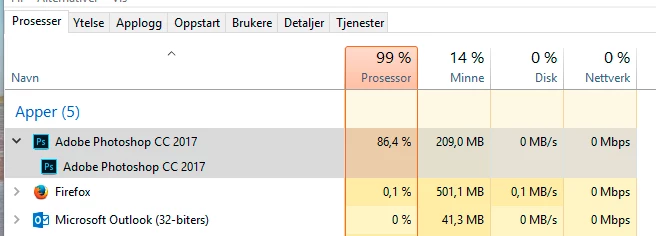
I have cleared the temp folders and restarted without a solution.

This topic has been closed for replies.

2 replies

Tristan63
Tristan63Author
Participating Frequently
April 7, 2017

I did remove the program re-started the computer and added Photoshop again. Still 100% when starting the program, but after a few minutes it calms down and seems to work normaly. If I close the program and start it up again still 100% for a time of 2-3 minutes.

Adam Jerugim
Community Manager
Community Manager
April 7, 2017

Hi Tristan,

Try the following:  Type > Font Preview Size... None

Then quit and re-launch PS.  Does that stop the CPU problem?

Thanks,

Adam

Tristan63
Tristan63Author
Participating Frequently
April 7, 2017

Sorry no it dosn't.

Tristan63
Tristan63Author
Participating Frequently
April 7, 2017

I created a new admin account on my computer and Photoshop works fine when startet in that account. I returned to my own account and the problem is still there.

Trevor.Dennis
Community Expert
Community Expert
April 7, 2017

Hey, I didn't know about no stink'n update!  I have just sign out and back in to the Application Manager, and they are installing now.

So what is new?

davescm
Community Expert
Community Expert
April 7, 2017

So what is new?

Looks like it is bug fixes

New features summary for the 2017 release of Photoshop CC

Dave