


Participant
July 3, 2020
Question

Photoshop crashed, is acting as if my recent file never existed

  • July 3, 2020
  • 1 reply
  • 1132 views

Hi all,


I just had my braker blow causing the power to go out, as I was working on a file in photoshop. I turned everything back on and went to recover my file, but it is no where to be found. I had not previously saved it, but I do have auto recover on.


All my other things I had pulled up on my PC recovered, but my photoshop is acting as if this file I was just working on, never existed. It does not pull up on 'recents' and when I search my computer files for auto recover, there is nothing. I have it so I can see hidden files as well. It is like its no where to be found. I went to the file listed on my auto recovery tab, and its empty. Is there any way to recover this file?


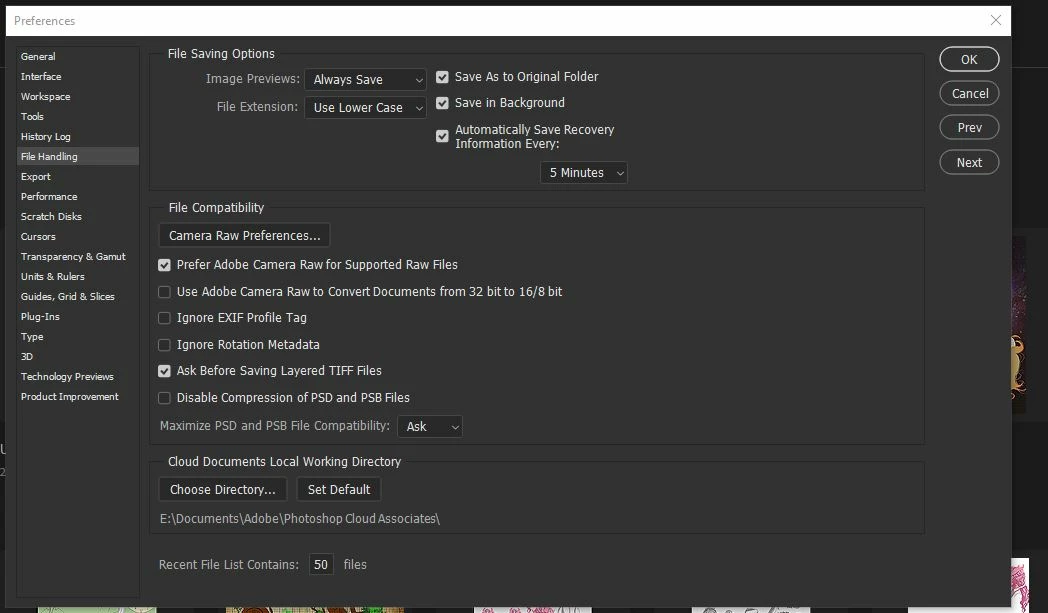
this is my file handling tab- i went to E:\documents\photoshop cloud associates\ 

there was nothing
 

This topic has been closed for replies.

1 reply

JJMack
Community Expert
Community Expert
July 4, 2020

On my windows 10 system I opened a document in Photoshop and made changes and did not save them.  After 5 minutes  I saw a recovery file created in PS 2020  version 21.2 Recovery Folder. 


I then used Windows Task Manager to end Photoshop 2020 execution

Then I started Photoshop 2020. Photoshop opened the recovery file

So it seem to be working  om my Window 10 system with PS 2020 version 21.2. Did the Power outage harm your file system?  Are you using  a Mac? 


JJMack
Participant
July 11, 2020

I'm on a windows 10 PC, using photoshop 2020. 

When I started my computer after the power blew, my chrome tabs and other things I was working on recovered, but photoshop still has no memory of what I was working on. It even said the last time a document was opened was a day prior to when this happned. I have searched my whole computer up and down, I cannot see where it saved. (If it did)


I have two hard drives for my computer, I recently moved photoshop from one hard drive to the other. Everything seemed to work fine, but I'm starting to think that caused an error in creating the recovery file. 

JJMack
Community Expert
Community Expert
July 11, 2020

You can test if Photoshop recovery is working.   There should be a recovery folder in your Photoshop version installation in your users id Application data for the photoshop version you are using..  The folder is normally empty.  When you configure autorecovery you set some time period.  Note the time.  Open a document in Photoshop New or Old make some modulation like add a layer. Do not save  the change  Start you stopwatch.  Wail for the time period to be timed. Perhaps a little longer  we are depending Adobe code. Now look in the recovery folder there should be a recovery psb file.  If it is not there Recovery is not working. If it is there use the Task manager to terminate Photoshop.  Start Photoshop. If Photoshop open the recovery PSB recovery is working.

"C:\Users\(your User id)\AppData\Roaming\Adobe\Adobe Photoshop 2020\AutoRecover\"


JJMack