


BrendanMaca250856
Participating Frequently
November 25, 2017
Question

Photoshop CS5.1 asks for legacy Java SE 6 runtime after updating macOS

  • November 25, 2017
  • 1 reply
  • 6481 views

I have only recently updated the software on my Mac - due to concerns about compatibility of updated software on a cutter that I have.

Now I have now updated the Mac software Adobe family products are reacting differently

  • Bridge
  • Acrobat
  • Exchange

are all working correctly.

  • Photoshop
  • Illustrator
  • InDesign

all display the message below
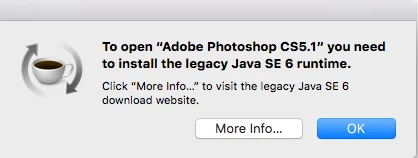
This topic has been closed for replies.

1 reply

kglad
Community Expert
Community Expert
November 25, 2017

your os isn't compatible with legacy software.  apple has a solution for that  particular problem, Download Java for OS X 2017-001

BrendanMaca250856
Participating Frequently
November 29, 2017

Hi

I followed the instructions - confirmation below

but still getting the same error message 

BrendanMaca250856
Participating Frequently
November 29, 2017

you installed the wrong (v 8) java version.  check your error message to see you need v 6 (which at the top of the message 1 linked page).


so how do i remove v8 and download v6 ?