


BrendanMaca250856
Participating Frequently
November 25, 2017
Question

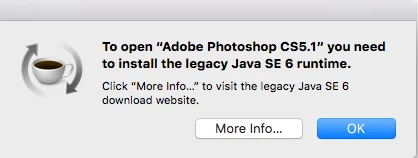
Photoshop CS5.1 asks for legacy Java SE 6 runtime after updating macOS

  • November 25, 2017
  • 1 reply
  • 6481 views

I have only recently updated the software on my Mac - due to concerns about compatibility of updated software on a cutter that I have.

Now I have now updated the Mac software Adobe family products are reacting differently

  • Bridge
  • Acrobat
  • Exchange

are all working correctly.

  • Photoshop
  • Illustrator
  • InDesign

all display the message below
This topic has been closed for replies.

1 reply

kglad
Community Expert
Community Expert
November 25, 2017

your os isn't compatible with legacy software.  apple has a solution for that  particular problem, Download Java for OS X 2017-001

BrendanMaca250856
Participating Frequently
November 29, 2017

Hi

I followed the instructions - confirmation below

but still getting the same error message 

kglad
Community Expert
Community Expert
November 29, 2017

it won't let me - there is no place that it will let me type it


you need to sign in as a root user, but you should just leave it alone.  you're more likely to cause problems than to help anything.

in addition, i don't think you need to remove j8 in order to install j6.