


Participant
January 9, 2016
Answered

Photoshop CS6: pen only drawing straight lines?

  • January 9, 2016
  • 2 replies
  • 31024 views

I am using Windows 8.1

I've seen this question posted on here before (Why can I only paint straight lines in Photoshop CS6?) but my situation and tablet are a bit different. I have recently bought this tablet from amazon and for a few weeks I have been practicing working with it on Paint tool SAI. It works beautifully on the program and I have had no problems with it.

Amazon.com: XP-Pen Artist10 10.1" IPS Interactive Pen Display Graphics Drawing Monitor (Black): Computers & Accessories

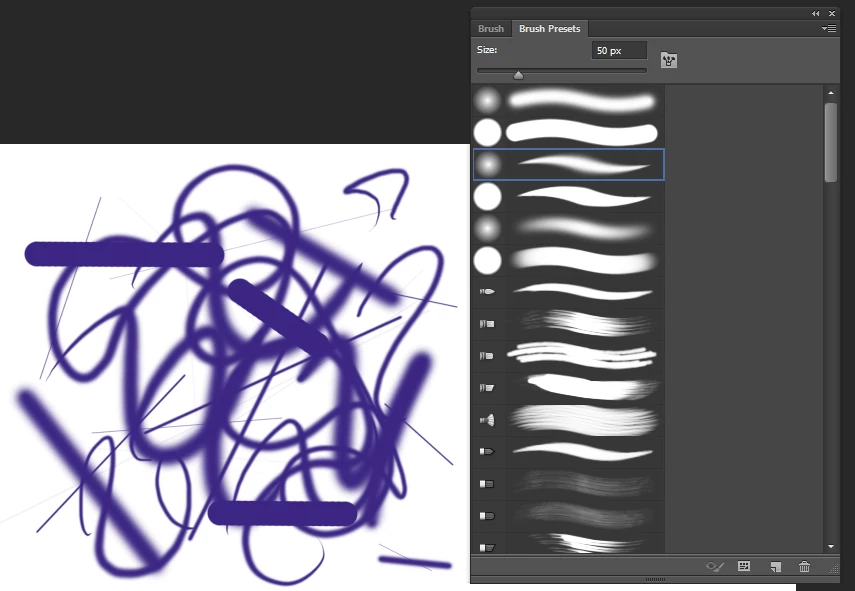
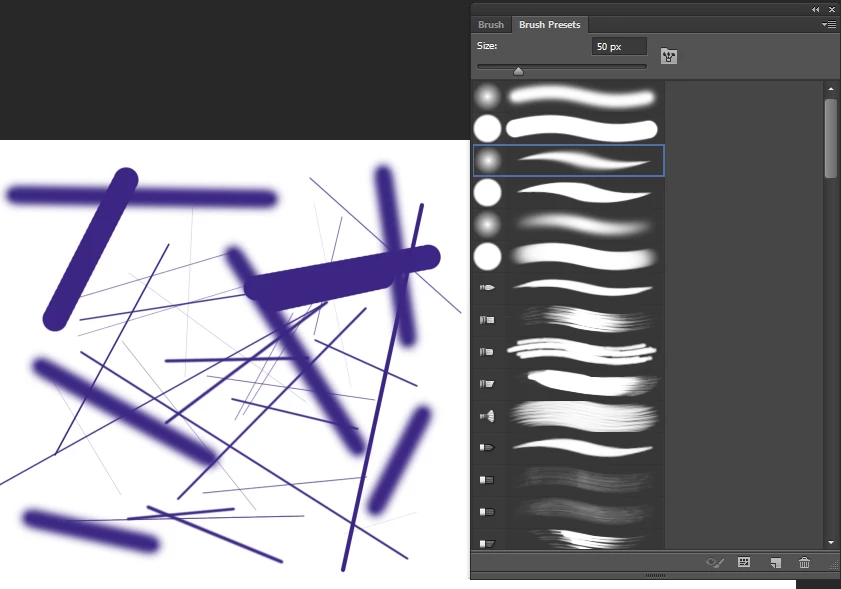
However, whenever I try to use the tablet with photoshop, it only makes straight lines. I know it is not a problem with the Shift key being stuck because, strangely, while I was attempting to draw for a screen capture of the problem, it randomly starting working for a few strokes, as seen in the first screen shot. After that had happened, I opened a new canvas to work on and it unfortunately went back to drawing lines from then on.

Here are the screenshots, trying different brushes (first 4) and having the control on Pen Pressure:
This topic has been closed for replies.
Correct answer Trevor.Dennis

This user of a Ugee 19" Graphics Drawing Pen Tablet Monitor had and fixed the issue by restarting the device.  That sounds like a likely fix to me as you are rebooting the device.  In fact I'd be surprised if it does not fix it for you as well.

Amazon.com: Tony Webb's review of Ugee 19" Graphics Drawing Pen Tablet Monit...

2 replies

Participant
May 13, 2018

Hey, I know this is old, but I'm having the same problem. Have you found a fix to it?

trixm31579626
Participant
June 21, 2018

Hey, I have Star 06 and I got here trying to look for a permanent solution.

The quick fixes I found can be either

1. Choosing another brush from the brush pallete (might take 1-4 tries)

2. Opening the XP Pen utility and in the mouse mode, clicking the other unselected mode then going back to your original selected mode (for me it is Relative Mode then click back to my original Absolute Mode) then click the OK button.

I noticed that the problem reoccurs if the pen got too far away from the tablet.

Trevor.Dennis
Community Expert
Community Expert
January 9, 2016

Wow!  That's a new one on me.  Check this video and I'll have a think about it.

[Unsolved] Photoshop Tablet Straight Lines Problem - YouTube

Trevor.Dennis
Community Expert
Trevor.DennisCommunity ExpertCorrect answer
Community Expert
January 9, 2016

This user of a Ugee 19" Graphics Drawing Pen Tablet Monitor had and fixed the issue by restarting the device.  That sounds like a likely fix to me as you are rebooting the device.  In fact I'd be surprised if it does not fix it for you as well.

Amazon.com: Tony Webb's review of Ugee 19" Graphics Drawing Pen Tablet Monit...

ciro711Author
Participant
January 9, 2016

Also, I had tried turning the monitor off and on again as well as tried using the tablet without the monitor on but there is no difference in results, sadly.