Participant
September 23, 2022
Answered

Photoshop is flashing when moving the cursor

  • September 23, 2022
  • 2 replies
  • 2466 views

Hey there,


I recently recognized a problem when using photoshop:

The top part of every picture I'm working on is flashing whenever I move the cursor (see attached video). If I zoom out a lot the problem is gone, but I need to zoom in to work on the picture. 


I tried the following already;

- restart computer

- uninstall and reinstall photoshop

- update macOS

- make sure my photoshop is compatible  with my CPU 

- free up some space on my macbook


... non of these made a difference 😞


I don't know what else to try. It was working perfectly before and I only realized this problem now (did the macOS update after I realized the problem).


Does anyone have an idea what to do in order to fix the problem? I'm grateful for every idea cause I need photoshop on a regular basis for my job and I can't really use it like it is now 😞


Thanks in advance, Silke
This topic has been closed for replies.
Correct answer Ged_Traynor

Hi

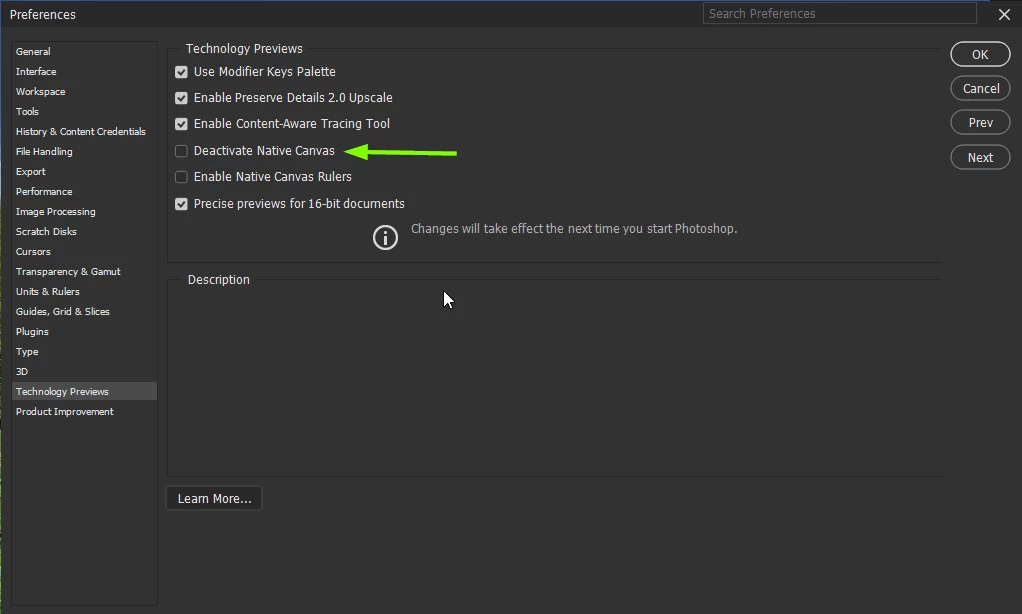
Looks like it's a GPU related issue, you could try enabling this option in preferences and restarting Photoshop to see if it helps

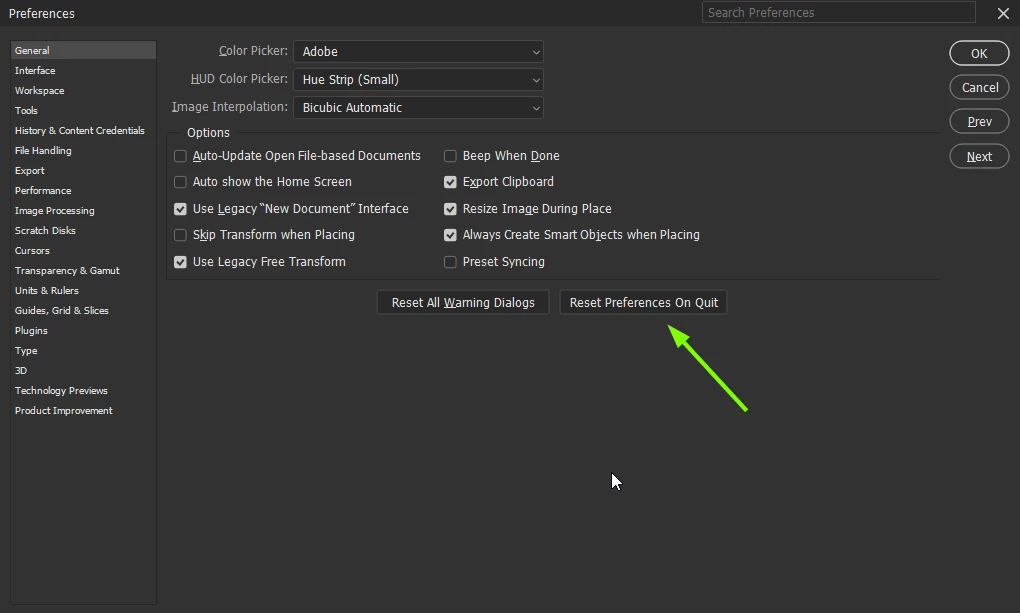
If that doesn't help try a preference reset

2 replies

Participant
November 4, 2022

This was happening on my laptop and I thought I was going to go mad. Finally I realized it was because my Pshop window was open "beyond" the monitor frame. When I made it fit into the window, the flashing resolved. This happened because I accidentally switched to full screen mode and when hit "escape" to get out of full screen, it didn't reduce my window in proportion to my laptop monitor.

Ged_Traynor
Community Expert
Ged_TraynorCommunity ExpertCorrect answer
Community Expert
September 23, 2022

Hi

Looks like it's a GPU related issue, you could try enabling this option in preferences and restarting Photoshop to see if it helps

If that doesn't help try a preference reset

Participant
September 23, 2022

Hey Ged! 

Your first idea worked - yay!!! 

Thanks for the quick fix!

Ged_Traynor
Community Expert
Community Expert
September 23, 2022

You're welcome 🙂