Exit
  • Global community
    • Language:
      • Deutsch
      • English
      • Español
      • Français
      • Português
  • 日本語コミュニティ
  • 한국 커뮤니티
1

Photoshop Laggy and using all my 32gb ram and 600gb storage

Community Beginner ,
May 07, 2024 May 07, 2024

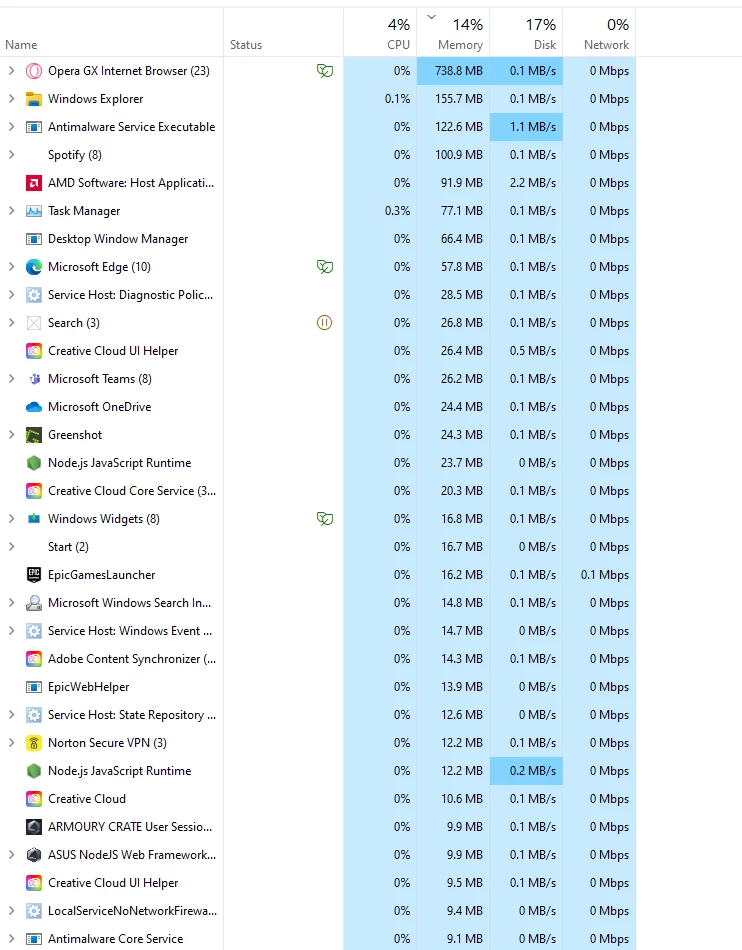
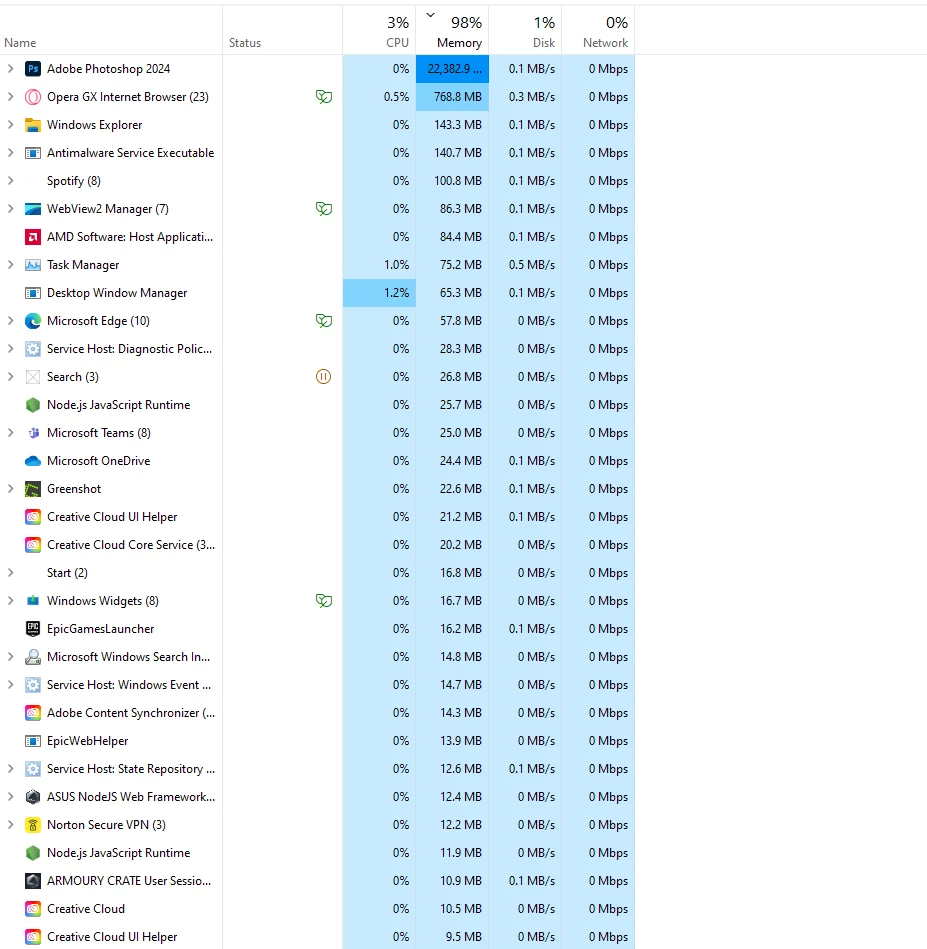
PhotoShop is super laggy on my pc, I have a 9650xt GPU (2022) ,  3900x Ryzen 9 12 Cores, 24 Thead, 32gb ram with 1tb ssd


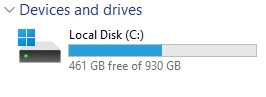
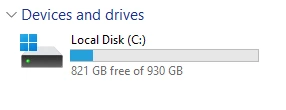
These components should easy be able to run photoshop, Ive listed photos below showing what happens when photoshop is open vs when i close it down and you can see the massive difference, this pc is only 9months old aswell , can someone help me  figure out why my photoshop is super slow and laggy with all these higher end components.


2024-05-07 09_20_47-This PC.png2024-05-07 09_20_24-Task Manager.png2024-05-07 09_19_55-.png2024-05-07 09_19_38-This PC.png

TOPICS
Windows
1.1K
Translate
Report
Community guidelines
Be kind and respectful, give credit to the original source of content, and search for duplicates before posting. Learn more
community guidelines

correct answers 2 Correct answers

Community Expert , May 07, 2024 May 07, 2024

Sounds like you may have selected centimetres rather than pixels, a 2500 * 2000 cm document would be about 22 GB in size, so the second screenshot you provided would be correct for that size of document

Translate
Community Expert , May 07, 2024 May 07, 2024

That size (assuming we're talking about pixels, as Ged mentioned 😉 ) shouldn't be a problem. Even 4,000 or 5,000 pixels on the longer side shouldnt be a problem at all.

My laptop specs are much lower than yours and working on 6,000 px images is no problem at all.


Translate
Adobe
Community Expert ,
May 07, 2024 May 07, 2024

@Calvin37218407usuj how large are the files you're working on.

Translate
Report
Community guidelines
Be kind and respectful, give credit to the original source of content, and search for duplicates before posting. Learn more
community guidelines
Community Beginner ,
May 07, 2024 May 07, 2024

2500 height 2000width ive now changed it and its much much faster Thank you!!!! but the thing is back in the day not with this computer but a worse laptop, i use to use around 2000+ and there would be no problem its not like my pc cant handle that size

Translate
Report
Community guidelines
Be kind and respectful, give credit to the original source of content, and search for duplicates before posting. Learn more
community guidelines
Community Expert ,
May 07, 2024 May 07, 2024

Sounds like you may have selected centimetres rather than pixels, a 2500 * 2000 cm document would be about 22 GB in size, so the second screenshot you provided would be correct for that size of document

Translate
Report
Community guidelines
Be kind and respectful, give credit to the original source of content, and search for duplicates before posting. Learn more
community guidelines
Community Expert ,
May 07, 2024 May 07, 2024

That size (assuming we're talking about pixels, as Ged mentioned 😉 ) shouldn't be a problem. Even 4,000 or 5,000 pixels on the longer side shouldnt be a problem at all.

My laptop specs are much lower than yours and working on 6,000 px images is no problem at all.


Adobe Community Expert
Adobe Certified Professional
Translate
Report
Community guidelines
Be kind and respectful, give credit to the original source of content, and search for duplicates before posting. Learn more
community guidelines
Community Expert ,
May 07, 2024 May 07, 2024

I think "2500 height 2000width" gives it away 🙂  Wrong units, and a gigantic file as a result.

Translate
Report
Community guidelines
Be kind and respectful, give credit to the original source of content, and search for duplicates before posting. Learn more
community guidelines
Community Expert ,
May 07, 2024 May 07, 2024

I think you're right 😉


Adobe Community Expert
Adobe Certified Professional
Translate
Report
Community guidelines
Be kind and respectful, give credit to the original source of content, and search for duplicates before posting. Learn more
community guidelines
Community Beginner ,
May 07, 2024 May 07, 2024
LATEST

yep!!!!

Translate
Report
Community guidelines
Be kind and respectful, give credit to the original source of content, and search for duplicates before posting. Learn more
community guidelines
Community Beginner ,
May 07, 2024 May 07, 2024


yep!!!!

Translate
Report
Community guidelines
Be kind and respectful, give credit to the original source of content, and search for duplicates before posting. Learn more
community guidelines