
Participant
June 7, 2021
Answered

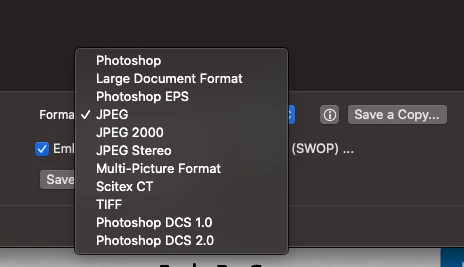
Photoshop no longer giving option to save as PDF

  • June 7, 2021
  • 4 replies
  • 22540 views

Hello, just today I've noticed my Adobe Photoshop (2021) can no longer save as PDF. Even in very small files, like a flat 3" business card, the PDF option is left off the list. Why is this? Thank you!
 

Correct answer Derek Cross

It's changed in the latest version of Photoshop, use Save a Copy when you want to save a layered PSD file to a single-layered format like JPG and PDF (read up on the forum as to why).

4 replies

Participant
January 24, 2024

And - silly though it sounds - look for Photoshop PDF in the list of formats, rather than PDF or Adobe PDF.

Participant
April 9, 2024

There is no option to save a pdf in my photoshop other than "Photoshop PDF" and yes, I too have enabled "Legacy Save As" and still can not save a PDF file without any image that is in the file is clear. Any Image is at a low resolution and all pixilated and the text that I typed is clear.

No more ability to save a High Resolution Print File Format. What is Adobe doing?!?! It's like you are getting rid of our ability to do any "Print Work" and are moving strictly to Digital web formats! ADOBE we still actually do print on physical materials like Brochures, Flyers, Photo's, Product Packaging etc.!  Please fix this problem and let us save our files as High Resolution PDF file formats.

alisham
Participant
September 29, 2023

ok, I am lost... I am trying to follow the "correct answer" but am not able to execute as instructed. "save as" does not populate a pdf option from the drop down. and there is no "legacy" option in the prefs menu as show in the screen shot. I am using Adobe Photoshop 2021 v22.0.1.73 (x64) on windows

Participant
November 22, 2023

Same here, I cannot save my PSD as a PDF anymore. Using ver 25.1.0 release

Stephen Marsh
Community Expert
Community Expert
November 22, 2023
quote

Same here, I cannot save my PSD as a PDF anymore. Using ver 25.1.0 release


By @Rising Tide


I have to ask, did you read the previous replies on using Save As a Copy or enabling Legacy Save As?


Otherwise, what is the canvas width and height in pixels of the document?

NB, colourmanagement
Community Expert
Community Expert
November 5, 2022

Reverting to the Photoshop "Legacy Save As" options as Derek mentioned is quite straightforward, more here.


REVERT TO LEGACY SAVE AS OPTIONS

With Photoshop 22.4.2, you can both revert to the legacy Save As workflow and/or omit the addended “copy” when saving as a copy if desired. 

To find these new preference options, navigate to: 

  • (macOS) Photoshop > Preferences > File Handling > File Saving Options
  • (Windows) Edit > Preferences > File Handling > File Saving Options 

Revert to legacy Save As workflow in Photoshop desktop


When you turn on the Enable legacy "Save As” preference:
  • macOS: The Save As and Save a Copy options will now both open the legacy save dialog enabling the Save As options that were available in Photoshop v22.3 and earlier, including the As a Copy checkbox. With the legacy workflow enabled, if you use the Save a copy option to save your Photoshop file, the As a Copy checkbox will be turned on by default. When selecting the Enable legacy "Save As” option in preferences on macOS, you will receive a warning dialog alerting you to the risk of overwriting files that arises when using the legacy Save As workflow, as “copy” will no longer be interactively appended to the filename. Because of this, when selecting the Enable legacy “Save As” preference the Do not append “copy” to filename when saving a copy preference will automatically become enabled and cannot be turned off unless the Enable legacy “Save As” preference is turned off.


Warning dialog for legacy save as


Windows: The Enable legacy "Save As” preference operates the save as workflow as it originally did, including the interactive appending of “copy” to the filenames when appropriate. Hence, you will not see a warning alert when turning on the legacy preference on Windows. Additionally, since the legacy Save As workflow can append “copy” to filenames, you will not see a warning alert and the Do not append ‘copy’ to filename when saving a copy preference option can be turned on or off based on your requirement.


I hope this helps
neil barstow, colourmanagement net :: adobe forum volunteer:: co-author: 'getting colour right'
google me "neil barstow colourmanagement" for lots of free articles on colour management

Participant
September 18, 2023

Hi! I'm having the same problem. I've enabled SAVE AS legacy, however I am not able to save my files as in PDF format. With "Automate -> PDF presentation" I have to close and open or add/remove the images if I want to save 'em seperately. Help:(

Derek Cross
Community Expert
Derek CrossCommunity ExpertCorrect answer
Community Expert
June 7, 2021

It's changed in the latest version of Photoshop, use Save a Copy when you want to save a layered PSD file to a single-layered format like JPG and PDF (read up on the forum as to why).

Participant
August 19, 2022

Not even showing in Save a Copy - completely disappeared from all options!

StrayCat808
Participant
November 5, 2022

Right? I had the option last week now save as only gives me "save to creative cloud". No format choices.