


Copy link to clipboard
Copied
The creative cloud app shows that version 27.0 is installed, but the "About Photoshop" in Photoshop still shows vresion26.11.1. I have a new Windows 11 computer, and 26.11.1 runs great on it. What would cause version 27.0 not install over 26.11.1? (I'm older, but I really don't know how else to describe the issue.)
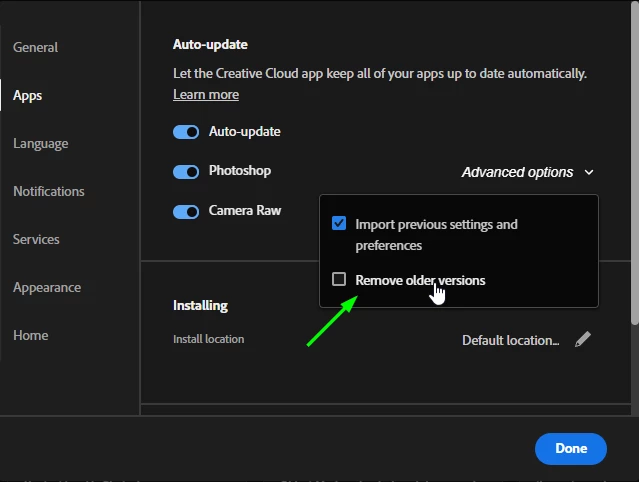
@juliust9149185 useless you have auto update enabled in the CC app, and this option checked the previous version will not be removed automatically
Copy link to clipboard
Copied
Photoshop 2026 (ps ver 27.0) is a new and separate version from older Photoshop versions, so when installed it doesn't overwrite existing installs, but is it's own install.
See if Photoshop 2026 (ps ver 27.0) is listed on the Windows 11 Start Menu by pressing Start then click All and scroll down the list to see Adobe Photoshop 2026 which is Photoshop 27.0.
Copy link to clipboard
Copied
@juliust9149185 useless you have auto update enabled in the CC app, and this option checked the previous version will not be removed automatically
Copy link to clipboard
Copied
The "Remove Older Versions" was not checked. I removed the 26.11.1 version, and now 27.0 open normally. (Everyone who contributed gave helpful suggestions, and that is appreciated!)
Copy link to clipboard
Copied
what’s likely happening is that the update didn’t fully install or got stuck partway, so creative cloud thinks it’s updated, but photoshop is still running the older version, try closing both photoshop and the creative cloud app completely, then reopen creative cloud and click the three dots next to photoshop to choose "check for updates" or "uninstall" > "reinstall" this usually clears up any version mismatch, sometimes a quick system restart before reinstalling also helps make sure the update goes through properly.
Get ready! An upgraded Adobe Community experience is coming in January.
Learn more