
Exit
  • Global community
    • Language:
      • Deutsch
      • English
      • Español
      • Français
      • Português
  • 日本語コミュニティ
  • 한국 커뮤니티
0

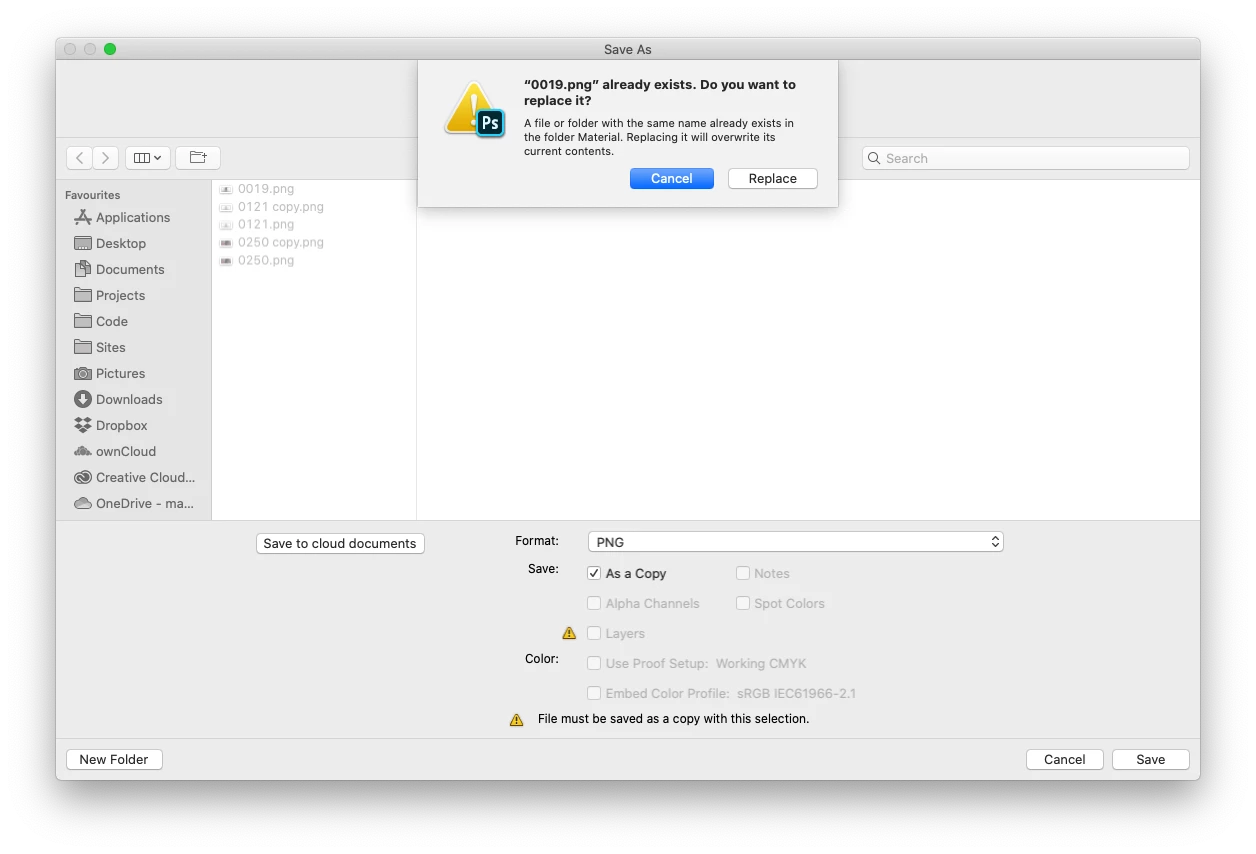
Photoshop save as PNG – save as Copy – notifies that file already exists

New Here ,
Nov 15, 2019 Nov 15, 2019

PS 2020
open PNG

File > Save as copy … PNG
PNG is name 1234.png
Dialog informs me, that a file named 1234.png already exists, then saves as 1234 copy.png


This does not make sense.

Edit:
to be more clear, I already chose Save as copy …Screenshot 2019-11-15 at 17.27.13.png
791
Translate
Report
Community guidelines
Be kind and respectful, give credit to the original source of content, and search for duplicates before posting. Learn more
community guidelines
Adobe
Community Expert ,
Nov 15, 2019 Nov 15, 2019

You have "Save as a Copy" checked below. Turn that off and it will overwrite.

Translate
Report
Community guidelines
Be kind and respectful, give credit to the original source of content, and search for duplicates before posting. Learn more
community guidelines
New Here ,
Nov 15, 2019 Nov 15, 2019

"Save as a Copy" cannot be unchecked, at least for me. Is there any other solution?

Translate
Report
Community guidelines
Be kind and respectful, give credit to the original source of content, and search for duplicates before posting. Learn more
community guidelines
Community Expert ,
Nov 15, 2019 Nov 15, 2019

Do you have layers when saving? This is a safety feature to prevent you from losing all your information when saving out. Saving a copy still allows you to save your original as a psd and warns before closing the document.

Translate
Report
Community guidelines
Be kind and respectful, give credit to the original source of content, and search for duplicates before posting. Learn more
community guidelines
New Here ,
Nov 15, 2019 Nov 15, 2019

I do not have layers checked when saving as a PNG, but do when saving as PSD. All of the document's information is saved already in the PSD file before each iteration of PNG, so no warnings or unsaved data is going on. Therefore why is the program's creation of "copy" PNGs its reaction if it's worried about me losing information?

Translate
Report
Community guidelines
Be kind and respectful, give credit to the original source of content, and search for duplicates before posting. Learn more
community guidelines
New Here ,
Nov 15, 2019 Nov 15, 2019

Update: dug a little deeper and it's a known issue:

https://community.adobe.com/t5/Photoshop/Photoshop-CC-wont-replace-my-jpg-but-saves-it-as-a-copy/m-p...

Surprised this hasn't been fixed in the most recent version

Translate
Report
Community guidelines
Be kind and respectful, give credit to the original source of content, and search for duplicates before posting. Learn more
community guidelines
Community Expert ,
Nov 15, 2019 Nov 15, 2019
Translate
Report
Community guidelines
Be kind and respectful, give credit to the original source of content, and search for duplicates before posting. Learn more
community guidelines
New Here ,
Nov 15, 2019 Nov 15, 2019
LATEST

Sorry, I'm not sure why you've linked this issue, I don't think I have enough context. 

Translate
Report
Community guidelines
Be kind and respectful, give credit to the original source of content, and search for duplicates before posting. Learn more
community guidelines