owenm68715587
Participant
August 3, 2018
Answered

Photoshop Technique Question:

  • August 3, 2018
  • 2 replies
  • 1757 views

Hi, I’m wondering if anyone can help me with a question I have? I am trying to create the effect of a figure like a person leaving the body in a swift motion. Here’s a reference video: (go to Link Removed) (0:42). Thanna!

    This topic has been closed for replies.
    Correct answer davescm

    Could someone help me find out which techniques were used and can you do this for a still photo? Thanks!


    Hi

    You could try something like this.

    Start with two images one with the person facing straight on the second with them sideways. On the second remove the background.

    Use the clone tool without align checked to copy the second image multiple times across the canvas onm a separate layer.

    Use motion blur on the cloned copy layer to blend it

    Use Transform> Warp to bend the blurred copies

    Add a mask to the side view and cloned copy layers, and paint on the masks with black/white using a soft brush to blend them
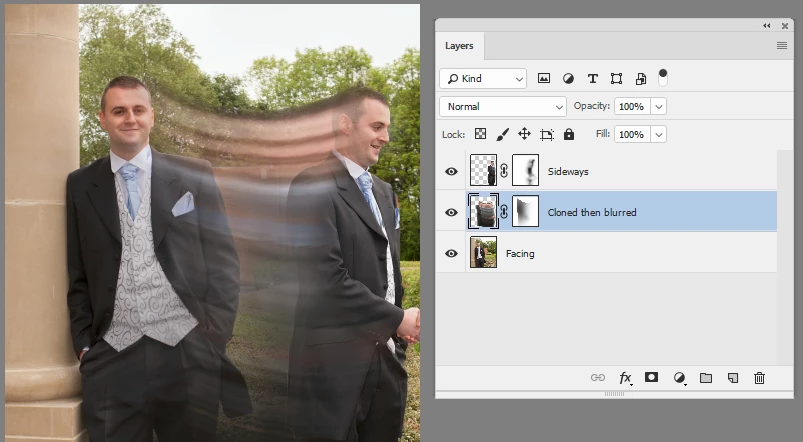
    I hope that gets you started

    Dave

    2 replies

    davescm
    Community Expert
    Community Expert
    August 3, 2018

    Are you wanting to do this as a still image or a video?

    Dave

    Terri Stevens
    Legend
    August 3, 2018

    Do you think this is a genuine request Dave or am I being unduly harsh?

    Terri Stevens
    Legend
    August 3, 2018

    Just in case I'm being unfair here are some frames showing the effect being asked about.

    Terri Stevens
    Legend
    August 3, 2018

    Nice music but a flagrant abuse of forum rules. This is purely an attempt to publicise a music video and has nothing to do with Photoshop. If you spam the Adobe forums you run the risk of a ban.

