Participating Frequently
Jun 27, 2023 10:56 AM UTC
Answered

Photoshop tool icons are missing

Recenlty my Photoshop tool icons simply do not appear on the toolbar. they function fine but it is troublesome to find the right tool. The only way I could solve this is to reinstall photoshop but I cannot possibly do that every day.

Sameer K
Sameer KCorrect answer
Community Manager
Sep 12, 2023 7:15 PM UTC

Hey, @Stefan31701036zdnm. Welcome to the Photoshop Community. I'll help you figure this out.

What version of Photoshop are you working on? Moving this to discussions for now.


Try this:

  • Go to the following location on Windows 10/11: Users/[user name]/AppData/Roaming/Adobe/UXP/PluginsStorage/PHSP
  • Press Windows + R & type this is the Run Window - %APPDATA%\Adobe\UXP\PluginsStorage
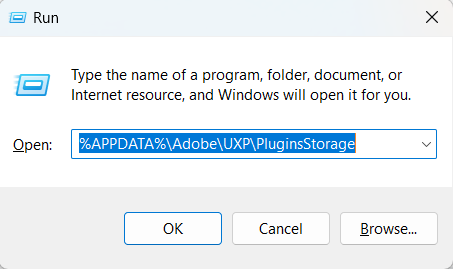
    image.png


  • In the PHSP Folder, rename the 26 folder by adding a .old at the end. ('26' > Rename > '26.old')

These changes will give a refresh to panels in Photoshop. Let me know how it goes.

Thanks!

Sameer K

139 replies

Participant
Sep 2, 2026 11:43 AM UTC

mam to samo! Pracować się nie chce aż a nikt sobie z tym nie robi nic. 


Translate
MarekMularczyk
Community Expert
Community Expert
Sep 2, 2026 2:20 PM UTC

Czy próbowalas zresetowac Photoshop’a?

Translate
Adobe Community ExpertAdobe Certified Professional
Ged_Traynor
Community Expert
Community Expert
Sep 1, 2026 7:52 AM UTC

​@kind_Coconut9eb1 have a look at the correct answer in this thread to see if it helps


Translate
Participant
Aug 31, 2026 12:09 PM UTC
that's what i see 


Translate
Participant
Aug 28, 2026 2:23 AM UTC

Previous versions are now doing all the errors that the latest version was doing. This is ridiculous. 

Translate
MarekMularczyk
Community Expert
Community Expert
Sep 2, 2026 8:41 AM UTC

So now all versions are not working correctly? Is that right?

Translate
Adobe Community ExpertAdobe Certified Professional
Participant
Aug 28, 2026 2:21 AM UTC

Have just gone back to the previous version, as rebooting the computer, un/reinstalling Photoshop, resetting preferences has done nothing. Photoshop continues to just shut down before it even starts up, shuts down during usage, and I still can’t see any of my tools. Please fix this bug @Adobe! 

Translate
MarekMularczyk
Community Expert
Community Expert
Aug 26, 2026 1:49 PM UTC

Which version of Photoshop are you running? And which version of the OS?

Translate
Adobe Community ExpertAdobe Certified Professional
MarekMularczyk
Community Expert
Community Expert
Aug 26, 2026 1:48 PM UTC

Have you tried resetting Photoshop preferences?

Translate
Adobe Community ExpertAdobe Certified Professional
Participant
Aug 28, 2026 12:32 AM UTC

Yes I have reset preferences and even uninstalled and reinstalled photoshop. I’m running the latest CC app version (27.9.1). And am working on a PC. (Work laptop). 

Translate
MarekMularczyk
Community Expert
Community Expert
Sep 2, 2026 8:40 AM UTC

Have you tried going back to the previous version?

Translate
Adobe Community ExpertAdobe Certified Professional
Participant
Aug 26, 2026 1:40 AM UTC

FInally got a screenshot of the issue with the left hand side tools. 


Translate
Participant
Aug 26, 2026 1:12 AM UTC

I am trying to open photoshop but it is taking at least 2-3 attempts as it shuts down after I try and open it. Then this morning when I first restarted my computer, Photoshop opened and all the tools in the left side toolbar were visible, but I could only see the little arrows in the bottom corner of the tools, and not what tools I was choosing to use as they were blank. Once force shut down photoshop they became visbile again but I still can’t see my adjustment tools as you can see in the screenshot. I have done forced restarts of the program adn restarted my computer also. 


Translate
yamato713108855
Community Expert
Community Expert
Aug 18, 2026 1:00 AM UTC

Please check this thread.


Translate


